Analysing a 10-Year
Indicators of compromiseauto-extracted · verify before use · export allAll →
| Type | Indicator | Context |
|---|---|---|
| domain | command.com | eates an anonymous pipe and a hidden instance of cmd.exe or command.com, depending on the platform ID. The command line output gets |
| domain | cpcc-rdc.org | s C2 server to host a script named outbase.php. The domain (cpcc-rdc.org) is the official site of Permanent Council of Accounting of |
| md5 | 52ac9e4b389c5b2f8a63af4a126c1c80 | with the Base64 encoded victim data. For example: 1 user = 52ac9e4b389c5b2f8a63af4a126c1c80 ; 3046 ; INFO ; mI7BkjovU % 2BoqZi4KTzd % 2F0wdqqjJegip2KgY |
Full article3,778 words · extracted from unit42.paloaltonetworks.com · click to collapse
Much has been written about the malware toolkit dubbed Animal Farm which is made up of several implants known as Babar, Bunny, NBot, Dino, Casper and Tafacalou. Some of these tools have been used in past attacks against organizations, companies and individuals.
One of the first tools believed to be used by this adversary to target a potential victim is Babar, also known as SNOWBALL. Previous samples of SNOWBALL date back to 2011. However, Palo Alto Networks Unit 42 has identified a much older version. This version of the malware dates back to 2007 according to its compilation time stamp which we believe is valid.
We discovered this sample by coincidence while searching for another unrelated malware in a large malware repository. While looking at the strings and the structure, we could make a connection to previously published documents and decided to do a deeper analysis.
Why analyse malware from the past?
Analysing historical malware samples helps us learn about its set of features and technical capabilities. This helps us compare a tool used by one adversary to that used by similarly adversaries at that time.
This earlier sample of Babar uses many features not present in later versions. The sample also uses a compromised third party website as a C2 server like later versions. We also found a simple bug and a design flaw in the code you wouldn’t expect from malware developed by mature actors.
Detailed technical breakdown
The Loader
The PE sample comes in form of a loader which has a compilation time stamp of 11/09/2007 11:37:36 PM. The loader contains a resource named MYRES (Figure 1) where the payload DLL is stored.
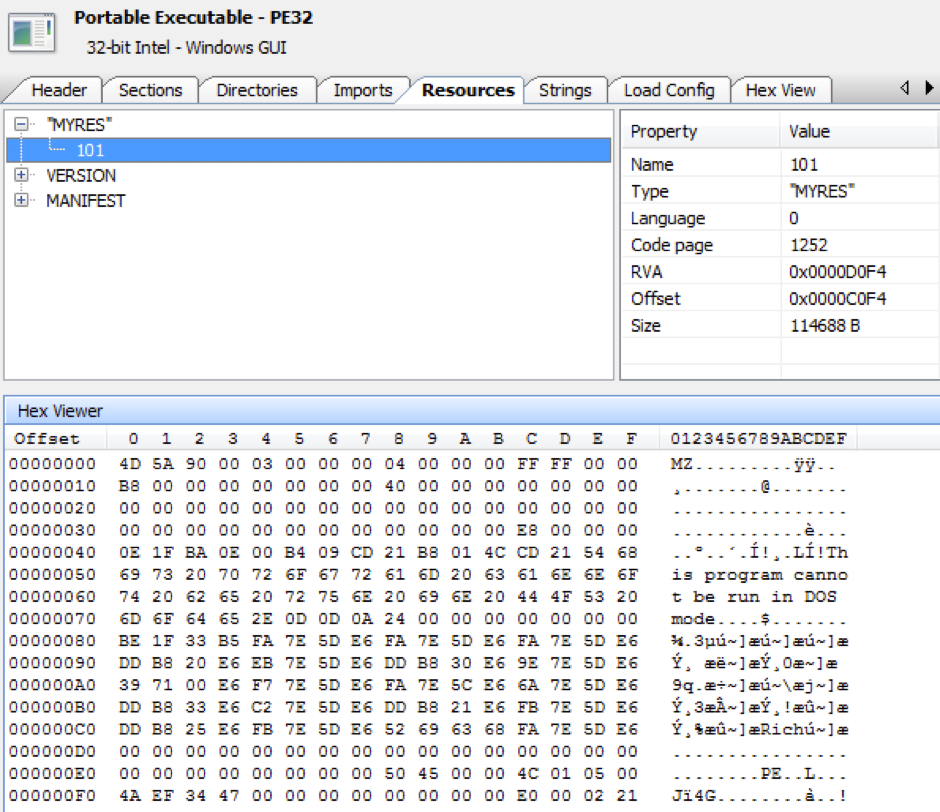
Figure 1. PE resource named MYRES with main payload DLL
The version info resource language ID is 1036 which stands for French.
The following clear text strings can be found in the loader:
|
1 2 3 4 5 6 7 8 9 10 11 12 13 14 15 16 17 18 19 20 21 22 23 |
HTTP\SHELL\open\command SOFTWARE\Clients\StartMenuInternet SOFTWARE\Microsoft\Windows\CurrentVersion\AppPaths\ %APPDATA% event.log Software\Microsoft\Windows\CurrentVersion\Explorer\ShellFolders %ALLUSERSPROFILE% %ALLUSERSPROFILE% %APPDATA% %APPDATA% AppData SeDebugPrivilege MYRES Software\Microsoft\Windows\ShellNoRoam\MUICache\ Software\Classes\Local Settings\Software\Microsoft\Windows\Shell\MuiCache\ \Microsoft\wmimgnt.dll \Microsoft\wmimgnt.exe ExitProcess KERNEL32.DLL %ProgramFiles% \Internet Explorer\iexplore.exe-embedding iexplore.exe -embedding |
At the beginning, it changes the error mode of the process to handle the following errors:
- SEM_NOOPENFILEERRORBOX
- SEM_NOGPFAULTERRORBOX
- SEM_FAILCRITICALERRORS
For this, it sets up an exception handler with the address to ExitProcess(). Thus, if any of the errors occur the malware just exits.
Next, it tries to gain debug privileges and checks if the major OS version is >= Windows Vista and the platform ID is VER_PLATFORM_WIN32_NT. If so, if tries to create a file named event.log in the %ALLUSERSPROFILE% folder. However, the authors forget to append the character "\" before appending the hardcoded string "event.log". This results in the creation of the following file:
|
1 |
C:\ProgramDataevent.log |
If the call to CreateFile() fails, it tries to delete this file.
Next, it tries to get the local AppData folder path first by querying the %APPDATA% environment variable and if that fails, it looks in the shell folders in the registry. This data is then used to create the following file paths with the hardcoded file names:
|
1 2 |
C:\Users\_username_\AppData\Roaming\Microsoft\wmimgnt.dll C:\Users\_username_\AppData\Roaming\Microsoft\wmimgnt.exe |
The malware also tries to delete any traces it was executed by deleting the corresponding entries in the following registry keys:
|
1 2 |
HKEY_CURRENT_USER\Software\Microsoft\Windows\ShellNoRoam\MUICache\ HKEY_CURRENT_USER\Software\Classes\Local Settings\Software\Microsoft\Windows\Shell\MuiCache |
After this, the malware checks if its main module is already present on a victim’s system by trying to open the file:
|
1 |
C:\Users\_username_\AppData\Roaming\Microsoft\wmimgnt.dll |
If the file is present, the malware checks if the module file name of the process is as follows and exits otherwise:
|
1 |
C:\Users\_username_\AppData\Roaming\Microsoft\wmimgnt.exe |
If it matches the malware creates a temporary file in the local user’s temp folder and copies the resource named MYRES into it. This file is the payload DLL which then gets moved as wmimgnt.dll to the AppData folder. The file attributes are changed to hidden and the file time is changed to make it look like an old file. The same procedure is done with the initial file which gets copied as wmimngt.exe into the AppData folder.
Thereafter, the malware checks again the major OS version and platform ID like previously and opens the following registry key to get the default internet browser:
|
1 |
HKEY_CURRENT_USER\SOFTWARE\Clients\StartMenuInternet |
The malware authors assumed the browser string always ends with a ".exe" extension and calculate the string in the following manner:
|
1 2 3 4 5 6 7 |
RegOpenKeyExA(HKEY_CURRENT_USER,"SOFTWARE\\Clients\\StartMenuInternet",0,1u,phkResult); RegQueryValueExA(phkResult,0,0,Type,Data,&cbData); ... v3=strstr((constchar*)Data,".exe"); ... v4=v3[-v1]-(char*)Data+4; memcpy(a1,Data[v1],v4); |
The calculation of the string length in v4 only works if the default browser is for example Internet Explorer or Firefox, as these browsers have an .exe extension in the registry key:
|
1 2 |
IEXPLORE.EXE FIREFOX.EXE |
While a browser like Chrome uses the following string:
|
1 |
Google Chrome |
In this case, the string length gets wrongly calculated and the subsequent call to memcpy() fails with an error so the exception handler kicks in to terminate the process. However, as Chrome was first released in 2008 and the malware was coded earlier, this can't be considered as a bug.
After retrieving the string of the default browser from registry, it builds the following string to get the application path of it:
|
1 |
HKEY_LOCAL_MACHINE\SOFTWARE\Microsoft\Windows\CurrentVersion\App Paths |
If this was successful it searches for the string "iexplore.exe" in the path and appends the string " -embedding" to it. If it failed, the malware retrieves the ProgramFiles path via the environment variable "%ProgramFiles%" and appends the string "\Internet Explorer\iexplore.exe -embedding".
The command line argument "-embedding" does the following according to Microsoft:
|
1 |
Starts Windows Internet Explorer through OLE embedding(such asthe WebBrowser Control). |
At last, it creates a suspended process of Internet Explorer and injects the payload DLL via the infamous CreateRemoteThread() method.
The Payload DLL
This sample has a compilation time stamp of 11/09/2007 11:37:46 PM (10 seconds after the loader.) It contains an encrypted resource named XML which contains configuration data. The encryption algorithm RC4 is used with the key +37:*$pK#s. Both the version info and the XML resource language IDs have again the value 1036 (French).
Decrypted configuration data:
|
1 2 3 4 5 6 7 8 9 10 |
<HOST>cpcc-rdc.org</HOST> <URL>/wp-pagin/outbase.php</URL> <PORT>80</PORT> <MIN>3000</MIN> <MAX>4000</MAX> <PREFIX>=#-+ApAcHe_ToMcAt+-#=</PREFIX> <ENCODE>1</ENCODE> <PASSWORD>TargetRenegade</PASSWORD> <CONFIG_KEY>SOFTWARE\Microsoft\MSRPC</CONFIG_KEY> <RUN_KEY>Windows Management Infrastructure(WMI)</RUN_KEY> |
As can be seen, a third-party website was compromised as C2 server to host a script named outbase.php. The domain (cpcc-rdc.org) is the official site of Permanent Council of Accounting of the Democratic Republic of the Congo. The script is not online anymore as the attack was most likely carried many years ago.
The following clear text strings can be found in the DLL:
|
1 2 3 4 5 6 7 8 9 10 11 12 13 14 15 16 17 18 19 20 21 22 23 24 25 26 27 28 29 30 31 32 33 34 35 36 37 38 39 40 41 42 43 44 45 46 47 48 49 50 51 52 53 54 55 56 57 58 59 60 61 62 63 64 65 66 67 68 69 70 71 72 73 74 75 76 77 78 79 80 81 82 83 84 85 86 87 88 89 90 91 92 93 94 95 96 97 98 99 100 101 102 103 104 105 106 107 108 109 110 111 112 113 114 115 116 117 118 119 120 121 122 123 124 125 126 127 128 129 130 131 132 133 134 135 136 137 138 139 140 141 142 143 144 145 146 147 148 149 150 151 152 153 154 155 156 157 158 159 160 161 162 163 164 165 166 167 168 169 170 171 172 173 174 175 176 177 178 179 180 181 182 183 184 185 186 187 188 189 190 191 192 193 194 195 196 197 198 199 200 201 202 203 204 205 206 207 |
reboot shutdown download wget fetch wput showconfig timeout timeout_main timeout_safe newurl_main newurl_safe movetosite listprocess killprocess kitkit uninstall %s\%s %d-%d [+]Timeout set successfully [-]Timeout error [+]Timeout_main set successfully [-]Timeout_main error [+]Timeout_safe set successfully [-]Timeout_safe error !EXECUTION TIME LIMIT EXCEEDED!You maybe have tokill the process"%s"you launched(Uselistprocess andkillprocess...) cmd.exe/C%s command.com/c%s [-]Unable togo tothisunit [-]Cannot reboot [-]Cannot shutdown [-]Download error [%s]>500Ko=>use"big" [-]Download error Upload;%s; [-]fetch error [-]fetch error [+]fetch seems tobe OK [-]fetch error [+]Uninstalled [-]Uninstall failed data= http:// [+]wput Ok [-]wput error http:// [+]wget Ok [-]wget error [+]movetosite"%s"Ok [-]movetosite failed [+]change main site url Ok [-]change main site url failed [+]change safe site url Ok [-]change safe site url failed Big inprogress...Please wait before downloading the file. [+]Big finished.You can now download the file Multi-Part;%d;%s; MULTI [-]big error [-]Can'tlistpartitions DRIVE_TYPELETTERVOLUME_NAME --------------------------------------- Fixed CDRom Removable NoRootDir Remote Ramdisk Unknown %12s%s%s PROCESSNAMEPID -------------------------------- %22s%4d [-]Unable tokill the process"%s"with the PID%d [-]Unable tokill the process"%s"with the PID%d [+]The process"%s"with the PID%dhas been killed [-]The process with the PID%dwas notfound [-]killprocess error =======CURRENT PARAMS [+]Url:http://%s%s [+]Port:%d [+]Timeout:%d-%d =======SAVED PARAMS [Main Site] [+]Url:http://%s%s [+]Port:%d [+]Timeout:%d-%d [Safe Site] [+]Url:http://%s%s [+]Port:%d [+]Timeout:%d-%d badallocation %APPDATA% event.log Software\Microsoft\Windows\CurrentVersion\Explorer\ShellFolders %ALLUSERSPROFILE% %APPDATA% AppData MSFirstUpdate %02d\%02d\%04d%02d:%02d:%02d :strt del/F/A"%s" ifEXIST"%s"GOTOstrt del/F/A"%s" del/F/A%0 \Microsoft\wmimgnt.exe \Microsoft\wmimgnt.dll wupdmgr.bat Software\Microsoft\Windows\ShellNoRoam\MUICache bad allocation user=%s;%d;%s; DefaultUser ID Identities sCountry Control Panel\International User Agent Software\Microsoft\Windows\CurrentVersion\Internet Settings Software\Clients\StartMenuInternet HTTP\SHELL\open\command RegisteredOrganization SOFTWARE\MICROSOFT\WINDOWS NT\CurrentVersion RegisteredOwner SOFTWARE\MICROSOFT\WINDOWS NT\CurrentVersion CSDVersion SOFTWARE\MICROSOFT\WINDOWS NT\CurrentVersion CurrentVersion SOFTWARE\MICROSOFT\WINDOWS NT\CurrentVersion DefaultUserName SOFTWARE\MICROSOFT\WINDOWS NT\CurrentVersion\Winlogon USERNAME Volatile Environment DefaultDomainName SOFTWARE\MICROSOFT\WINDOWS NT\CurrentVersion\Winlogon USERDOMAIN Volatile Environment RegisteredOrganization SOFTWARE\MICROSOFT\WINDOWS\CurrentVersion RegisteredOwner SOFTWARE\MICROSOFT\WINDOWS\CurrentVersion CSDVersion SOFTWARE\MICROSOFT\WINDOWS\CurrentVersion CurrentVersion SOFTWARE\MICROSOFT\WINDOWS\CurrentVersion DefaultUserName SOFTWARE\MICROSOFT\WINDOWS\CurrentVersion\Winlogon DefaultDomainName SOFTWARE\MICROSOFT\WINDOWS\CurrentVersion\Winlogon Default Login(owner):%s(%s) Computer name:%s Organization(country):%s(%s) OS version(SP):%s(%s) Defaultbrowser:%s IE version:%s Timeout:%d(min) %d(max) First launch:%s Last launch:%02d\%02d\%04d%02d:%02d:%02d bad allocation \Microsoft\wmimgnt.exe SeDebugPrivilege ExitProcess KERNEL32.DLL RUN_KEY CONFIG_KEY bad allocation after init Before transform After transform bits:%d%d buf:%x%x%x%x bad allocation Content-Type:application/x-www-form-urlencoded bad allocation msupdate32 SOFTWARE\Microsoft\Windows\CurrentVersion\Run Mozilla/4.0(compatible;MSIE7.0;Windows NT6.0) +37:*$pK#s <%s>%s <%s>%d PREFIX ENCODE PASSWORD CONFIG_KEY RUN_KEY HOST_SAFE URL_SAFE PORT_SAFE MIN_SAFE MAX_SAFE PREFIX =#-+ApAcHe_ToMcAt+-#= ENCODE PASSWORD TargetRenegade RUN_KEY Windows Management Infrastructure(WMI) /outbase.php 127.0.0.1 URL_SAFE /outbase.php HOST_SAFE 127.0.0.1 PORT_SAFE MIN_SAFE MAX_SAFE |
The sample only executes if the reason code why the DLL entry-point function was being called is DLL_PROCESS_ATTACH.
At first, the malware decrypts the XML configuration data to memory, searches for the XML tags <RUN_KEY> and <CONFIG_KEY> and extracts their content. With this data, it checks if the malware's persistency is already present in the registry Run key and creates it if it's not the case:
|
1 2 3 |
HKEY_LOCAL_MACHINE\SOFTWARE\Wow6432Node\Microsoft\Windows\CurrentVersion\Run Value:Windows Management Infrastructure(WMI) Value key:C:\Users\_username_\AppData\Roaming\Microsoft\wmimgnt.exe |
Thereafter, it decrypts the data of the following XML tags and stores them in memory:
|
1 2 3 4 5 6 7 8 9 |
PREFIX ENCODE PASSWORD RUN_KEY URL HOST PORT MIN MAX |
The implementation of this part of the code is somewhat flawed, since the malware contains the encrypted configuration data, but the same data (except for the C2 domain) is also present as clear text strings. If the decryption didn’t work it uses the clear text strings.
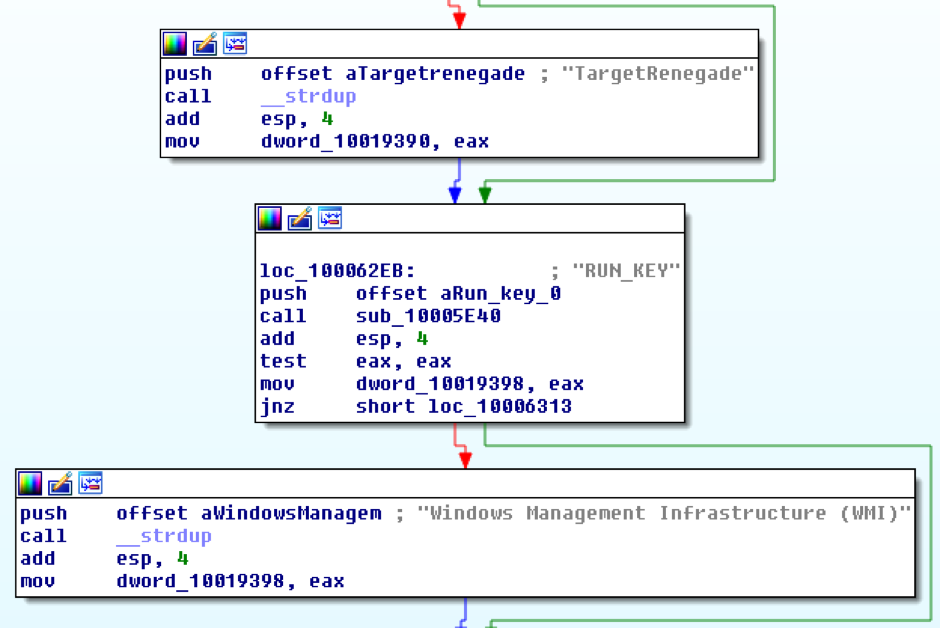
Figure 2. Clear text configuration data
It also creates the following new XML tags based on the old ones:
|
1 2 3 4 5 |
<MAX_SAFE>4800</MAX_SAFE> <MIN_SAFE>3600</MIN_SAFE> <PORT_SAFE>80</PORT_SAFE> <URL_SAFE>/outbase.php</URL_SAFE> <HOST_SAFE>127.0.0.1</HOST_SAFE> |
All the XML tags are then RC4 encrypted with key +37:*$pK#s and stored in the following registry key:
|
1 2 |
HKEY_LOCAL_MACHINE\SOFTWARE\Wow6432Node\Microsoft\MSRPC Value:msupdate32 |
Then, it tries to get system information from the following registry keys:
|
1 2 3 4 5 6 7 8 9 10 11 12 13 14 15 16 17 18 19 20 21 |
HKEY_CURRENT_USER\Identities Value:DefaultUser ID HKEY_CURRENT_USER\Control Panel\International Value:sCountry HKEY_CURRENT_USER\Software\Microsoft\Windows\CurrentVersion\Internet Settings Value:User Agent HKEY_CURRENT_USER\Software\Clients\StartMenuInternet HKEY_LOCAL_MACHINE\SOFTWARE\MICROSOFT\WINDOWS NT\CurrentVersion Value:RegisteredOrganization HKEY_LOCAL_MACHINE\SOFTWARE\MICROSOFT\WINDOWS NT\CurrentVersion Value:RegisteredOwner HKEY_LOCAL_MACHINE\SOFTWARE\MICROSOFT\WINDOWS NT\CurrentVersion Value:CSDVersion HKEY_LOCAL_MACHINE\SOFTWARE\MICROSOFT\WINDOWS NT\CurrentVersion Value:CurrentVersion HKEY_LOCAL_MACHINE\SOFTWARE\MICROSOFT\WINDOWS NT\CurrentVersion\Winlogon Value:DefaultUserName HKEY_CURRENT_USER\Volatile Environment Value:USERNAME HKEY_LOCAL_MACHINE\SOFTWARE\MICROSOFT\WINDOWS NT\CurrentVersion\Winlogon Value:DefaultDomainName |
The malware also retrieves the current system time, encrypts it with RC4 and the same key and stores it in the following registry key:
|
1 2 3 |
HKEY_LOCAL_MACHINE\SOFTWARE\Wow6432Node\Microsoft\MSRPC Value:MSFirstUpdate Value key:<RC4encrypteddatetime> |
Then, it creates a string with the previously retrieved system information, the configuration data and the following string template:
|
1 2 3 4 5 6 7 8 9 |
Login(owner):%s(%s) Computer name:%s Organization(country):%s(%s) OS version(SP):%s(%s) Defaultbrowser:%s IE version:%s Timeout:%d(min)%d(max) First launch:%s Last launch:%02d\%02d\%04d%02d:%02d:%02d |
Next, the MD5 hash of this string is calculated and encrypted with RC4 and the same key again. This encrypted string gets then stored in the following registry key:
|
1 2 3 |
HKEY_LOCAL_MACHINE\SOFTWARE\Wow6432Node\Microsoft\MSRPC Value:MSID Value key:<MD5hashedandRC4encryptedsysteminformation> |
To send victim information to the C2 server, it prepares a URL query string by entering the "INFO" branch. The other query branch named "CMD" is entered to send back the result of a command sent by the C2 server.
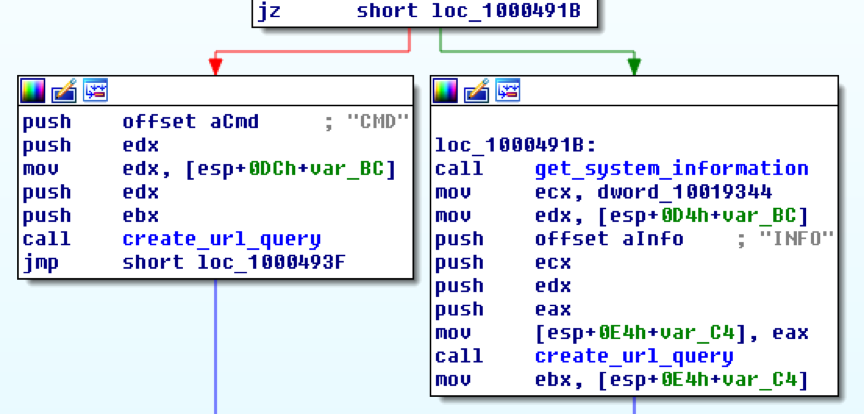
Figure 3. URL query string creation branches
At first, the checks if the <ENCODE> XML tag is set to 0x1 and if so it encrypts the previously created string with the victim’s information with the password contained in the <PASSWORD> XML tag. It does this by bytewise adding 0x80 to the password string and then using an encoded byte to bytewise XOR the information string. The encrypted string gets then Base64 encoded and the characters "+", "/" and "=" URL encoded ("%2B", "%2F", "%3D"). The following string template is then used together with the encrypted data to form the final URL query string:
|
1 |
user=%s;%d;%s; |
The first string is the previously calculated MD5 hash, the decimal number is made of a random number between 3000/3600 ( XML tag) and 4000/4800 ( XML tag). The last string is made of the hardcoded "INFO" string along with the Base64 encoded victim data. For example:
|
1 |
user=52ac9e4b389c5b2f8a63af4a126c1c80;3046;INFO;mI7BkjovU%2BoqZi4KTzd%2F0wdqqjJegip2KgYXN6N6inYqV... |
To test if the computer is connected to the internet it uses InternetGetConnectedState() API function. Next, it enters either the "main" or the "safe" branch referring to the XML tags. The main branch is the usual execution path, while the safe branch only gets used for a specific malware command. If there is no internet connection it sleeps for a certain time, otherwise it contacts the C2 server present in the <HOST> XML tag together with the URL query string. The malware has the ability to send data with both HTTP request methods, GET and POST. However, this sample only uses the POST request method along with the following content type field:
|
1 |
Content-Type:application/x-www-form-urlencoded |
After contacting the C2 server, the malware copies the response into memory and scans for the marker =#-+ApAcHe_ToMcAt+-#= taken from the <PREFIX> XML tag. If successful, the response gets Base64 decoded and decrypted with the same algorithm used to encrypt the victim information string. The PHP script outbase.php can respond with one of the commands listed below, which the malware then executes.
To process some commands, the malware creates an anonymous pipe and a hidden instance of cmd.exe or command.com, depending on the platform ID. The command line output gets redirected to the pipe, read into memory and later send back encrypted and encoded via the "CMD" URL query branch.
Possible malware commands:
1. pwd
Get current working directory
2. cd
change directory to delivered string
3. part
Get list and type of partitions
4. reboot
Reboot system
5. shutdown
Shutdown system
6. download
Download file < 512,000 bytes delivered in form of a URL ("500 Ko") to disk
7. big
Download file > 512,000 bytes delivered in form of a URL ("500 Ko") to disk
8. wget
Download file with predefined HTTP query string
9. fetch
Download file via URLDownloadToFile()
10. wput
Download data from internet via download command and sent data back via "data=" query
11. info
Send back victim system information (see above)
12. showconfig
Send back current config data with following string template:
|
1 2 3 4 5 6 7 8 9 10 11 12 13 14 15 16 |
=======CURRENT PARAMS [+]Url:http://%s%s [+]Port:%d [+]Timeout:%d-%d =======SAVED PARAMS [Main Site] [+]Url:http://%s%s [+]Port:%d [+]Timeout:%d-%d [Safe Site] [+]Url:http://%s%s [+]Port:%d [+]Timeout:%d-%d |
13. timeout
Change current timeout interval variables
14. timeout_main
Change timeout intervals in main XML configuration
15. timeout_safe
Change timeout intervals in safe XML configuration
16. newurl_main
Change host URL in main XML configuration
17. newurl_safe
Change host URL in safe XML configuration
18. movetosite
Change current host URL variable
19. listprocess
Get list of current processes with PID
20. killprocess
Terminate process delivered via string
21. kitkit
Terminate itself
22. uninstall
Delete malware files on disk and registry entries
Conclusion
This malware has a small set of features ranging from retrieving system information, to downloading files or killing processes on a victim’s system. Technically, it is not outstanding and can be considered only average compared to alleged state sponsored malware written at that time (e.g. Careto or Regin). The code and structure is similar to the Casper implant which is most likely based on this implant. The malware contains an obvious design flaw leaving the main part of the configuration data visible in clear text.
- AutoFocus customers can identify this, and other samples related to it using the Snowball
- WildFire and Traps properly classify Snowball samples as malicious.
Thanks to Esmid Idrizovic for his assistance in this analysis.
Indicators of Compromise:
Hashes (SHA-256)
Loader: c71b1a31bdf3a08fa99ed1f6a1c5ded61e66f3d41e4ed88a12430d1c14ed10ca
Payload DLL: a9220590d3c35fe22df9d38a066ca8d112b83764b39fea98b38761daa64c77b8
Text extracted automatically; images, tables and formatting may be missing. Original: https://unit42.paloaltonetworks.com/unit42-analysing-10-year-old-snowball/