ANY.RUN & SentinelOne: One Workspace, Instant Context for Rapid Response
ANY.RUN integrates its interactive sandbox, IOC lookups, and STIX/TAXII threat feeds natively into SentinelOne for faster automated malware triage.
ANY.RUN and SentinelOne launched connectors that embed interactive sandbox analysis and threat intelligence into the SentinelOne console via Singularity Hyperautomation. Suspicious files and URLs from alerts are automatically submitted to the ANY.RUN sandbox, with behavioral verdicts and risk scores returned into alert notes. On-demand IOC lookups draw on sandbox history from 16,000 organizations and 700,000 analysts. A separate STIX/TAXII feed streams verified malicious IPs, domains, and URLs through the SentinelOne Marketplace TAXII Connect app.
- Hyperautomation connector auto-submits suspicious files and URLs to ANY.RUN sandbox, returning verdicts into SentinelOne alerts.
- Threat Intelligence Lookup enriches hashes, IPs, and domains using data from 16,000 organizations and 700,000 analysts.
- STIX/TAXII feed streams verified malicious indicators into SentinelOne via the Marketplace TAXII Connect app.
Full article1,524 words · extracted from any.run · click to collapse
Speed and clarity are the ultimate advantages for modern SOC teams. The integration of ANY.RUN into SentinelOne delivers exactly that. Instant threat intelligence and interactive sandbox capabilities embedded right where your analysts already work.
Let’s look at how this unified workflow eliminates context switching, accelerates incident response, and drives higher ROI by transforming alerts into actionable insights without leaving the platform.
About the ANY.RUN & SentinelOne Integration
The integration between ANY.RUN and SentinelOne brings advanced malware analysis and global threat intelligence into the platform as native, actionable data.
Instead of manually exporting files or switching between multiple consoles, security teams can operationalize ANY.RUN’s capabilities within the SentinelOne ecosystem.
New Connectors for Interactive Sandbox and Threat Intelligence Lookup (via Singularity Hyperautomation):
- Accelerate File/URL Triage with Automated Behavioral Analysis: Automatically submit suspicious files and URLs from alerts to the ANY.RUN sandbox. Behavioral verdicts and risk scores are delivered directly into SentinelOne, enabling evidence-based decisions.
- Enrich Alert Investigations with Instant Context: Perform on-demand lookups for IOCs like hashes, IPs, and domains. This provides analysts with immediate data on industry targeting, malware families, and related infrastructure without leaving the alert interface.
Existing Integration for Threat Intelligence Feeds (via the native TAXII Connect IOC Ingestion app on the SentinelOne Marketplace)
- Strengthen Proactive Defense with High-Fidelity Indicators: Stream verified malicious indicators (IPs, domains, URLs) directly into the platform via STIX/TAXII. This allows for automated correlation against endpoint logs and the generation of native alerts for matching threats.
By turning malware analysis and threat enrichment into a native part of the investigation pipeline, ANY.RUN and SentinelOne empower SOC teams to stay ahead of evasive attacks while maximizing the value of their existing security stack.
1. ANY.RUN Interactive Sandbox: Improve Triage Speed and Detect Evasive Attacks
This integration component can be used via Singularity Hyperautomation, allowing for deep behavioral analysis of suspicious artifacts.
When SentinelOne triggers an alert, it automatically sends the file or URL to the ANY.RUN Sandbox based on your pre-set preferences (like OS or analysis duration). Once the analysis is complete, behavioral verdicts (malicious, suspicious, or benign) are delivered directly into the Notes section of the specific SentinelOne alert.
Benefits:
- Faster Time-to-Verdict: By automating the submission process, analysts receive a definitive verdict in minutes, significantly reducing MTTR (Mean Time to Resolution).
- Reduced Manual Routine: Eliminates the need for analysts to manually export files or copy-paste URLs into external tools, preventing “console fatigue”.
- Standardized Triage: Templates ensure that every suspicious artifact is analyzed using the same rigorous methodology, regardless of the analyst’s experience level.
- Higher Detection of Evasive Threats: Behavioral analysis catches advanced threats that often bypass the static detection layers of an EDR.
Practical Use Case: Automated Malware Triage
When an alert triggers due to a suspicious file execution, the Hyperautomation workflow automatically or manually sends the file itself to the ANY.RUN Sandbox. The analyst immediately sees a “Malicious” verdict in the alert Notes, allowing them to initiate containment actions without ever leaving the SentinelOne console.
2. ANY.RUN Threat Intelligence Lookup: Identify and Prioritize Risks Faster
This Threat Intelligence Lookup component, available via Singularity Hyperautomation, provides on-demand enrichment of indicators using ANY.RUN’s vast database of millions of previous sandbox investigations across 16,000 organizations and 700,000 analysts.
The moment a suspicious file hash, IP, or domain appears, the system scans ANY.RUN’s threat intelligence history. Analysts can also force a manual check at any point during active hunting. The resulting intelligence, including threat tags, industry targeting info, and “last seen” data, is seamlessly added directly into the SentinelOne alert’s Notes.
Benefits:
- Smarter Prioritization: Immediate access to industry targeting data helps SOC managers quickly identify if they are facing a serious incident.
- Fewer Tier 2 Escalations: Tier 1 analysts gain enough context to confidently close false positives or resolve actual threats on their own, reducing bottlenecks.
- Enhanced Decision Accuracy: Access to historical behavioral data from over 700,000 analysts worldwide reduces the risk of incorrect alert closures.
- Improved Quality of Evidence: Escalated cases include a full TI context, allowing senior investigators to start their work with a complete picture of the threat.
Practical Use Case: IOC Enrichment during Investigation
When a Singularity alert flags a suspicious file execution, the system can instantly run a TI Lookup enrichment for the specific file hash.
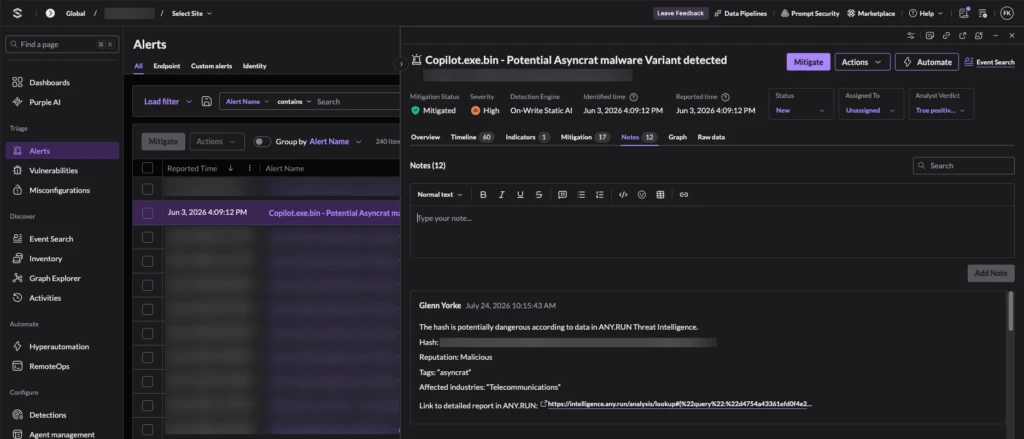
Within seconds, a note pops up in the console revealing that the hash matches a known ransomware strain previously analyzed in ANY.RUN’s Sandbox. Instead of wasting time on manual research, the analyst immediately gets the full threat profile, allowing them to quarantine the host right away without ever leaving the console.
3. ANY.RUN Threat Intelligence Feeds: Upgrade Defense Against Emerging Threats
The Threat Intelligence Feeds integration utilizes the native TAXII Connect IOC Ingestion app found in the SentinelOne Marketplace to systematically fortify your environment.
This component establishes a continuous, live stream of verified malicious IPs, domains, and URLs from ANY.RUN directly into your perimeter. The indicators are extracted and delivered in real time from the newest sandbox investigations of emerging malware & phishing threats across 16,000 organizations and 700,000 analysts around the world.
Utilizing the standardized built-in STIX/TAXII mechanism, it completely eliminates the need for custom scripts or maintenance overhead. The system silently cross-references endpoint traffic against these fresh indicators, automatically triggering native high-priority matches the second an internal asset interacts with a blacklisted entity.
Benefits:
- Proactive Threat Detection: Fresh indicators are added to the system as soon as they appear in live sandbox investigations, improving MTTD (Mean Time to Detection).
- Elimination of Blind Spots: Provides access to 99% unique malicious infrastructure that traditional, slower-moving feeds often miss.
- Reduced Tier 1 Workload: Because indicators are pre-verified as malicious, the resulting alerts are high-fidelity, leading to fewer false positives to investigate.
- Scalable Operational TI: The integration scales across multiple sites and configurations, making it ideal for large Enterprises and MSSPs.
Practical Use Case: Detecting Emerging Campaigns
When a fresh phishing campaign targeting your sector is active globally, its malicious infrastructure is streamed to SentinelOne in real-time. If an employee clicks an obfuscated link from that specific campaign minutes later, SentinelOne’s native detection engine identifies the match against the ingested indicators, instantly blocking the connection and flagging a critical alert. This protection happens automatically at the platform level, stopping advanced attacks based on fresh global telemetry.
How to Integrate ANY.RUN with SentinelOne Singularity
The integration is designed for rapid deployment, utilizing native SentinelOne modules to ensure that setup does not require custom scripts or complex development. Depending on the product you are connecting, there are two primary paths for integration.
Hyperautomation) 1. Integrating Sandbox & TI Lookup (via Singularity Hyperautomation)
The Sandbox and TI Lookup components are implemented through Singularity Hyperautomation.
- Step 1: Connect the ANY.RUN Integration
Navigate to the Hyperautomation section in your SentinelOne console. Open the Integrations tab, locate ANY.RUN, and click “Connect.” You will need to provide your ANY.RUN API key to establish the link.
- Step 2: Install Workflow Templates
Go to the Templates section within Hyperautomation and search for ANY.RUN. Select and install the templates that fit your SOC needs, such as:
- TI Lookup workflow for indicator enrichment.
- Sandbox URL workflow for automated URL analysis.
- Sandbox file workflow for automated file analysis.
- Step 3: Configure Automation Criteria
Set the specific rules for when these workflows should trigger (e.g., based on alert severity, name, or type).
- Step 4: Define Analysis Parameters
For Sandbox templates, specify the OS and environment version for the analysis. For TI Lookup, define which alert indicators (hash, IP, or URL) should be checked. Note that you will also need to create a password for the workflow as a technical requirement of the platform.
Note: Singularity Hyperautomation is an independently licensed module within the SentinelOne platform.
SentinelOne Marketplace) 2. Integrating TI Feeds (via SentinelOne Marketplace)
The TI Feeds connector uses the native TAXII Connect IOC Ingestion app to stream verified indicators directly into your detection logic.
- Step 1: Install the Connector
Open the SentinelOne Singularity Marketplace, find the TAXII Connect IOC Ingestion integration, and install it.
- Step 2: Create the Configuration
Within the app, create a new configuration and provide the following details:
- Name and Scope: Define the configuration’s identity within your environment.
- Endpoint URL: Enter the TAXII URL for your desired ANY.RUN TI Feeds collection (e.g., “All Indicators,” “IPs,” “Domains,” or “URLs”).
- Credentials: Provide the username and password associated with your ANY.RUN TI Feeds subscription.
- Step 3: Operationalization
Once connected, indicators will automatically stream into the system. If an ingested indicator matches an event on an endpoint, SentinelOne will generate a native “Threat Intelligence Indicator Match” alert in the console.
About ANY.RUN
Trusted by 700,000+ cybersecurity professionals and 16,000+ organizations across critical industries, including 64% of Fortune 500 companies, ANY.RUN helps security teams detect and investigate threats faster.
Our Interactive Sandbox provides real-time behavioral analysis of suspicious files and URLs, enabling confident triage and response.
Threat Intelligence Lookup and Threat Intelligence Feeds deliver live, verified threat data that strengthens detection and improves prioritization.
By embedding analysis and intelligence into daily SOC workflows, ANY.RUN helps organizations reduce response time, lower operational costs, and minimize security risk.
Text extracted automatically; images, tables and formatting may be missing. Original: https://any.run/cybersecurity-blog/sentinelone-integration/