Mapping out your unknown: A threat hunter’s guide to GitHub
Datadog Security Labs publishes a threat-hunting guide with audit-log queries to detect GitHub token theft, device code phishing, and source code exfiltration.
Datadog's threat-hunting guide covers GitHub audit log queries for detecting compromised accounts, stolen personal access tokens, and malicious OAuth app authorizations. Attackers typically obtain credentials through phishing, credential stuffing, leaked secrets, or device code phishing, then map private repositories, exfiltrate source code, and pivot into connected cloud and CI/CD environments. The guide maps detections to MITRE techniques like T1078 and T1528 and documents GitHub logging quirks affecting attribution, token metadata, and visibility fields.
- Attack chains follow Initial Access, Discovery, Credential Access, and Collection tactics within GitHub organizations.
- Device code phishing tricks victims into authorizing attacker-generated codes against real GitHub prompts.
- Queries detect logins from new devices or geolocation and new OAuth app authorizations.
- Leaked tokens in scripts, .env files, or infostealer-compromised laptops are a common entry path.
Full article2,955 words · extracted from securitylabs.datadoghq.com · click to collapse
In the previous posts in this series, we looked at threat hunting in your Snowflake and Salesforce logs. For this post we are going to dive into actions available in your GitHub audit logs.
GitHub is where many engineering teams keep their source code and CI/CD pipelines. Authentication mechanisms allow users to access critical infrastructure but some of those mechanisms are far more fragile than others.
Over the past year, attackers have gone straight after GitHub accounts and tokens. They've used stolen access for source code exfiltration and for pivoting into connected cloud environments and CI/CD pipelines. Datadog's Security Research and Internal Threat Hunting team investigated these techniques and the logging that can catch compromised accounts.
This post shares queries you can use to start hunting for malicious activity in your GitHub organization.
The threat model
Generally speaking, a GitHub attack may progress through the following MITRE Tactics:
- Initial Access: gaining the first access, typically through compromised secrets
- Discovery: learning about the GitHub environment once inside
- Credential Access: gain access to more credentials
- Collection: steal source code
The attack often starts with a valid credential such as a personal access token, an OAuth access token, or a compromised user account belonging to a user within your GitHub organization. Attackers obtain these credentials through phishing, credential stuffing, secrets leaked in public repos, or malicious OAuth apps. Specifically:
- Leaked tokens that may be hardcoded in scripts, committed and pushed away, pasted into third-party tools, or sitting in a .env on a laptop hit by infostealer malware
- Device code phishing where the victim sees a real GitHub URL and a real prompt, enters a code the attacker generated, and authorizes a token
- A user interacts with malicious IDE extensions or OAuth apps that have broad scopes
Once inside, an attacker can map your private GitHub footprint such as listing private repositories, requesting resources, or exfiltrating source code.
Several behaviors are worth investigating, such as a token used from a new ASN, an account anomalously hitting private paths, or a burst of downloads across your organization. Effective threat hunting depends on knowing what normal looks like in your environment.
Kicking off your threat hunt
The following sections describe queries you can use to detect attacker behavior in your GitHub environment. In GitHub audit logs, some events have their own event type (for example, git.clone), but many actions taken through API requests are logged under the api.request event type, with the route and url_path fields providing the intended action's detail.
GitHub’s audit logs are documented in various pages but for ease of use, we recommend reviewing their public JSON files for a complete picture of their audit logging.
Once you have your GitHub audit logs, several logging quirks will shape your queries. We’ve encountered these:
- Attribution to employees can be unreliable. The
external_identity_nameidvalue is populated for most SSO-authorized actions but is missing from someapi.requestevents, including successful reads against private repositories. - GitHub omits external identity and source IP when a request fails, which removes the geolocation fields you may want when triaging suspicious behavior.
- Token metadata can be easy to misread. The permission fields on token activity describe the token's permissions within its owning organization, which may not be yours. A token belonging to an internet-wide scanner with admin rights in its own org will show admin privileges in the log even when it's only reading your public repositories.
- Repository visibility is expressed by more than one field depending on event type (i.e.,
visibility,public_repo,andrepository_publicmay appear). Any query that distinguishes public from private access needs to use the appropriate field.
Initial access
These queries identify activity that suggests an attacker has successfully gained access to your GitHub environment through a compromised user account. To understand what event types may be available for hunting, monitor for user and user session events within your environment.
Successful login events from new device and geo-location (T1078 - Valid Accounts)
GitHub logs when a user signs in successfully from an unrecognized device and location.
source:github
action:user.sign_in_from_unrecognized_device_and_location
actor_is_bot:false
These logs populate minimal detail with no token type used and no source IP address. They do consistently provide the country code of the IP address and user agent.
What to look for in the results:
Monitor login and API activity from the associated user accounts to confirm the activity is expected. If you ingest GitHub logs into your SIEM and enrich them with geolocation data, look for surrounding activity from proxy or VPN services your company hasn't approved.
Review subsequent activity from the associated IP address for signs of access to sensitive repositories, data downloads, or a burst of API requests.
Check your identity provider’s audit logs for the same patterns if your organization manages login through an IdP rather than GitHub directly. Focus on events targeting GitHub as the application.
Consider reviewing the related event type user.sign_in_from_unrecognized_device.
Credential Access
These queries identify activity suggesting an attacker has established access to your GitHub environment, such as application authorization and integration events.
New OAuth application is authorized by a user account (T1528 - Steal Application Access Token)
GitHub logs when a user grants an application permission to act on their behalf.
source:github
action:oauth_authorization.create
# group by distinct oauth_application_name and actor
What to look for in the results:
Use the oauth_application_name or integration field to identify the authorized application. The two fields never appear in the same event. Monitor for uncommon OAuth applications in your environment.
Review both user-to-server tokens and traditional OAuth application tokens. A populated integration field indicates that the user has granted a user-to-server token.
Monitor for uncommon application names and token_scopes.
Track an OAuth application’s subsequent activity after it receives an OAuth access token by using application_name in api.request events. Because application_name is inconsistent across event types, use the hashed_token value, which remains consistent across all event types, to monitor a specific token’s activity.
Build and maintain an inventory of every app authorized in your org, including who authorized it, as you review legitimate OAuth applications in your environment. Review new OAuth applications on a regular cadence or through a detection rule. This inventory lets you quickly identify new suspicious applications and assess your exposure if a third-party integration vendor discloses a breach.
Discovery
An attacker can enter your GitHub environment through several vectors, including compromised user accounts or their associated tokens. From there, the attacker will likely pivot to learning about the GitHub organization.
These queries help identify activity suggesting an attacker is gathering information from inside your GitHub environment.
High-volume secrets listing enumeration (T1552 – Unsecured Credentials)
Once an attacker has a foothold, secrets stored in GitHub (Actions secrets, org-level secrets, secret-scanning alerts) offer one of the most direct paths to escalate into other systems: CI/CD pipelines, cloud credentials, and third-party API keys. Before stealing a secret, an attacker usually locates it first, either by listing which repos, orgs, or environments have secrets configured, or by pulling secret-scanning alert findings.
source:github
action:api.request
route:("/organizations/:organization_id/secret-scanning/alerts"
  OR "/repositories/:repository_id/actions/secrets"
  OR "/repositories/:repository_id/actions/organization-secrets"
  OR "/repositories/:repository_id/environments/:environment/secrets"
)
status_code:[200 TO 299]
# group by actor, count distinct repo over 1h
These four routes cover the main ways to discover where secrets exist without reading a value:
- listing a repo's own Actions secrets
- listing which org-level secrets are visible to a repo
- listing environment-scoped secrets
- pulling secret-scanning alert results at the org level
None of these calls expose an actual secret value in the audit log. They expose only the fact that a listing was requested, and by whom.
What to look for in the results:
Group by actor and inspect any actor with a high count of distinct repositories accessed. This activity should be uncommon outside an authorized audit. If possible, plot the number of distinct repos each user accessed during a time period; an anomaly will stand out clearly, as in the example below, where each color represents a different actor.
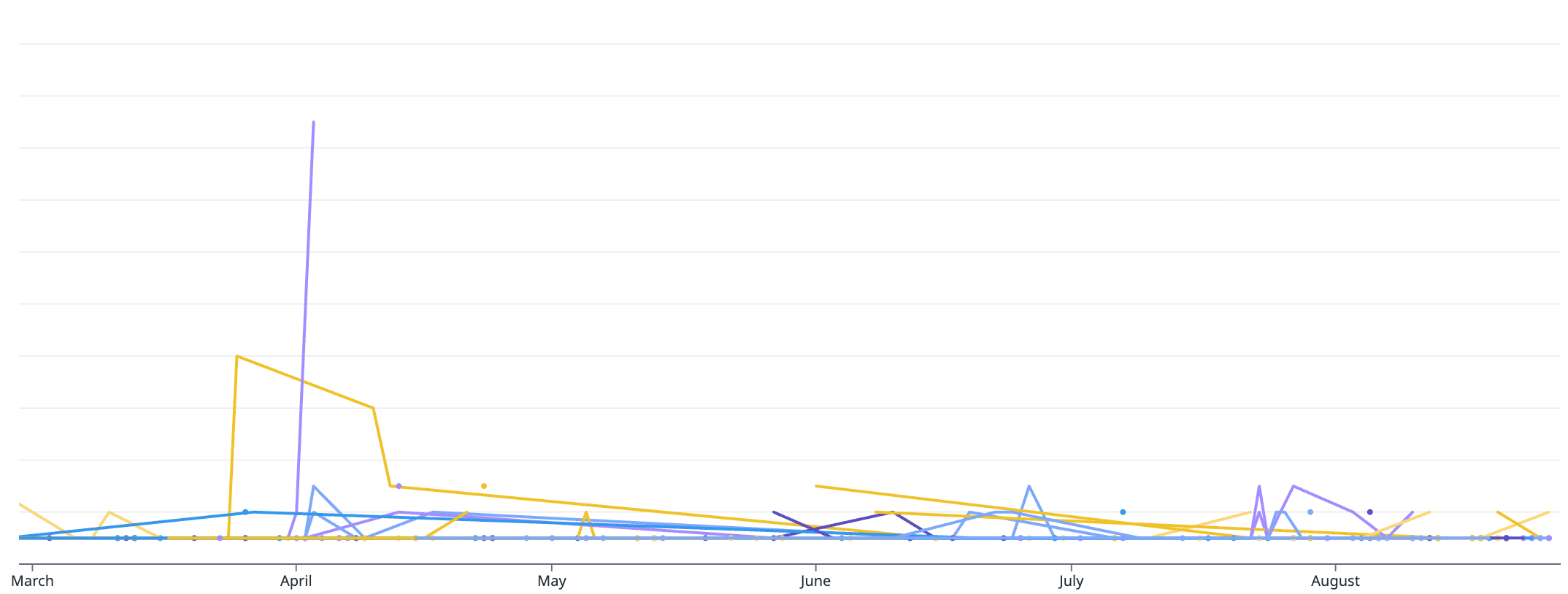
Drill down on any actor who stands out. Use programmatic_access_type to identify the credential type that may be compromised, and inspect url_path for the specific resources accessed. If you suspect a compromised token, filter on hashed_token to isolate that token’s activity.
High-volume repo access against private repos (T1526 - Cloud Service Discovery)
Attackers may identify your private repositories and explore their contents before exfiltrating source code. They may first list an org's repos via /organizations/:organization_id/repos. They can then walk a private repo's file tree via the Git Trees API (git/trees or git/trees/*, optionally with recursive=1 on its query_string) or Contents API (contents/*), without triggering a clone or download event just yet.
Use these queries to isolate actors performing this kind of activity:
source:github
action:api.request
route:"/organizations/:organization_id/repos"
-status_code>=300
# group by actor, count distinct query_string "page" values over 10 minutes
# flag actors with page value >= ~5, or a run of sequential increasing pages
The cardinality of distinct page values per actor is the strongest signal here. It can indicate an actor paged through an entire org's repo list.
source:github
action:api.request
route:("/repositories/:repository_id/git/trees"
OR /repositories/:repository_id/git/trees/*
OR /repositories/:repository_id/contents*)
-status_code>=300
-(public_repo:true OR repository_public:true OR visibility:public)
# group by actor, count distinct repo over 1h periods
GitHub exposes a repo's privacy status through three different fields: public_repo, repository_public, and visibility. For api.request events, only public_repo applies; the other visibility fields populate in other event types.
What to look for in the results:
For the first query, sort actors by distinct pages read, from highest to lowest, and examine who stands out. Also surface type=private in the query_string separately, since it signals specific interest in the org's private repos rather than a generic listing.
For the second query, sort actors by distinct repositories read, from highest to lowest, and examine who stands out. A recursive=1 query string on the Git Trees call is more suspicious than a plain call, since it pulls a repo's entire file tree in one request instead of one folder level at a time.
If you can graph the data, use a line graph to isolate actors that stand out, as in the example below. Each color represents a different actor; a spike stands out immediately.
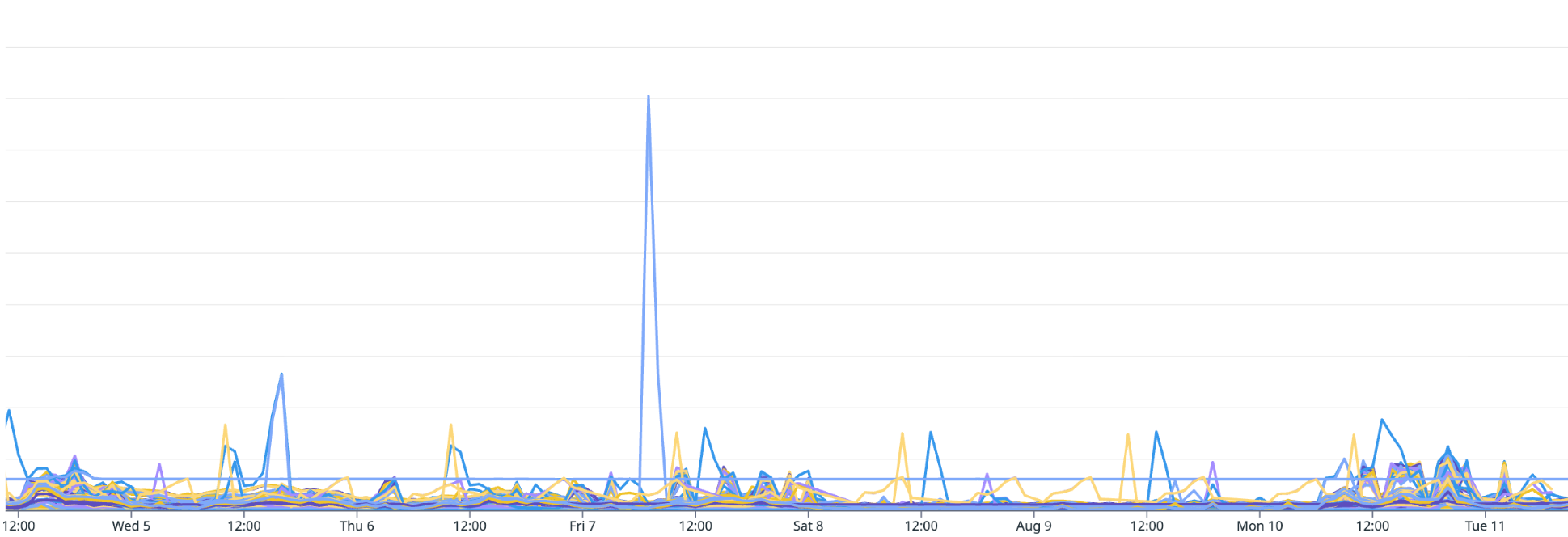
If an actor stands out, drill down on that user the same way you would for the secret-listing case: Pull every other action that token has performed to scope the full blast radius of a suspected compromise.
An api.request to route:"/user/repos" also tells an attacker which repos a user can see and what permissions they hold. You'll only have these log entries if you use GitHub Enterprise Managed Users (EMU).
Run the following query to find external actors probing your internal repositories by name or ID. The results show unsuccessful access attempts against internal repositories, which tells you whether your private repo names or IDs have leaked.
source:github
action:api.request
route:*repositories*
status_code>=400
-(public_repo:true OR repository_public:true OR visibility:public)
Exclude known employees from these results: build a list of GitHub actors with an @external_identity_nameid value in the logs (present if you use SSO), then exclude them from the search above.
Discovery of data from GitHub organization through API requests (T1526 - Cloud Service Discovery)
The GitHub API lets an attacker use a single token to enumerate an organization's resources. Within seconds, the attacker can list every accessible repository and page through members, teams, and repository metadata. Even a single API request can expose sensitive information about the organization.
source:github
action:api.request
request_method:GET
route:*repositories*
public_repo:false
actor_is_bot:false # optional to filter out actor_is_agent:false
status_code:2*
# if you utilitize GitHub SSO you can monitor for non recognized users with -@external_identity_nameid:*
What to look for in the results:
Use the url_path field to identify the exact resource accessed, such as a commit, file, or pull request.
Monitor for multiple attempts, within a short window, that hit repository-related routes, stored in route, across different repositories, stored in repo, and different resources.
Use the hashed_token field to group activity by the exact token used because GitHub users often hold multiple tokens or grants. Review activity across all token types. The programmatic_access_type field tells you whether a request used a classic PAT, a fine-grained PAT, an OAuth app token, or a GitHub App installation token.
Check the user agent, source IP, and ASN against the identity's history. Escalate requests from cloud hosting providers, VPNs, or a geography the user has never authenticated from, particularly when there's no corresponding interactive login from that address.
Attackers commonly use personal access tokens because of their broad permissions and because infostealer malware can capture them from a user's endpoint; however, attackers can use various token types for unauthorized access.
Collection
Once an adversary gains access to a private code repository, they may collect proprietary source code from it in bulk through clone operations, downloads, or API requests.
Monitor for an anomalous number of collection attempts within a given time frame, calibrated to your organization's size. For example, a large organization that normally sees dozens of collection attempts per 10 minutes might alert only when that count reaches the hundreds.
The following queries help you detect activity that could indicate an attacker collected data from your GitHub organization.
Collection of data from GitHub organization through cloning of repositories (T1213 - Data from Information Repositories)
Cloning gives an attacker direct, bulk access to source code and its git history. It's difficult to distinguish from normal engineering work since developers clone repositories every day.
Breadth and pace separate collection from routine activity. If an account clones many private repositories unrelated to their standard working habits in a short window, that activity is a good indicator of collection.
source:github
action:git.clone
repository_public:false
# filter out bot users with -actor:*[bot]*
What to look for in the results:
Compare the cloned repositories against the user's typical footprint. Clones spanning multiple services, teams, and languages the user has never contributed to are the strongest signal. A backend engineer cloning forty repositories across every product area is a different event from that same engineer cloning the twelve repos their team owns.
Compare the source IP, ASN, and geography to the user's history. Prioritize clones from hosting providers, VPN exits, Tor exit nodes, or locations where the user hasn't previously authenticated.
Rule out common benign causes: a new laptop setup, onboarding, dev environment rebuilds, gh repo clone scripts, local backup jobs, and CI runners misconfigured to use a human's PAT instead of a GitHub App.
Collection of data from GitHub organization through GitHub ZIP file downloads (T1213 - Data from Information Repositories)
Downloading a repository as a ZIP archive gives an attacker the same current file contents as a clone, but without the commit history.
Monitor for a non-bot user downloading many distinct repositories as ZIP files in a short period. This can indicate a compromised user.
source:github
action:repo.download_zip
public_repo:false
-@actor_is_bot:true
# if you utilitize GitHub SSO you can monitor for non recognized users with -@external_identity_nameid:*
# if the behavior is generated by an OAuth app, oauth_application_id will populate
What to look for in the results:
Focus on downloads of many distinct repositories in under five minutes. Dozens of pulls of the same repo usually indicate a retry loop or a misconfigured job.
Check the user agent, source IP, and ASN against the identity's history. Escalate requests from cloud hosting providers, VPNs, or locations where the user has never authenticated. Prioritize requests without a corresponding interactive login from the source IP address.
Check timing and device against the user's norms. Archive downloads outside the user's working hours or from an unrecognized device's session warrant a direct conversation with the user.
Build a baseline of typical user agents, geolocations, and actions for bot accounts and OAuth applications. This baseline lets you evaluate non-user accounts for compromise as well.
Conclusion
Your employees use GitHub every day to build things. Like any technology, it can be misused. Because GitHub has so much access to your critical infrastructure, an attacker who gains access to your GitHub organization can often pivot into that infrastructure.
The hunting techniques in this guide are a starting point for investigating threats and deepening your knowledge of your organization's logs. Turn the queries that prove useful into a detection rule or a continuous hunt so that you don't have to hunt for the same activity twice.
To read more about GitHub reconnaissance and exfiltration activity, check out our Coordinated GitHub API enumeration and access token abuse blog post.
How Datadog can help
To get started on building detections within Datadog, use Datadog's GitHub integration to ingest audit log data directly into Datadog Cloud SIEM. Once your logs are flowing, you can create detections tailored to your environment.
Datadog Cloud SIEM comes with a number of out-of-the-box detection rules that can help you identify malicious activity in your GitHub environment, such as:
- GitHub user anomalously downloaded data as a ZIP file
- GitHub secret enumeration via API
- GitHub repository activity from suspicious IP
- GitHub personal access token used by previously unseen user agent
- GitHub personal access token impossible travel detected from suspicious IP
- GitHub activity observed from Tor client IP
- GitHub anomalous number of repositories cloned by user
- GitHub critical resource enumeration activity via API
- GitHub large amount of classic personal access token use via suspicious VPN
- GitHub mass exfiltration via cloning of repositories using a personal access token
- GitHub mass zip file exfiltration of repositories using a personal access token
The Datadog Code Threat Detection product provides additional visibility and detection capabilities on pull requests within your GitHub organization.
Text extracted automatically; images, tables and formatting may be missing. Original: https://securitylabs.datadoghq.com/articles/mapping-out-your-unknown-threat-hunters-guide-to-github/