How Pentest Companies Adapt In The Era of AI
Opinion piece urges pentest firms to adopt self-hosted AI like Qwen3-Coder via Ollama, warning client findings pasted into cloud models breach confidentiality.
The article argues penetration testers are already using AI tools, and pasting client findings, scope documents, or credentials into cloud models like ChatGPT or Claude risks NDA breaches and GDPR/HIPAA compliance violations. It recommends self-hosted models on firm-controlled infrastructure instead of banning AI. The piece promotes PentestPad, a pentest reporting platform offering managed, self-hosted, and air-gapped deployment, an MCP server exposing fourteen typed tools, and a writing assistant that can target a local LLM. PentestPad's own team reportedly runs Qwen3-Coder through Ollama with OpenCode or Claude Code as the agent harness.
- Pasting client findings into ChatGPT or Claude can violate NDAs, client contracts, GDPR, and HIPAA obligations.
- Author recommends self-hosted LLMs so client vulnerability data never leaves the firm's network.
- PentestPad supports air-gapped deployment and an MCP server exposing fourteen typed agent tools.
- PentestPad's team runs Qwen3-Coder locally via Ollama, using OpenCode or Claude Code as harness.
- Banning AI is framed as futile; testers will use personal accounts without sanctioned workflows.
Full article1,993 words · extracted from gbhackers.com · click to collapse
Every penetration testing firm is facing the same pressure right now. AI tools are faster, cheaper, and increasingly capable, and testers are using them whether the company has a policy on it or not.
There’s a high change AI has already entered your workflow the question is whether it has entered on your terms or your employee’s personal Claude account. And in this industry, that distinction really matters.
The Cloud AI Problem No One Wants to Talk About
When a developer pastes code into ChatGPT, the worst case is a licensing headache. When a penetration tester does the same thing with a client’s findings, you’ve just uploaded a detailed map of a company’s vulnerabilities to a third-party cloud infrastructure you have no control over.
Besides a policy violation, that’s a potential breach of client confidentiality, NDA, and in regulated industries, compliance frameworks like
GDPR or HIPAA.
The major AI providers (OpenAI, Anthropic, Google) are excellent products. But their cloud-hosted models were not designed with the data sensitivity of offensive security work in mind.
Client scope documents, discovered vulnerabilities, network diagrams, hardcoded credentials found during testing. None of that should be leaving your infrastructure, and none of it should be in a training pipeline you didn’t consent to.
The truth is that if your firm doesn’t give testers a sanctioned AI workflow, they will build their own. And it’s not likely they’ll be thinking about your client contracts when they do.
The Right Architecture Exists
The answer isn’t to ban AI. That ship has sailed, and the firms that try will just end up with testers using it covertly while competitors who embrace it properly pull ahead on speed and output quality.
The answer is to bring AI in-house, on infrastructure you control, with client data that never leaves your network.
Self-hosted AI models have matured significantly. Running a capable model locally is no longer just a research project, but an operational choice.
And when you combine a self-hosted model with an orchestration layer built specifically for security workflows, you get the productivity benefits of AI without handing your clients’ attack surface to a third party.
AI specifically designed for cybersecurity companies
PentestPad is a pentest reporting tool that reduces the time security teams spend turning raw notes into a client-ready report, while keeping the project organised around it.
The teams using it are not all in the same business. Some deliver security testing to clients. Some test their own systems in-house. Others coordinate several external providers at once, and use the platform to keep the findings in one place.
Day to day that means project management, collaboration, retesting and report generation. Much of the tooling that usually surrounds a pentest sits inside it as well: notes, evidence and attachments, comments on findings, proposals and scope import.
Less of the work needs a scratch file, a shared drive or a spreadsheet.
Almost none of it is fixed. Reports are generated from your own template rather than a generic one, the client portal carries your branding on your own domain, and the fields, layouts, and statuses behind a finding are defined by your team rather than inherited.
The instructions the AI assistant writes to are yours as well, so a draft comes back in your methodology and your wording rather than a generic house style.
The same holds for where it all runs. PentestPad is available as a managed cloud service or fully self-hosted on your own infrastructure, including air-gapped, and the writing assistant can be pointed at a self-hosted model inside your own network rather than a vendor’s.
That last choice is the one pentest teams get stuck on. A finding is a client’s unremediated vulnerability, and handing it to OpenAI or Anthropic’s API sends it to a company your client never agreed to.
Most client contracts list which outside companies can handle their data, and a model vendor is not on that list.
Adding one means telling every client and usually asking them to sign off, while the data sits somewhere you did not choose for as long as someone else decides. Running the model yourself removes the question instead of answering it.
The platform exposes itself over MCP, so an agent can work against your real findings, fields and templates instead of guessing at them.
Built for agents as well as people
PentestPad is built to be driven by software as well as by a person at a keyboard, and the model doing the driving can sit inside your own network.
That is the whole answer to the problem above: the assistant is pointed at a self-hosted LLM, and client content never crosses your perimeter.
The writing assistant works from what a tester already has. Hand it scanner output, a Burp finding, a screenshot or a log file, attach the evidence, and it returns a structured finding written to the instructions your organisation has defined, so the draft arrives in your format rather than a generic one.

Underneath, PentestPad exposes itself over MCP. Methodology, past findings, templates, finding fields and the rules for writing them live in the platform, and the MCP server exposes fourteen typed tools over them, from searching projects and findings to filing a new one from a template, updating remediation after a retest, or adding a comment.
The platform stays the source of truth and the agent holds no state of its own.
Run end to end the stack is three parts, all on hardware you control. PentestPad is the knowledge base, a local model does the reasoning, and a terminal harness is wired to both.
PentestPad’s own team uses Qwen3- Coder through Ollama, with OpenCode or Claude Code as the harness.
For teams that would rather not assemble one, there is a command-line agent for macOS, Linux and Windows, carrying six customisable specialists across web, network, reconnaissance, API and mobile testing, plus a general one for methodology and tool selection.
How the report gets built
A project holds the client, the assessment type, the scope, the testers assigned to it and the timeline. Findings attach to it as testing progresses, so what is in scope, who is working on it and what has been found so far sit together rather than across a folder, a chat thread and a spreadsheet.
Each finding carries a title and description, the affected assets, severity, remediation, references and the supporting evidence.
Severity is set with a built-in CVSS calculator, and where a team hides its own impact and probability fields the risk rating derives from the CVSS score instead.
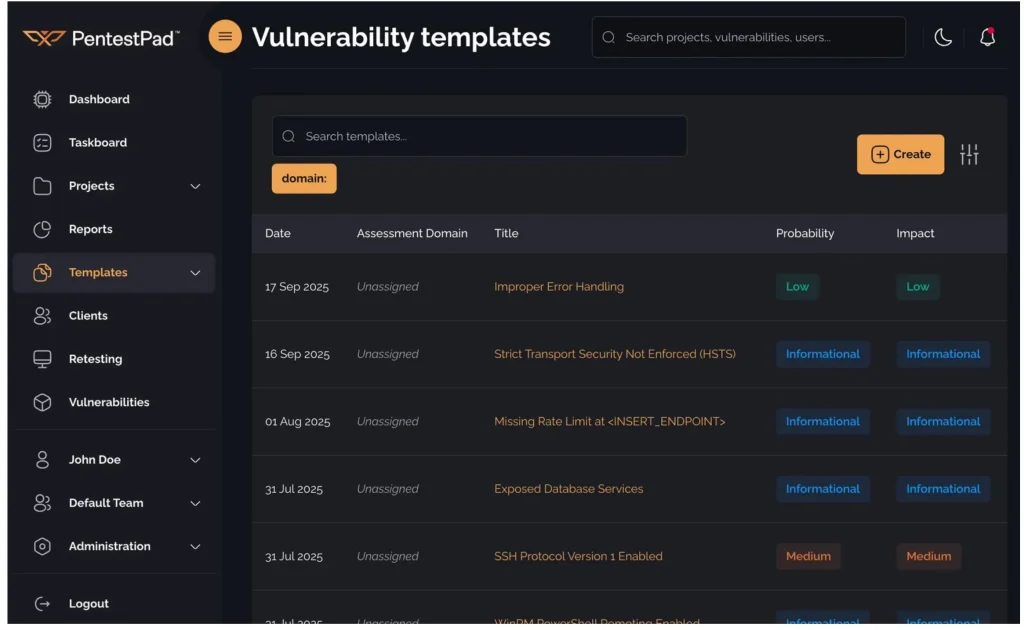
Findings do not have to start empty. A library of reusable vulnerability templates sits alongside the projects, searchable by name and filterable by assessment domain, and importing one fills every field of a new finding with your own house description, remediation text and CVSS vector, leaving only the engagement-specific detail to write. Executive summaries work the same way.
Findings move through statuses your team defines, from draft to ready. Comments attach to individual vulnerabilities rather than to the document, and revision history shows what changed between drafts.
The report itself is built from your own file, with placeholders dropped in where the data belongs, and the PentestPad team does the conversion at no cost. For teams starting from scratch there is a free penetration test report template to work from.

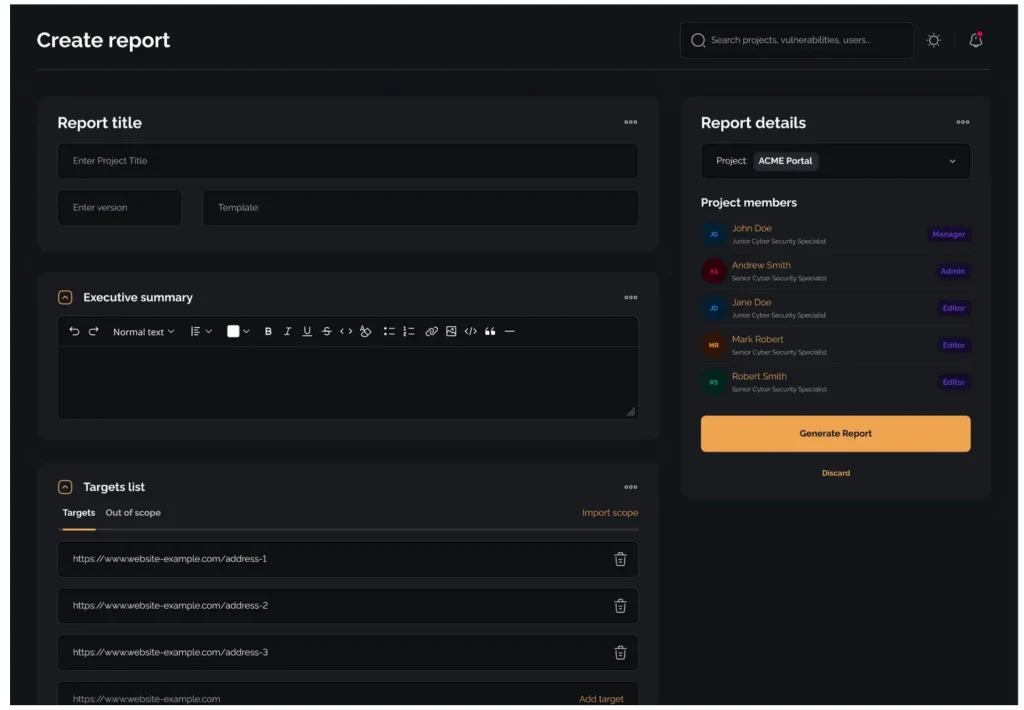
Report settings, where the template and the contents of the build are chosen.
Generation pulls the structured data through it. Tables of contents regenerate on every build, charts and tables populate from the findings, and cross-references resolve through a dynamic link system so they stay correct when content moves.
Reusable field templates cover report-level and finding fields, and a live preview renders the document in the browser before anything is exported.
What comes out covers executive summary, scope, methodology, findings, technical detail, remediation recommendations and supporting
information.
A single project can span more than one assessment domain, with each finding tagged to the domain it came from, so a web application test and a network test for the same client arrive as one report with the findings grouped rather than as two separate deliverables.
A library of template functions ships with the platform, from parsing a CVSS vector and deriving a risk rating to counting findings by severity or filtering scope down to just the IPs or just the URLs.
You can define your own JavaScript functions and call them from the template. Reports generate over the API, so a pipeline can produce one without a human opening the platform, and a finished PDF can be encrypted with a password you supply.
Individual DOCX or PDF files can be swapped inside an existing report without rebuilding it.
Branding, access and retention
Whitelabeling covers the logo, the colours and the domain, so someone logging in to check progress arrives at your brand rather than the vendor’s, down to the 2FA challenge screen, and exported reports carry the
same identity.
Access control is granular rather than role-shaped. Pentester, Manager and Admin ship as defaults, but you can define your own roles from a permission set covering projects, findings, reports and clients, assign more than one role to a single user, and override individual permissions on top of a role where it does not quite fit.
Role administration is itself a separate permission, so team administration can be granted without also handing over the ability to edit roles.
Client accounts are created and invited over the API, and client API keys are restricted separately from your team’s.

Permissions are individual gates rather than a fixed role, set per role and overridable per user.
Uploads are scanned for malware and flagged files rejected, though anyone with the permission can override that and upload a known sample anyway. Scanning is always on for the managed service and optional when
self-hosted.
The data lifecycle is configurable in the same way. Inactive projects archive automatically, and archived reports can be deleted on a schedule you set rather than accumulating until someone remembers them.
Deployment, compliance and pricing
| Area | Detail |
| Deployment | Managed EU cloud, or fully self-hosted including air- gapped, on every plan |
| AI | Hosted, or pointed at a self-hosted LLM in your own network |
| Agent tooling | MCP server, plus a CLI agent for macOS, Linux and Windows |
| Compliance | EU-based entity, GDPR, ISO 27001 certified |
| Export | DOCX, PDF, XLSX and API |
| Integrations | Two-way Jira sync, imports from Burp Suite, Nessus, Qualys, Nuclei, OpenVAS, CSV and JSON, REST API, MCP |
| Pricing | Professional EUR 49, Business EUR 129, per pentester per month; Enterprise on request |
Self-hosting is available on every tier, which matters when a client contract or an internal policy restricts where report data may live.
Self-hosted instances check a version endpoint and raise update notifications, so an isolated deployment knows when it has fallen behind.
Project data, evidence, the finding library, report templates and user configuration export in DOCX, PDF, XLSX or over the API.
Quotes
Available if useful. Use either, both or neither.
“Where a client’s findings are allowed to live is decided by the team holding them, and for many that means nowhere outside their own infrastructure. That is the requirement we built the AI around, so the model runs wherever a team needs it to, including entirely inside their own network.”
Luka Šikić, CEO, PentestPad
“Most teams reshape the fields, the layout and the statuses to match how they already work, set which parts a client can see, put their own branding on the portal and write their own instructions for how the AI should fill a finding in. That was the point of building it that way.”
Mirna Novak, Director, PentestPad
Text extracted automatically; images, tables and formatting may be missing. Original: https://gbhackers.com/how-pentest-companies-adapt-in-the-era-of-ai/