Attackers Abuse Legitimate ScreenConnect Client in Phishing Campaign to Gain Remote Access
Phishers deliver a legitimately signed ConnectWise ScreenConnect client preconfigured to call back to attacker infrastructure, bypassing malware detection for remote access.
An invoice-themed phishing email (subject 'EFT Wire Transfer', fake $5,745.65 payment pretext) directed victims via a hyperlink to a ScreenConnect.ClientSetup.exe hosted on thelittlecupandsaucer.com.au. The executable was an authentic ScreenConnect client validly signed by ConnectWise, LLC through DigiCert G4 Code Signing CA1, but configured to contact the attacker-operated relay instance-v2e2-relay.screenconnect.com over TCP 443 (instance v2e3e2), granting remote desktop control after execution. Microsoft confirmed no ScreenConnect vulnerability was exploited and separately documented phishing-delivered MSP360 installers used to deploy ScreenConnect as a second remote-access channel for file transfer, payload execution, and credential access. Attackers have similarly abused AnyDesk, TeamViewer, LogMeIn, BeyondTrust, Zoho Assist, Remote Utilities, NetSupport Manager, and SimpleHelp.
- Invoice-themed email delivered a validly signed ScreenConnect.ClientSetup.exe via embedded hyperlink
- Signed binary configured to connect to attacker-controlled relay on port 443 for remote control
- No ScreenConnect flaw exploited; legitimate RMM software abused after victim execution
- Microsoft documented MSP360-delivered ScreenConnect used as second remote-access channel
- Defenders should alert on unapproved RMM installs; valid publisher signatures don't authorize configuration
Indicators of compromiseauto-extracted · verify before use · export allAll →
| Type | Indicator | Context |
|---|---|---|
| domain | instance-v2e3e2-relay.screenconnect.com | nto its configuration. The client was configured to contact instance-v2e3e2-relay.screenconnect.com over TCP port 443, using the v2e3e2 ConnectWise-hosted clou |
| domain | mejuri.com | began with a simple invoice-themed email sent from contact@mejuri[.]com with the subject line “EFT Wire Transfer.” ScreenConnect |
| domain | screenconnect.com | eenConnect.ClientSetup.exe Relay host instance-v2e3e2-relay.screenconnect[.]com Port 443 ScreenConnect instance ID v2e3e2 Signing entity |
| domain | thelittlecupandsaucer.com.au | PDF, the embedded “Click here” hyperlink pointed to hxxps://thelittlecupandsaucer[.]com[.]au/ScreenConnect.ClientSetup.exe . The destination hosted |
| url | https://thelittlecupandsaucer[ | ng to a PDF, the embedded “Click here” hyperlink pointed to hxxps://thelittlecupandsaucer[.]com[.]au/ScreenConnect.ClientSetup.exe . The destination h |
Full article773 words · extracted from gbhackers.com · click to collapse
Threat actors are increasingly bypassing conventional malware detection by abusing legitimate remote monitoring and management software instead of deploying custom implants.
In a recent phishing operation, attackers delivered a genuine, digitally signed ConnectWise ScreenConnect client configured to establish remote access to infrastructure controlled by the operator.
The message claimed that a payment of $5,745.65 had been received and urged the recipient to open a PDF containing order information.
It also used a common refund scam pretext, telling recipients to call a customer-service number if the payment was unauthorized.
Rather than leading to a PDF, the embedded “Click here” hyperlink pointed to hxxps://thelittlecupandsaucer[.]com[.]au/ScreenConnect.ClientSetup.exe.
The destination hosted a Windows executable that appeared benign to basic email and web controls because it was a real portable executable rather than a script, archive, or known malware sample.
Analysis showed that the payload was an authentic ScreenConnect client, a remote-access product now operated by ConnectWise.
The executable was digitally signed by ConnectWise, LLC through the DigiCert G4 Code Signing CA1 certificate, and its Authenticode digest matched the signed digest.
There was no evidence that the file had been modified after signing through certificate-table abuse, appended overlays, or other tampering techniques.
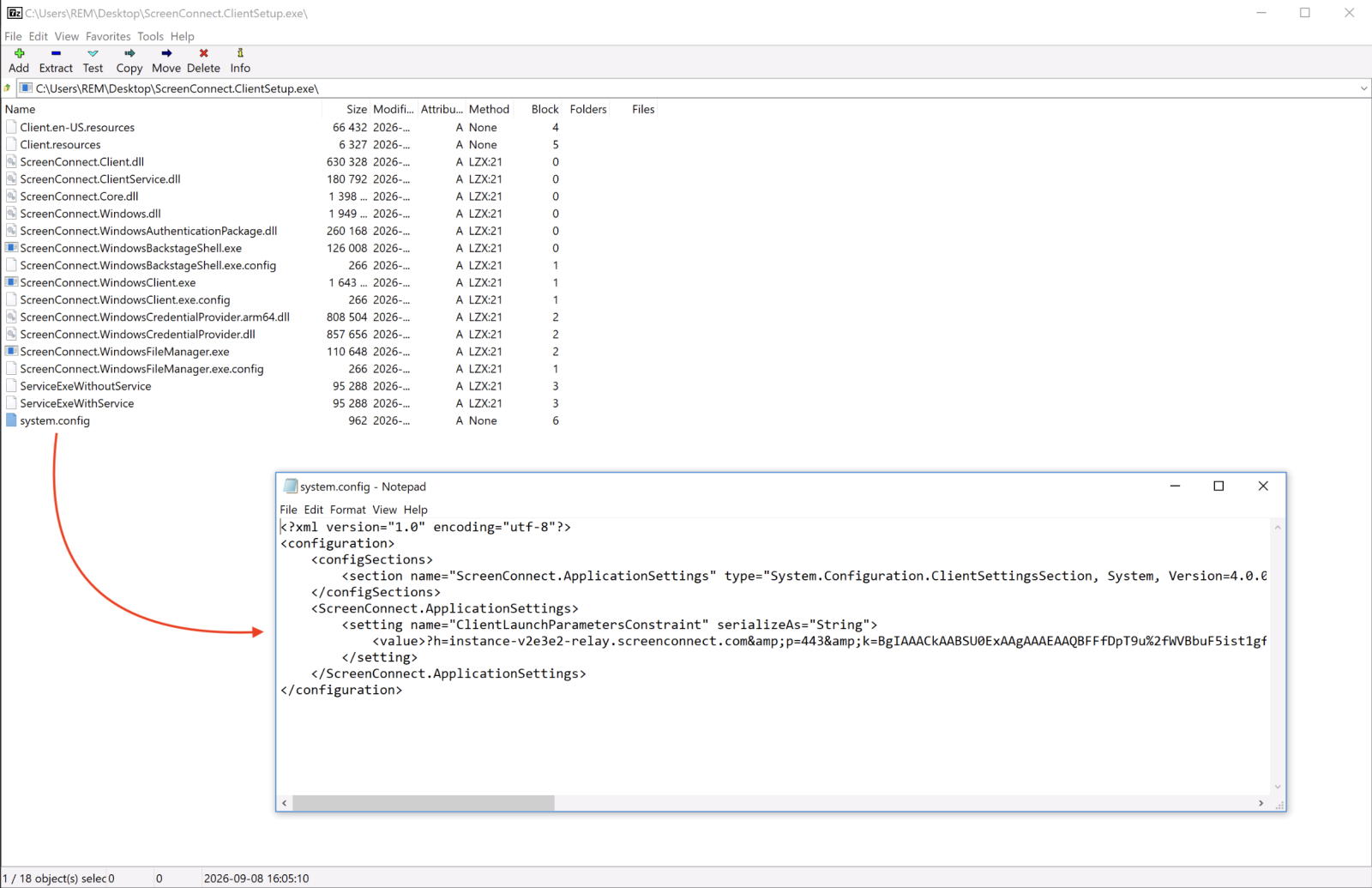
Instead, the attackers appear to have created or obtained a legitimate ScreenConnect client and embedded their own connection settings into its configuration.
The client was configured to contact instance-v2e3e2-relay.screenconnect.com over TCP port 443, using the v2e3e2 ConnectWise-hosted cloud instance.
Once a victim executes the installer, the client can call back to the attacker-operated ScreenConnect environment, potentially allowing the operator to remotely view and control the compromised endpoint.
This technique removes the need for attackers to develop a custom remote access Trojan.
A signed ScreenConnect binary is more likely to appear trustworthy to users and may blend into environments where remote-support utilities are commonly installed.
It also complicates detection because a valid publisher signature proves the file came from the software vendor, not that its remote-management configuration is authorized by the victim organization.
The campaign reflects a broader trend in which phishing operations abuse legitimate RMM platforms to establish persistence and conduct hands-on-keyboard activity.
Microsoft recently documented intrusions in which phishing-delivered MSP360 RMM installers were used to deploy ScreenConnect as a second, independent remote-access channel.
SANS Researchers said that, the attack began with a simple invoice-themed email sent from contact@mejuri[.]com with the subject line “EFT Wire Transfer.”
ScreenConnect Phishing Abuse
The attackers used the combined tooling to transfer files, execute payloads, collect information, and support credential-access activity.
The PE file was unknown on VT so I did a quick analysis of it. It’s a legit application: a ScreenConnect[1] client preconfigured to call-back a test account operated by the Attacker
Microsoft said the observed activity did not exploit a ScreenConnect vulnerability; it abused legitimate administration software after victim execution.
ScreenConnect is only one of many tools routinely misused in this manner. Threat actors have also abused AnyDesk, TeamViewer, LogMeIn, BeyondTrust Remote Support, Zoho Assist, Remote Utilities, NetSupport Manager, and SimpleHelp.
The value of these tools lies in their operational legitimacy: they offer remote desktop control, file transfer, command execution, and unattended access capabilities that can be repurposed immediately after installation.
The phishing sample contained the following notable configuration details:
| Parameter | Observed value |
|---|---|
| Delivery URL | hxxps://thelittlecupandsaucer[.]com[.]au/ScreenConnect.ClientSetup.exe |
| Relay host | instance-v2e3e2-relay.screenconnect[.]com |
| Port | 443 |
| ScreenConnect instance ID | v2e3e2 |
| Signing entity | ConnectWise, LLC |
| Certificate authority | DigiCert G4 Code Signing CA1 |
| Embedded instance key | RSA-2048 public key; blob SHA-256 begins 16b1cec1 and ends 9b00ead7 |
Organizations should treat unexpected ScreenConnect installations as a potential security incident, particularly when the software was installed following an invoice, payment, document-sharing, software-update, or technical-support lure.
Security teams should inventory approved RMM products, alert on unapproved ScreenConnect client deployment, and investigate unusual outbound connections to ScreenConnect relay hosts.
Application allowlisting should distinguish between approved remote-support instances and merely trusted software publishers.
Microsoft recommends governing authorized RMM use with MFA, restricting unauthorized remote-management products through Application Control for Windows or AppLocker publisher rules, and investigating suspicious RMM installations promptly.
Defenders should also monitor for ScreenConnect service creation, unexpected ScreenConnect.ClientService.exe and ScreenConnect.WindowsClient.exe processes, newly installed remote-access applications, and remote-tool activity originating shortly after a user opens a phishing-delivered executable.
A valid digital signature should not be treated as a guarantee of safety when the signed application has been configured to connect to attacker-controlled infrastructure.
Cut every SOC alert investigation by 21 min. Power your SOC with instant IOC context for immediate response: Integrate TI Lookup in your SOC
Mayura Kathirhttps://gbhackers.com/
Mayura Kathir is a cybersecurity reporter at GBHackers News, covering daily incidents including data breaches, malware attacks, cybercrime, vulnerabilities, zero-day exploits, and more.