Hackers Abuse MSP360 and ScreenConnect RMM Tools for Persistent Access and Credential Theft
Microsoft details a phishing campaign abusing signed MSP360 RMM installers to deploy ScreenConnect for persistent access and browser credential theft.
Microsoft observed July 2026 phishing activity across multiple industries delivering a legitimately signed MSP360 RMM v2.5.0.67 installer renamed as lures like ZoomSetup_Installation.exe and fake Adobe Acrobat updates. After UAC approval, the installer registered RMM.Agent.exe services, added autorun entries, opened inbound UDP 48678, then used PowerShell and msiexec to silently deploy ConnectWise ScreenConnect as a redundant remote-access channel. Post-access tooling included WebBrowserPassView, DefenderControl, and password-recovery utilities for credential theft and defense evasion. Microsoft found no ScreenConnect vulnerability exploited and attributed the campaign to no named actor; Faronics Deploy Agent was seen in a similar July chain.
- Phishing lures deliver signed MSP360 RMM installer renamed as documents and app updates
- ScreenConnect silently installed via msiexec as backup access if MSP360 is removed
- Tooling includes WebBrowserPassView and DefenderControl for credential theft and evasion
- Separate July activity used Faronics Deploy Agent as first-stage RMM
- Hunt for RMM.Agent.exe spawning PowerShell and UDP 48678 firewall rules
Indicators of compromiseauto-extracted · verify before use · export allAll →
| Type | Indicator | Context |
|---|---|---|
| sha256 | 108ef7e628d7a20bd6241a5b57149e27a6061f467123eb64061975559f8f73dc | e following SHA-256 hash for the observed MSP360 installer: 108ef7e628d7a20bd6241a5b57149e27a6061f467123eb64061975559f8f73dc After execution, the installer attempted to obtain elevated |
| sha256 | 4188c6588f3dcda881c3f2d12df580051179a999f040b799af506edeb3211a26 | 24ca62536de6f5fc10e49896bb1ac330ca39dce30203afdcc45ae237e • 4188c6588f3dcda881c3f2d12df580051179a999f040b799af506edeb3211a26 SHA256 Legitimate MSP360 RMM Agent Service observed during |
| sha256 | 6a89de024ca62536de6f5fc10e49896bb1ac330ca39dce30203afdcc45ae237e | 83de799faa74b56e862c0a9f96e67aa1b4fa4a9e46395098365b99de3 • 6a89de024ca62536de6f5fc10e49896bb1ac330ca39dce30203afdcc45ae237e • 4188c6588f3dcda881c3f2d12df580051179a999f040b799af506edeb |
| sha256 | 857c2f283de799faa74b56e862c0a9f96e67aa1b4fa4a9e46395098365b99de3 | 63471c7b76dbed03d420736449920368fa0eca2ed6b1aea2645138d97 • 857c2f283de799faa74b56e862c0a9f96e67aa1b4fa4a9e46395098365b99de3 • 6a89de024ca62536de6f5fc10e49896bb1ac330ca39dce30203afdcc4 |
| sha256 | f094b8263471c7b76dbed03d420736449920368fa0eca2ed6b1aea2645138d97 |
Full article795 words · extracted from gbhackers.com · click to collapse
The phishing campaigns that weaponize legitimate remote monitoring and management software to establish persistent access and support credential theft on Windows systems.
The campaign demonstrates a recurring operational trend: rather than exploit a vulnerability or deploy obvious custom malware, attackers are abusing trusted administrative platforms already designed to execute commands, transfer files, deploy applications, and maintain persistent access.
Microsoft said it found no evidence of a ScreenConnect software vulnerability being exploited; the tools themselves were legitimately obtained and misused after victims executed the phishing payload.
The intrusion begins with phishing emails and social-engineering landing pages impersonating common business workflows.
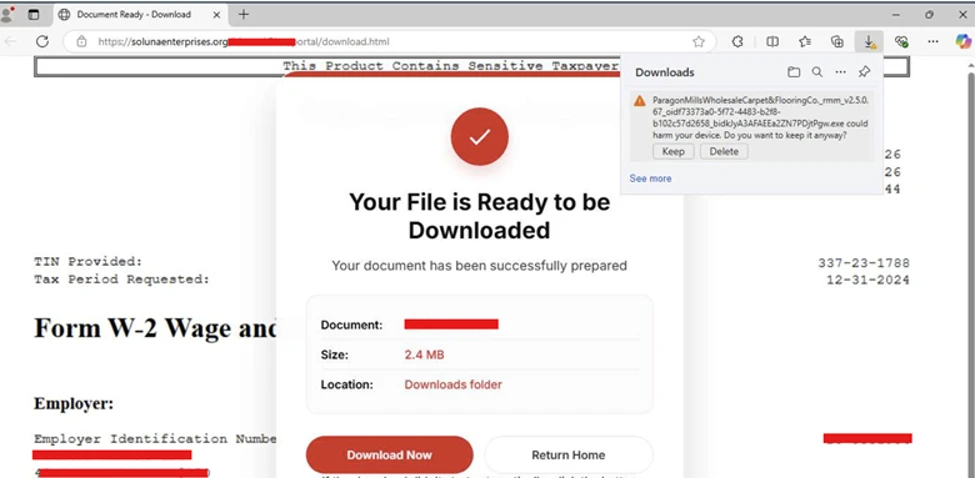
Observed lures included workplace meeting invitations, Zoom and Google Meet setup prompts, Adobe Acrobat and PDF-reader updates, RSVP e-cards, job-offer documents, signature requests, tax-themed files, and delivery notifications.
Victims were redirected to download locations hosted on actor-controlled infrastructure as well as legitimate cloud services, including Amazon S3, Cloudflare R2, Dropbox, GitLab, and Supabase.
This mixed hosting approach helps operators rotate payload locations rapidly and makes network-based blocking more difficult.
The downloaded executable was a legitimate, digitally signed MSP360 RMM version 2.5.0.67 installer, but renamed to resemble an expected document or application.
Sample filenames included VIP_ECARD_INVITATION_rmm_v2.5.0.67.exe, ZoomSetup_Installation_v2.5.0.67.exe, and PDF Reader & Editor the Adobe Acrobatte_rmm_v2.5.0.67.exe.
Microsoft published the following SHA-256 hash for the observed MSP360 installer:
108ef7e628d7a20bd6241a5b57149e27a6061f467123eb64061975559f8f73dc
After execution, the installer attempted to obtain elevated privileges through a User Account Control prompt.
Where users approved elevation, the installer deployed MSP360 components under C:\Program Files\RMM Agent\, registered the RMM.Agent.exe and RMM.Agent.Launcher.exe services, and added autorun entries for MSP360 user-interface components.
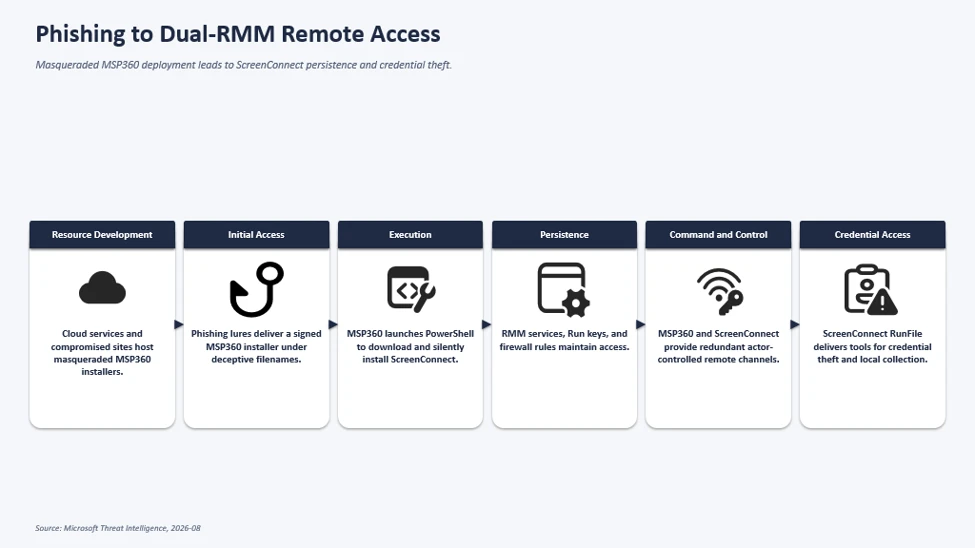
The installation also created an inbound Windows Firewall rule allowing UDP traffic on port 48678 for RMM.Agent.exe.
These service, registry, and firewall changes gave the attacker durable remote-management access that could blend into expected IT-administration activity. Failed or denied UAC elevation prevented the installation from completing.
Microsoft observed that, the activity, observed in July 2026 across multiple industries, used a signed MSP360 Remote Monitoring and Management installer as the initial foothold before silently deploying ConnectWise ScreenConnect as a redundant remote-access channel.
MSP360 and RMM Abuse
The MSP360 service then launched PowerShell, modified the session execution policy, and used Invoke-WebRequest to retrieve a ClientSetup.msi package from attacker-controlled infrastructure.
The package was silently installed through msiexec.exe /qn, deploying ConnectWise ScreenConnect components, including ScreenConnect.ClientService.exe and ScreenConnect.WindowsClient.exe.
This created two independent remote-access paths. If defenders discovered or removed MSP360, the ScreenConnect client could still provide the operator with access to the compromised endpoint.
Following ScreenConnect deployment, attackers used the platform’s built-in RunFile capability to transfer and execute tools from ScreenConnect temporary directories, including paths under the user’s Documents and OneDrive folders.
Microsoft observed utilities masquerading as Windows security, Defender, Phone Link, password, and update-related applications.
Examples included WindowsSecurity_PIN.exe, WindowsSecurity_Password.exe, Passwords.EXE, WebBrowserPassView.exe, WebBrowserBookmarksView.exe, DefenderControl.exe, and HideMouse.exe.
The tooling supported information collection, browser credential access, payload execution, and attempts to reduce defender or user visibility.
Microsoft has not attributed the campaign to a named threat actor. It also observed separate July activity in which Faronics Deploy Agent was used as the first-stage RMM platform to install ScreenConnect, indicating that the technique is not exclusive to MSP360.
Organizations should inventory authorized RMM products and investigate any unapproved MSP360, ScreenConnect, or other remote-administration deployment.
Particular attention should be given to endpoints where both MSP360 and ScreenConnect were installed within a short period, PowerShell launched by RMM.Agent.exe, unexpected ClientSetup.msi installations, and firewall rules exposing UDP port 48678.
Microsoft recommends enforcing MFA for approved RMM platforms, using App Control for Windows or AppLocker publisher rules to block unauthorized signed management tools, and enabling cloud-delivered antivirus protection.
If an unauthorized RMM deployment is found, organizations should reset credentials used to install its services and investigate for system-level compromise and additional persistence.
IOCs
| Indicator | Type | Description |
| •108ef7e628d7a20bd6241a5b57149e27a6061f467123eb64061975559f8f73dc | SHA256 | Legitimate MSP360 RMM v2.5.0.67 installer observed being distributed under deceptive filenames during the campaign. The observed sample was signed using a certificate that has since been revoked. |
| •f094b8263471c7b76dbed03d420736449920368fa0eca2ed6b1aea2645138d97 •857c2f283de799faa74b56e862c0a9f96e67aa1b4fa4a9e46395098365b99de3 •6a89de024ca62536de6f5fc10e49896bb1ac330ca39dce30203afdcc45ae237e •4188c6588f3dcda881c3f2d12df580051179a999f040b799af506edeb3211a26 | SHA256 | Legitimate MSP360 RMM Agent Service observed during the campaign |
Note: IP addresses and domains are intentionally defanged (e.g., [.]) to prevent accidental resolution or hyperlinking. Re-fang only within controlled threat intelligence platforms such as MISP, VirusTotal, or your SIEM.
Cut every SOC alert investigation by 21 min. Power your SOC with instant IOC context for immediate response: Integrate TI Lookup in your SOC
Mayura Kathirhttps://gbhackers.com/
Mayura Kathir is a cybersecurity reporter at GBHackers News, covering daily incidents including data breaches, malware attacks, cybercrime, vulnerabilities, zero-day exploits, and more.