AI helps scammers build convincing antivirus renewal pages
Malwarebytes found scammers using AI to build polished fake antivirus renewal pages impersonating Avast, harvesting names, emails and phone numbers for follow-up fraud calls.
Malwarebytes analyzed a fake Avast renewal site targeting Belgian users in French, claiming a €129.99 Avast Premium Security renewal and collecting name, email address and Belgian mobile number through a cancellation form. Leftover code comments written in polite French and other stylistic clues suggest the page was generated with AI assistance, and the form was never connected to send data anywhere. The scam typically progresses to phone calls pressuring victims to install remote access software, and AI substantially lowers the barrier for producing polished, localized scam pages at scale.
- Fake Avast page claimed a €129.99 Premium Security renewal for Belgian users and requested only name, email and mobile number.
- Leftover code comments written in polite French suggest an AI assistant generated the scam page.
- Harvested details feed follow-up phone calls posing as support and pushing remote access software installs.
- AI lowers the skill barrier, enabling rapid production of polished, localized scam variants across brands and languages.
Full article1,292 words · extracted from malwarebytes.com · click to collapse
Antivirus renewal scams often begin with a message claiming that your subscription has automatically renewed. When you follow the instructions to cancel it, you are taken to a fake page designed to collect your contact details. The renewal charge never existed.
Receiving a message that names the antivirus software you use does not necessarily mean the sender has access to your device or account. Scammers impersonate popular brands and send the same message to large numbers of people, knowing that some recipients will be customers.
As we’ve reported before, simply responding to a scam message can make your contact details more valuable because it confirms that your number is active and that you are willing to engage. Filling in this form gives scammers even more: your name, email address, phone number, and an indication that you may respond to a call about a supposed antivirus payment.
Those details can be sold to other scammers or used for the next stage of the scam: a phone call from someone who tries to persuade you to install remote access software or help them reverse a payment that never happened.
A closer look at a fake Avast site
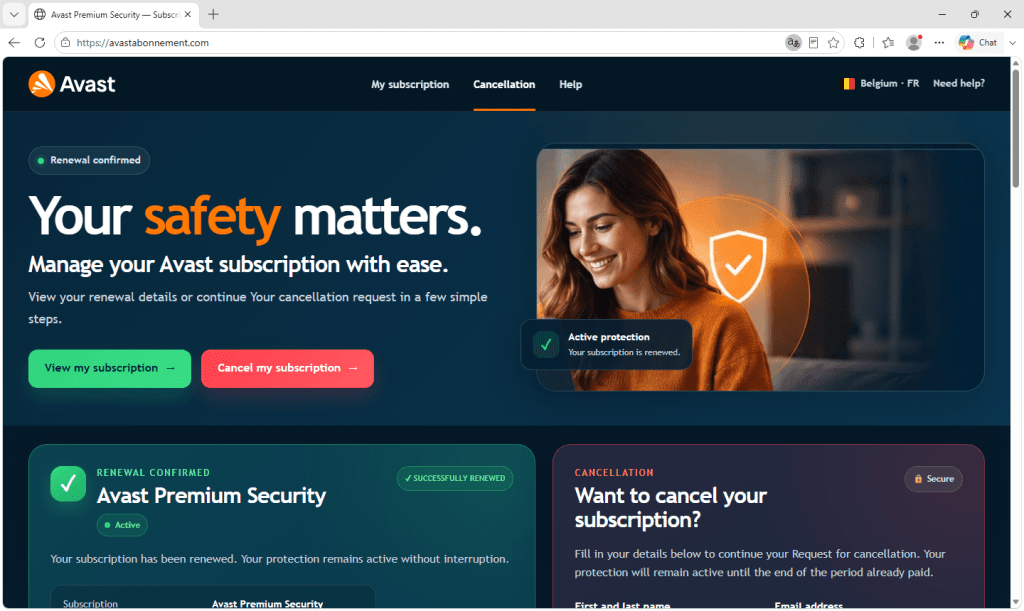
During our scam-hunting activity, we saw one renewal scam site impersonating Avast, aimed at users in Belgium. It was noticeably more polished than most scam sites and contained several signs that it had been produced with the help of AI.
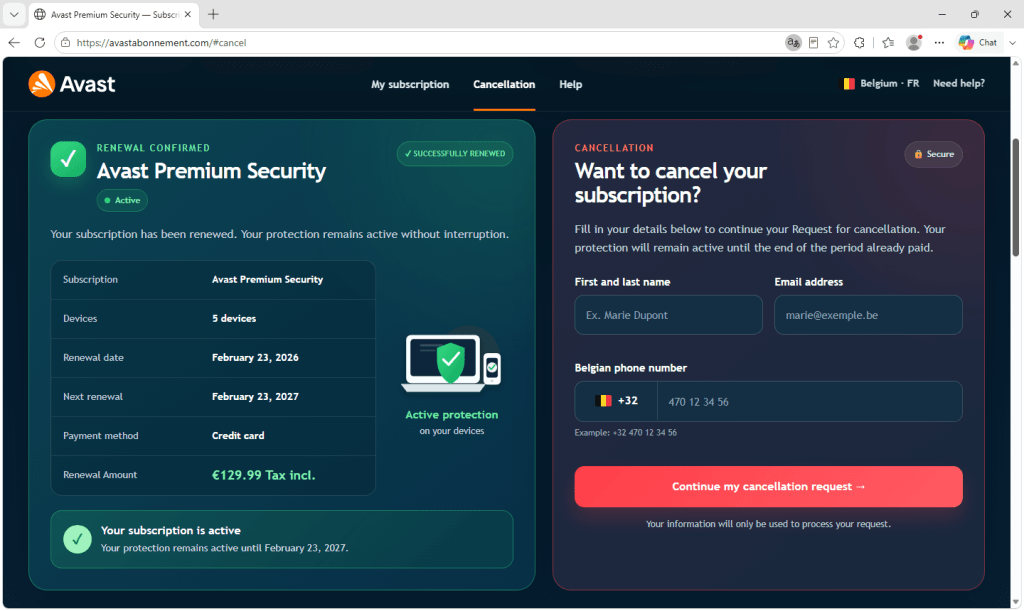
The page tells you that your Avast Premium Security subscription has renewed for €129.99, that it covers five devices, and that it will renew again the following February. There is a green tick, a status badge reading Active, and a tidy summary table laying out the amount, the payment method, and the dates.
None of it is real. There is no subscription and no charge, and the page has no connection to Avast, whose branding is being used without permission.
The page is written in French for a Belgian audience. The screenshots below have been machine-translated into English so the layout and wording are easier for you to follow.
Alongside the renewal summary is the part the scammers actually care about. A cancellation form asks for your full name, email address, and Belgian mobile number, but nothing else.
There is no password field or request for card details, which may be deliberate. A form asking only for a name, email address, and phone number can feel harmless and is far easier to fill in than a login page. A working mobile number attached to a real name is exactly what a scammer needs for the next stage: calling the victim and posing as support staff. The form is the lure, and the call is where the real danger begins.
The signs of AI involvement
The page was left with two notes in its code that were never meant for victims. Both were written in polite French and addressed to whoever had commissioned the work, explaining that the form did not yet send anything anywhere and that a real submission process would need to be connected later.
They read like a contractor handing over an unfinished job rather than a scammer leaving themselves a reminder, and that courteous, second-person summary of what still needs doing is very much how an AI assistant signs off.
Other clues are also consistent with AI-generated code. The code contained unused styling for a section that had been removed, suggesting that the page had been created in stages without a final review. The copy was grammatically correct but vague. It described the benefits of the subscription across four paragraphs without mentioning any specific Avast features, such as its firewall, VPN, or ransomware protection.
Taken together, these signs suggest that the page was built with the help of AI. Generated code carries no watermark, so that cannot be proven from the files alone.
The page was never finished
As the comments in the code explain, the form on this page sent nothing at all. Someone built a convincing fake, got the difficult parts right, and then stopped before connecting the piece that actually sends the data anywhere.
Other signs in the code suggest nobody had even opened the page in a browser to check it, since two pieces of text would have displayed as visible gibberish if they had. What we were looking at was most likely half-built, or possibly a template waiting to be sold on to someone who would add a destination for the stolen details.
Building a page like this used to take a certain amount of skill, which limited how many of them could be made. AI has lowered that barrier. Whoever made this could ask for a version in Dutch or German, or one aimed at an entirely different brand, and have it within minutes.
How to spot an antivirus renewal scam
The old advice was to look for mistakes: bad grammar, the wrong currency, a clumsy layout, or a stretched logo. That advice is less useful now because AI can produce fluent copy and polished layouts, while scammers can easily copy real logos. A page that looks professional is no longer evidence that it is genuine.
But the structure of the scam hasn’t changed. It still needs you to arrive somewhere unexpected, worry about losing money, and provide a way to contact you. Judge the situation rather than the appearance of the page.
- Check whether you were charged. If the message says a payment has already been taken, check your bank or card statement directly. If the payment is not there, there is nothing to cancel.
- Check the subscription through the official app or website. Don’t click the link in the message. Open the company’s app or website independently and sign in. Your account will show whether you have an active subscription and when your next payment is due.
- Be wary of a cancellation form that mainly wants your phone number. Legitimate cancellations usually happen inside your account, and a company you already pay knows how to reach you.
- Treat the follow-up call as the real danger. If you have filled in a form like this, you may receive a scam call next. You are under no obligation to answer or engage.
- Don’t install remote access software for someone who called you. It gives them control of your device and could put your accounts, passwords, and money at risk.
If you have already been on a call and installed something, disconnect the device from the internet, remove the software they asked you to install, and change your passwords from a different device. If you sent money or shared card details, contact your bank straight away.
Block and check suspected scams
The best protection is to stop scam pages before they open. Malwarebytes Browser Guard is a free extension for Chrome, Edge, Firefox, and Safari that blocks malicious websites, phishing attempts, and scam ads before they can do any harm.
Not sure whether something is a scam? Share a screenshot, message, phone number, or link with Scam Guard. It checks it in seconds and recommends what to do next. Scam Guard is built into Malwarebytes Premium Security for Windows, Mac, iOS, and Android.
If you received a call after filling in a form like this, enter the number into Malwarebytes Scam Number Check to see whether it has been linked to scam activity.
“One of the best cybersecurity suites on the planet.”
According to CNET. Read their review →
About the author

Sr. Malware Research Engineer/Web Protection Technical Lead, ThreatLabs
Passionate about antivirus solutions, Stefan has been involved in malware testing and AV product QA from an early age. As part of the Malwarebytes team, Stefan is dedicated to protecting customers and ensuring their security.
Text extracted automatically; images, tables and formatting may be missing. Original: https://www.malwarebytes.com/blog/threat-intel/2026/09/ai-helps-scammers-build-convincing-antivirus-renewal-pages