I built my daughter a custom alarm clock because everything on Amazon sucked
A parent built an ESP32 bedside clock so a child can manage alarms and Spotify without a listening speaker.
A parent describes building a bedside alarm clock for a school-age child after rejecting plastic buzzers and microphone-equipped smart displays. The device uses an Adafruit QT Py ESP32-S3, a 16x2 LCD, and a rotary dial, with sunrise lighting, a school-calendar-aware alarm, weather, and a local parent web dashboard. Spotify plays through a physically muted Amazon Echo set to an unused wake word, so the clock acts as a remote without collecting voice data. It is a personal maker project, not a security or AI product.
- Clock uses an Adafruit QT Py ESP32-S3 and a 16x2 LCD.
- Sunrise light and a ramping chime replace a jarring buzzer.
- School-calendar logic suppresses alarms on holidays and breaks.
- A muted Echo provides Spotify playback with no voice assistant.
Full article1,334 words · extracted from reclaimtheday.substack.com · click to collapse
If you have kids in school, you already know that weekday mornings can be a bear.
Before your coffee, you’re coordinating breakfast, packing backpacks, checking the weather, yelling upstairs to see if someone is out of bed, and doing math on whether they have four minutes or twelve minutes before it’s time to leave for school.
A few months ago, we decided we needed an upgrade from the Yoto player/alarm clock in my daughter’s room. She was getting older, she wanted more independence, and I was tired of forgetting to set, change, and unset the time on the Yoto app. She’s at that tricky in-between age: too old for her elementary school gadget, but too young for a smartphone (hello Middle School!)
So I did what every parent does: I searched Amazon. I wanted something that had two basic features:
An alarm clock she could set and manage herself.
Allowed her to play Spotify, but wasn’t a smart speaker.
After spending too much time and energy searching, I realized that modern alarm clocks falls into two categories:
The Plastic Buzzer: Clunky plastic bricks with zero smart features and an alarm sound engineered to trigger an instantaneous jolt.
The Big-Tech “Smart” Display: Amazon Echo Shows or Google Nests. They have high-res screens pushing news headlines, rotating ads, and live microphones sitting three feet from where your kid sleeps.
I didn’t want an obnoxious buzzer, and I definitely didn’t want a my daughter getting used to an AI assistant to set an alarm. In my opinion, it sets a bed habit of asking an assistant for basic things she should be able to do herself.
Being a tinkerer with a habit of over-engineering household problems, I decided to build one from scratch. My wife was reasonably skeptical when I announced I was spending weekends building a clock from scratch instead of just buying one...
Before prompting AI to write a single line of code or heating up a soldering iron, I asked: What would a truly great kid’s clock actually do?
Wake her up gently. Start with a soft sunrise light in her room, followed by a nice chime that ramp up slowly.
Zero screen distractions at night: No bright blue LED blaring across the room while she’s trying to sleep. Music is able to automatically shutoff.
School-calendar aware: It must know the school district calendar. If it’s a holiday or a winter break, the alarm must not go off. (There is no greater parent fail than accidentally waking up the family at 7AM on Labor day).
Morning routine at a glance: Put the weather, the day’s agenda, and the live school bus countdown right on the screen.
Spotify without the surveillance: Let her listen to music while doing homework or winding down, without a microphone listening in.
I wanted this to work intuitively and look somewhat decent for my daughter room. Here is what I ended up building.
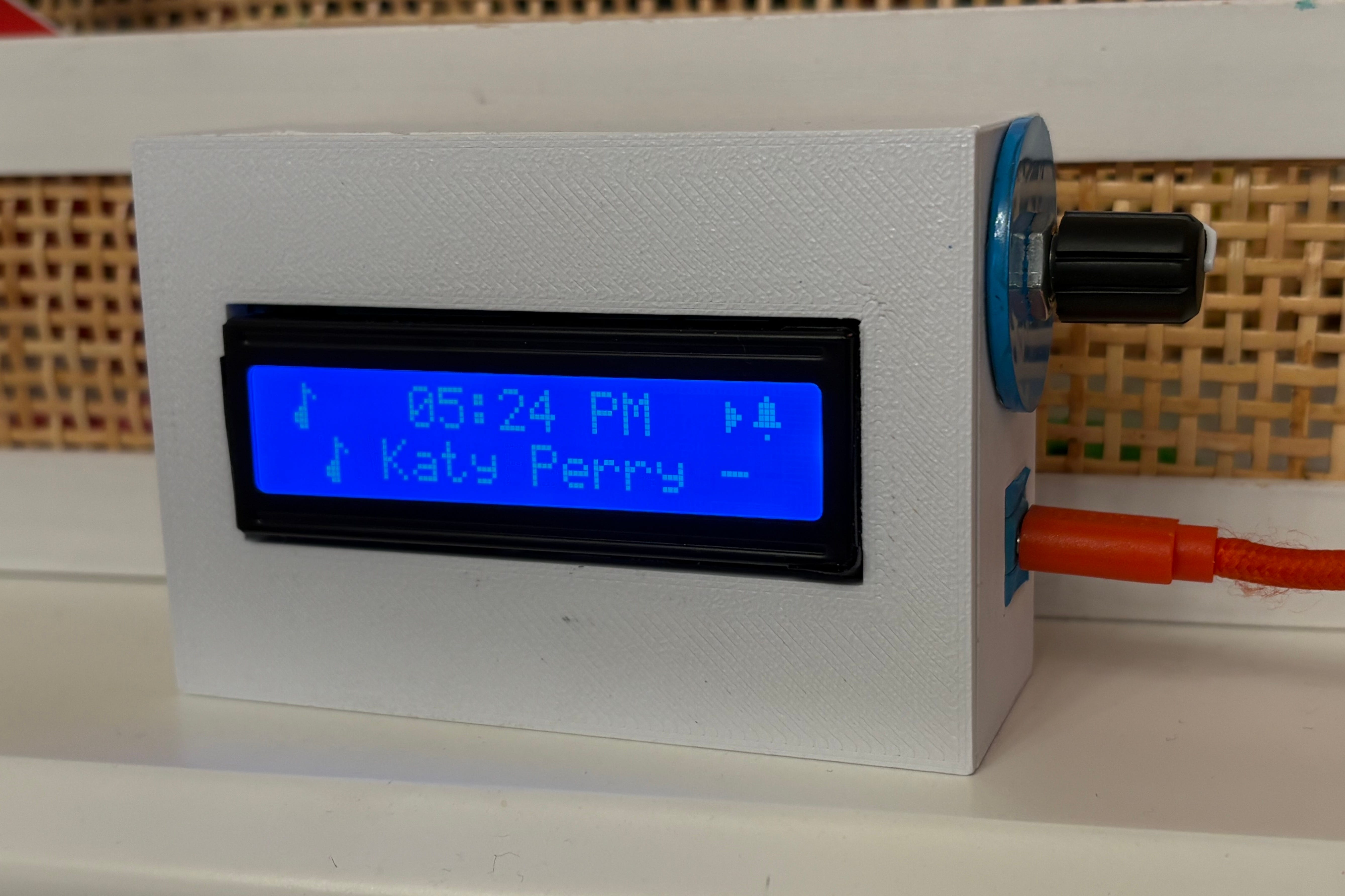
The Brain: An Adafruit QT Py ESP32-S3 microcontroller. It’s tiny, costs around $12, and has built-in Wi-Fi.
The Display: A classic 16x2 character LCD display. It gives off a calm, 90s-retro aesthetic. No videos, no apps, no notifications.
The Controls: A single physical rotary knob on the right side. You turn it to cycle screens, and click it to confirm. In an era where everything has a touchscreen, having a tactile, physical dial feels pretty cool.
Auto-Dimming: Using a weather API, the clock automatically fetches daily sunrise and sunset times. During the day, it’s bright and readable. At night, it automatically turns off the display so the room stays dark unless interacting with the device.
The clock doesn’t play Spotify for the alarm—it uses its own onboard speaker for wake-up sounds. But my daughter loves listening to her Spotify playlist while doing homework or before bed.
We had an old Amazon Echo speaker, but I didn’t want an active voice assistant in her room. So I pulled a small parent hack: I physically muted the Echo’s microphone and set the wake word to Ziggy.
She can’t talk to Alexa, and Alexa can’t talk to her. Instead, the bedside clock acts as her physical Spotify Connectremote:
🎵 04:30 PM  ▶
Cruel Summer - Taylor Swift
As music plays, the track and artist name scroll across her LCD screen. Two quick clicks of the dial skips to the next track; turning the knob adjusts the volume. She can connect to her custom playlists, and Amazon gets zero voice data
The clock sits on her nightstand running local firmware, but on our home Wi-Fi, it hosts its own lightweight web server accessible from any phone or laptop in the house.
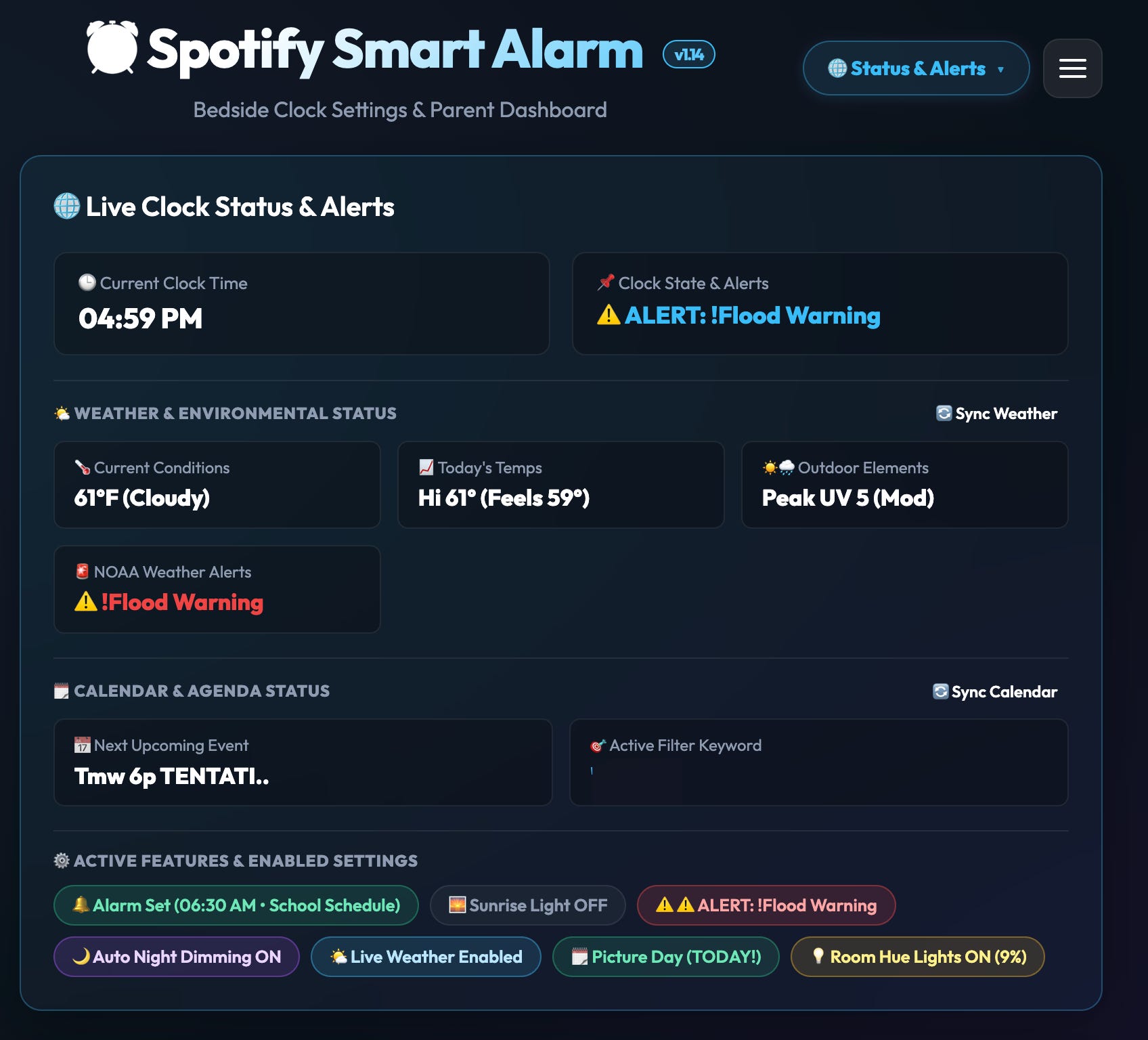
Here are the features that completely transformed our mornings:
Instead of yelling up the stairs or setting off a jolting buzzer, her room slowly warms with soft light 10 minutes early. A gentle chime ramps up on the clock’s speaker. When she clicks the knob to dismiss it, the screen flashes YOU ARE AMAZING!❤️. She wakes up calm and ready for the day.
Mornings used to be an exhausting parent interrogation: “You need a jacket! What time is practice today? You are going to miss the bus?!”
Now, she turns the dial herself. She sees the temperature. She sees if she has soccer after school. She sees the bus is 6 minutes away. We aren’t air traffic control anymore—she owns her morning.
When she’s doing reading or a homework block, she can click the dial into timer mode. A progress bar physically moves from right to left as time ticks away. For kids who struggle with “you have 15 minutes left,” being able to see time disappear is a bonus homework hack. And at bedtime, one click dims the room lights to a 15% lavender glow and setting night mode will automatically turn off music after she falls asleep.
Notice that green badge in the dashboard screenshot above:
Alarm Set (06:30 AM • School Schedule)Instead of a generic Monday–Friday alarm you constantly forget to disable before long weekends, the clock automatically checks our school district calendar. If school is closed for Thanksgiving, a teacher in-service day, or a snow day, the alarm stays silent. We get to sleep in without touching a single button.
Yes. In fact, it worked better than I imagined.
Mornings went from a series of wake-up warnings and stairwell check-ins to a more autonomous rhythm. She gets up on her own, checks her own forecast and bus schedule, and takes genuine pride in managing her morning.
It took some weekend vibe coding, a handful of APIs, a 3D-printed box, and some hot glue—but getting our family’s morning back was worth every single minute. She is also think it’s cool to have a one-of-a-kind device.
I originally built this clock just for our house, but after a few friends saw it, the question keeps coming up: Can I build one for my kid?
My daughter has already informed me that I need to start selling these to her friends parents. If there’s enough interest, I’m happy to put together a full DIY guide—or, if my daughter gets her way, see if there’s enough demand to put together a real Kickstarter:
Let me know in the comments or vote in the poll below:
For parents and tinkerers who want to see how the clock was wired, we put together a dedicated spec page on our site with the complete parts list (BOM), rotary menu breakdown, and quick-start guide:
Explore the Spotify Clock Details
Reclaim The Day is all about practical tech, smart-home automation, and real-world stories that eliminate mental fatigue for busy working parents. If you enjoyed this build, hit subscribe to get our future projects and guides delivered straight to your inbox.
No posts