Attack Reduction in Huntress Managed ESPM: Disrupting ClickFix
Opens in a new window Opens an external website Opens an external website in a new window This website uses cookies to improve your viewing experience. To find out more about the cookies we use, see our Cookie Policy Manage Preferences Storage Preferences Summarize This Page ChatGPTClaudePerplexityGoogle AI Summarize This Page ChatGPTClaudePerplexityGoogle AI Deception is moving at machine speed.…
PHP has various global state that temporarily points into request memory
PHP has various global state that temporarily points into request memory. In some scenarios, global state may not be correctly reset, or may be repopulated after being reset. The global state may then refer to request memory even after it has been freed. Subsequent requests may read or branch on this stale state before it is fully initialized. Multiple strategies can trigger this condition and produce remote code execution (RCE).
Mandy was stuck at an airport with a few hours to kill. She decided to get her nails done, so she found a spa listed on the airport's website and clicked through. It looked like the spa's real website, on a normal domain with HTTPS, and Chrome showed no warnings.
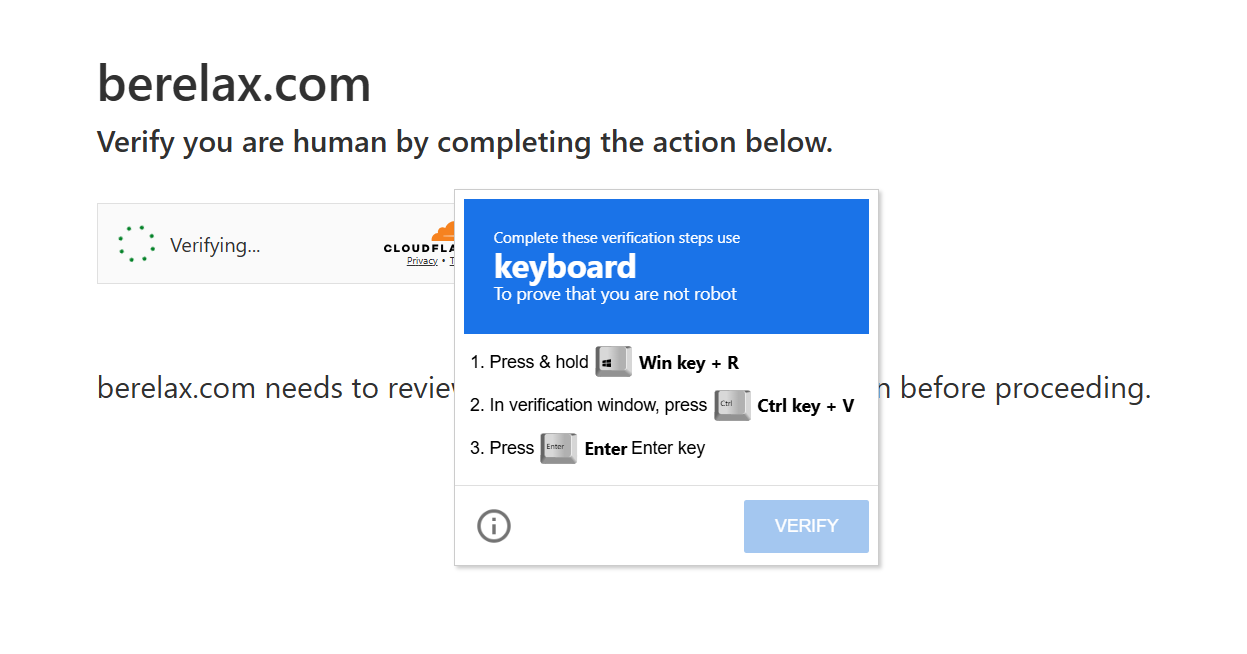
Then a CAPTCHA popped up. Nothing too unusual there. It asked for a few "verification steps" to ensure she was a human user:
Press and hold Windows key + R
In the verification window, press Ctrl + V
Press Enter
An example ClickFix attack where a user is told to press "Windows Key + R" and paste a command into the Run dialog that opens.
But this simple sequence of hotkeys actually opens the Windows Run dialog, and in this case, would have pasted a malicious PowerShell command that the webpage quietly copied to the clipboard. (The Windows Run dialog is a small box that lets you type a command or program name and run it right away.)
If Mandy pressed Enter, the command would have downloaded and run a file from the internet. That file sets up persistence through a registry key, installs a remote access trojan, and steals the browser's saved passwords, cookies, and credit card details.
This is not a hypothetical example. This actually happened to a Huntress employee (name changed for privacy). Thankfully, she realized what was going on and didn't get pwned. A LOT of people aren't so lucky. So, this post is about one simple idea: what if "Windows key + R" didn't open anything at all?
What is ClickFix, and why is it everywhere?
ClickFix is a simple social engineering attack that tricks users into running malicious commands they don't understand. It often employs messaging related to fixing a problem, hence the name "ClickFix."
It also works very well. Our 2026 Cyber Threat Report linked ClickFix and fake CAPTCHA scams to over half of all malware loader activity. In our own SOC, ClickFix-style Run dialog attacks now account for 31% of EDR SOC signals.
The lures keep changing: fake Windows Update screens, fake Docker ads, compromised small-business websites, and now malicious AI chatbots. But the classic version almost always ends the same way, with Windows key + R.
Most of your users should never open the Run dialog
Here's what makes this so frustrating. The Run dialog is a power-user shortcut. IT folks love it. Most employees have never opened it on purpose and wouldn't know what to type into it if they did.
We've seen this play out in the data. Across organizations in ESPM Early Access, it's common to see 90% or more of users who never use the Run dialog at all. Which is why they don't recognize the commands they are pasting in as being a problem.
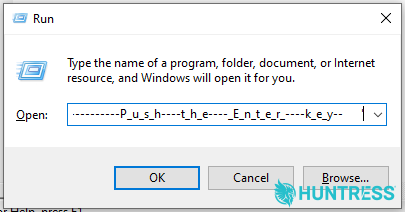
Run dialog box on Windows in which a user has pasted a malicious command, unwittingly copied from a ClickFix attack.
That's a big gap. A feature almost nobody needs is the starting point for nearly a third of what our EDR SOC investigates. Detection still matters, and Huntress Managed EDR's Attack Disruption engine can kill many ClickFix chains in under a second. But when the attack depends on a feature your users don't need, the simplest fix is to turn that feature off. If only there was an easy way to do that…Oh, wait, now there is!
Introducing Attack Reduction
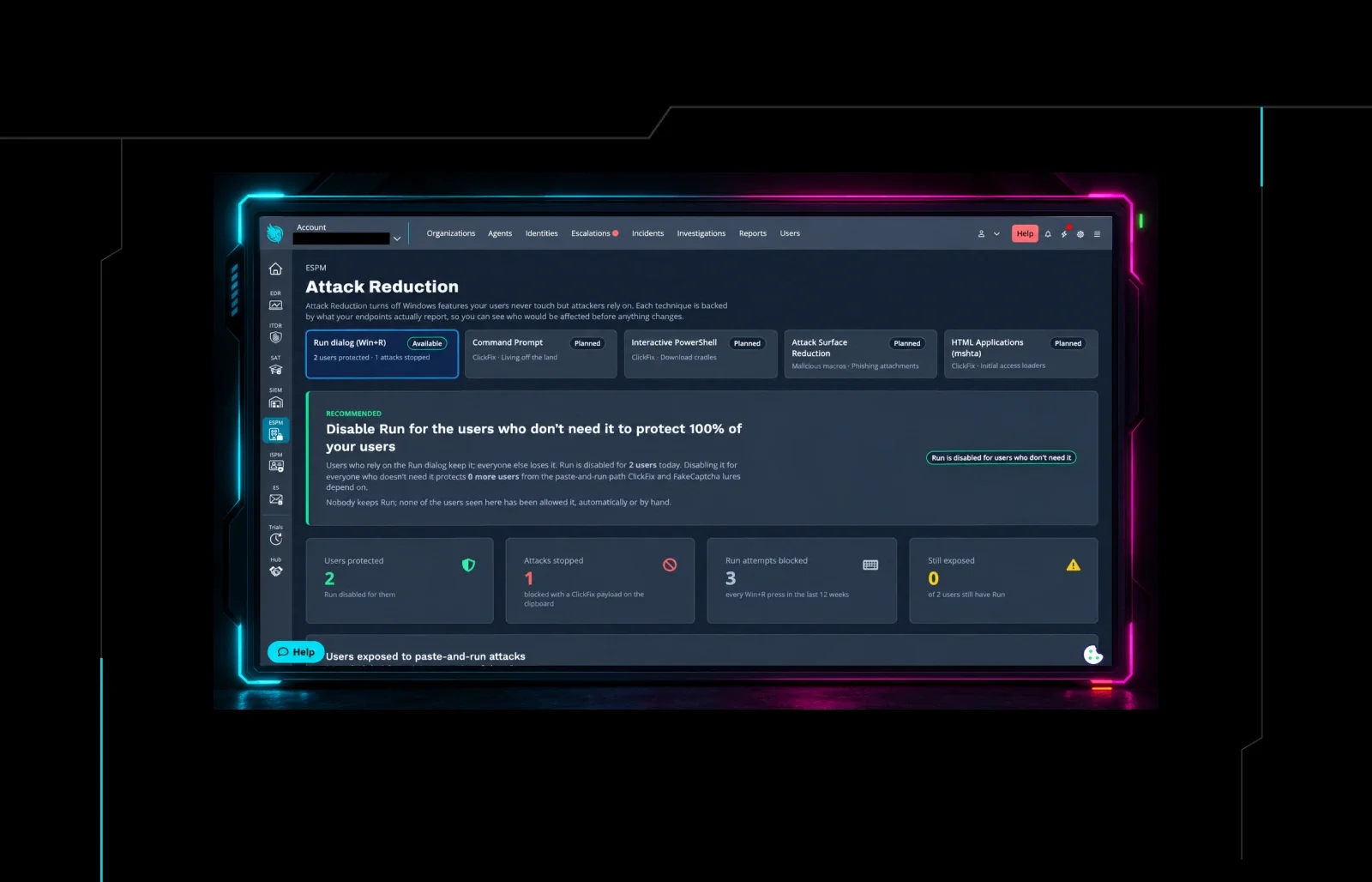
Attack Reduction is a new capability in Huntress Managed ESPM that turns off Windows features your users never touch, but attackers rely on, starting with "Windows key + R". That fits what ESPM is built to do: harden your endpoints before an attack ever starts.
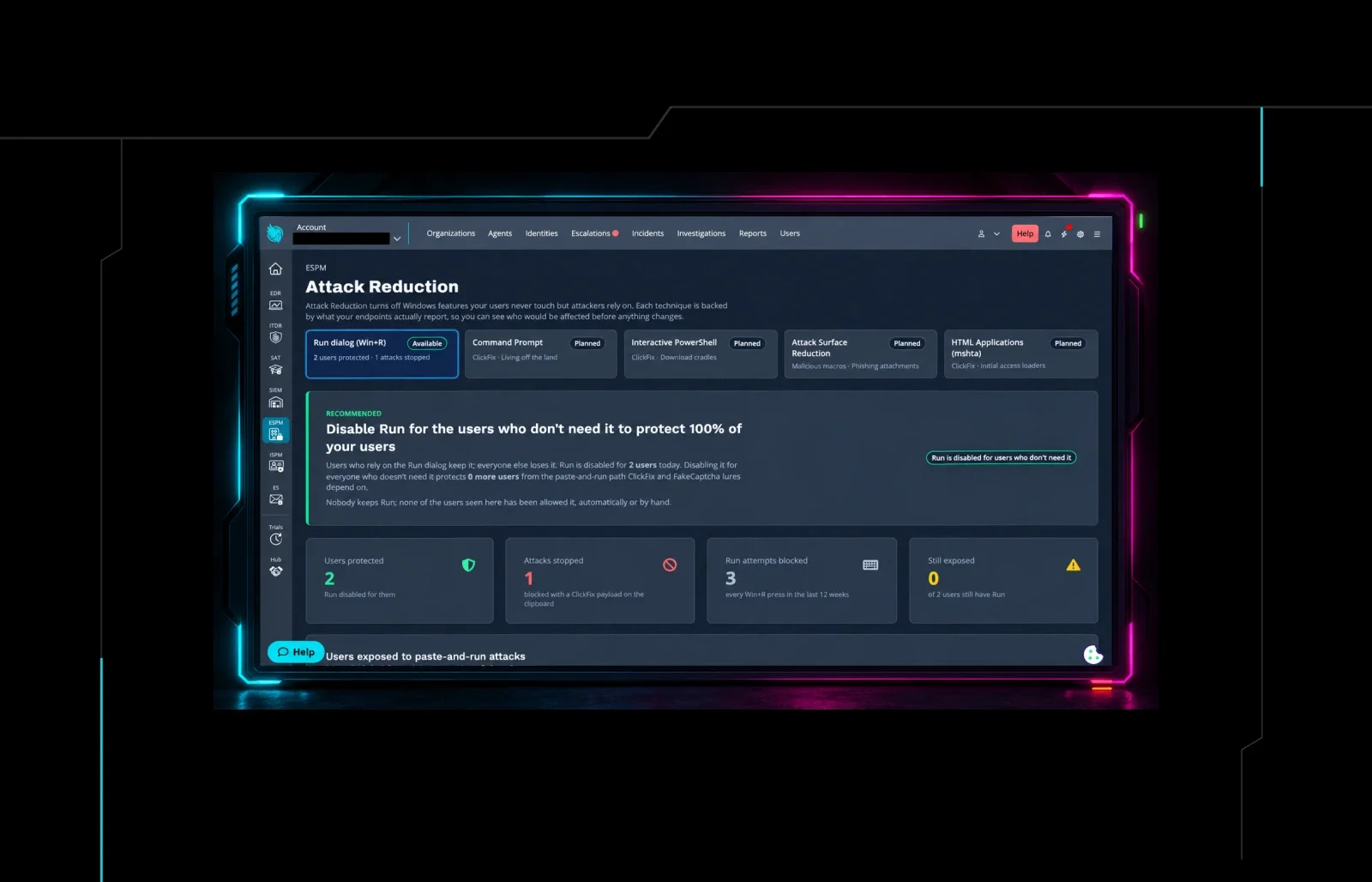
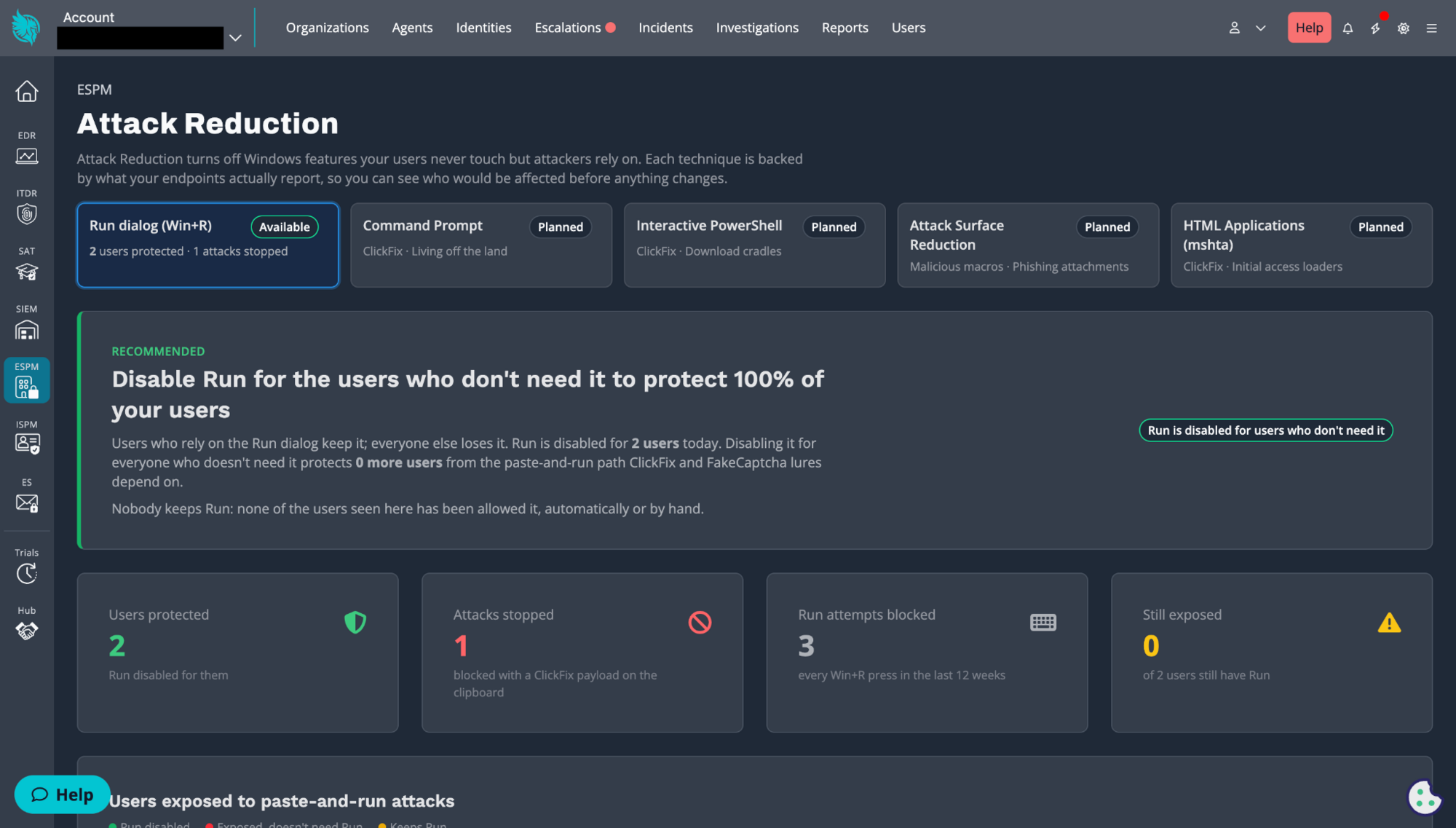
ESPM Attack Reduction dashboard
We're starting with the Run dialog, because that's where ClickFix starts. More controls are coming:
**Available now:**Blocking the Run dialog for users who don't need it to disrupt "Windows key + R" attacks.
**Planned:**Command Prompt restrictions for users who don't use cmd.exe.
Planned: Interactive PowerShell restrictions for users who don't use it.
Planned: Windows Attack Surface Reduction (ASR) rules that stop Office, script, and email apps from launching or injecting payloads.
Planned: Blocking HTML applications (mshta) for users who don't use them.
How Attack Reduction works
The hard part of turning off a Windows feature isn't flipping the switch. It's knowing who will be affected and not breaking legitimate workflows. Attack Reduction is designed with the following in mind.
1. See who actually uses the Run dialog
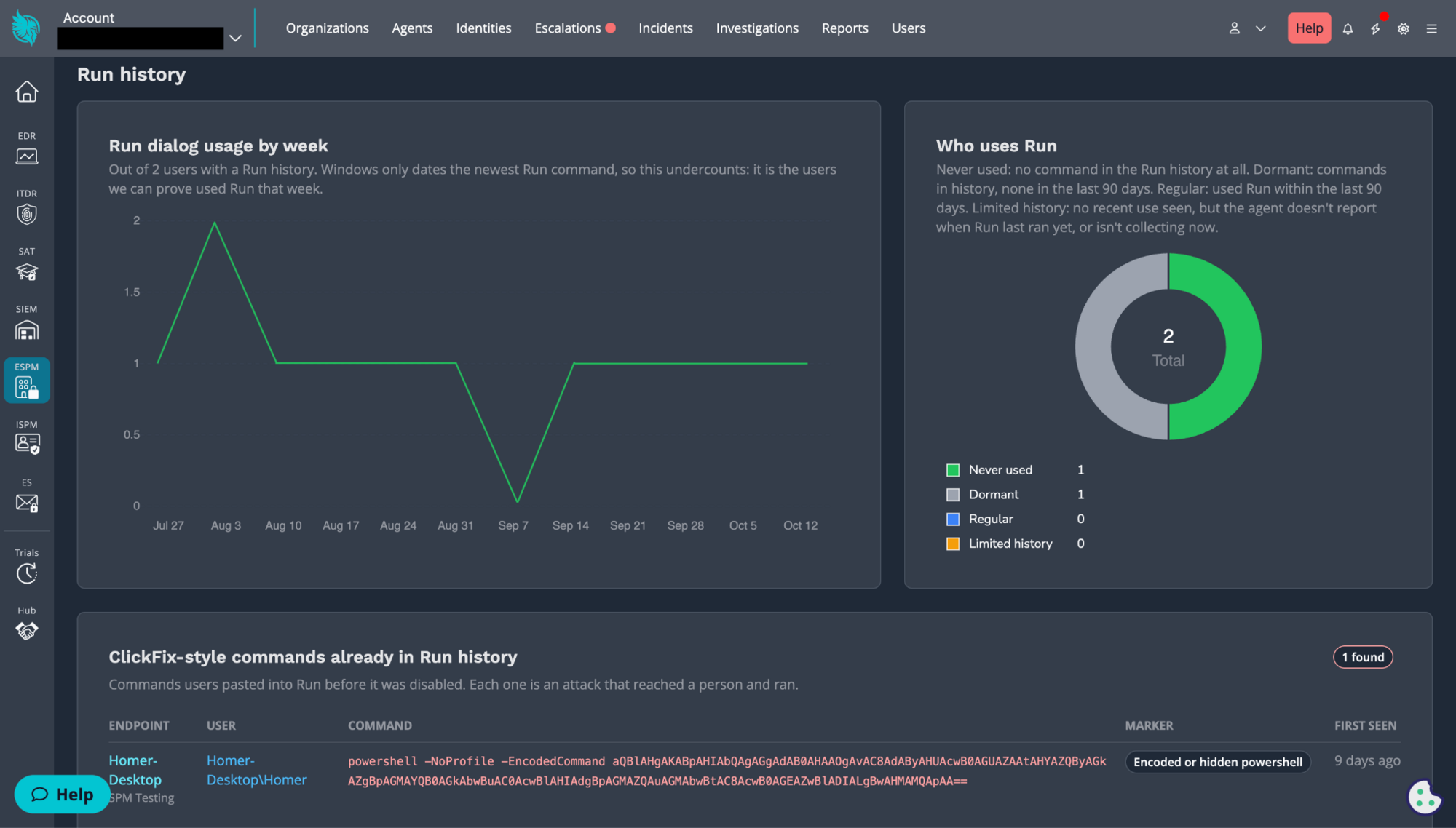
Once ESPM is on, Attack Reduction collects each user's Run dialog history and builds a baseline. On the Attack Reduction dashboard, you can see which users rely on the Run dialog and which never touch it, across your whole account or one organization at a time. You'll know exactly who would be affected before anything changes.
The dashboard also flags commands in a user's Run history that look like ClickFix. Windows doesn't record when those commands ran, so treat them as a reason to investigate rather than proof of an active attack.
The ESPM Attack Reduction dashboard and how many users are utilizing the Run dialog per week.
2. Turn on blocking
When you're ready, turn on blocking at the account or organization level. Attack Reduction then turns off the "Windows key + R" shortcut for users who don't need it. Users who rely on the Run dialog can keep it, and you can switch any user between allowed and blocked at any time.
3. Users get a clear message, not a mystery
If a blocked user presses Windows key + R, nothing runs. Instead, they see a pop-up explaining that the action was blocked for security reasons and asking them to contact their IT support team or take Security Awareness Training. Either way, the attack stops, and a confused user gets a quick security lesson.
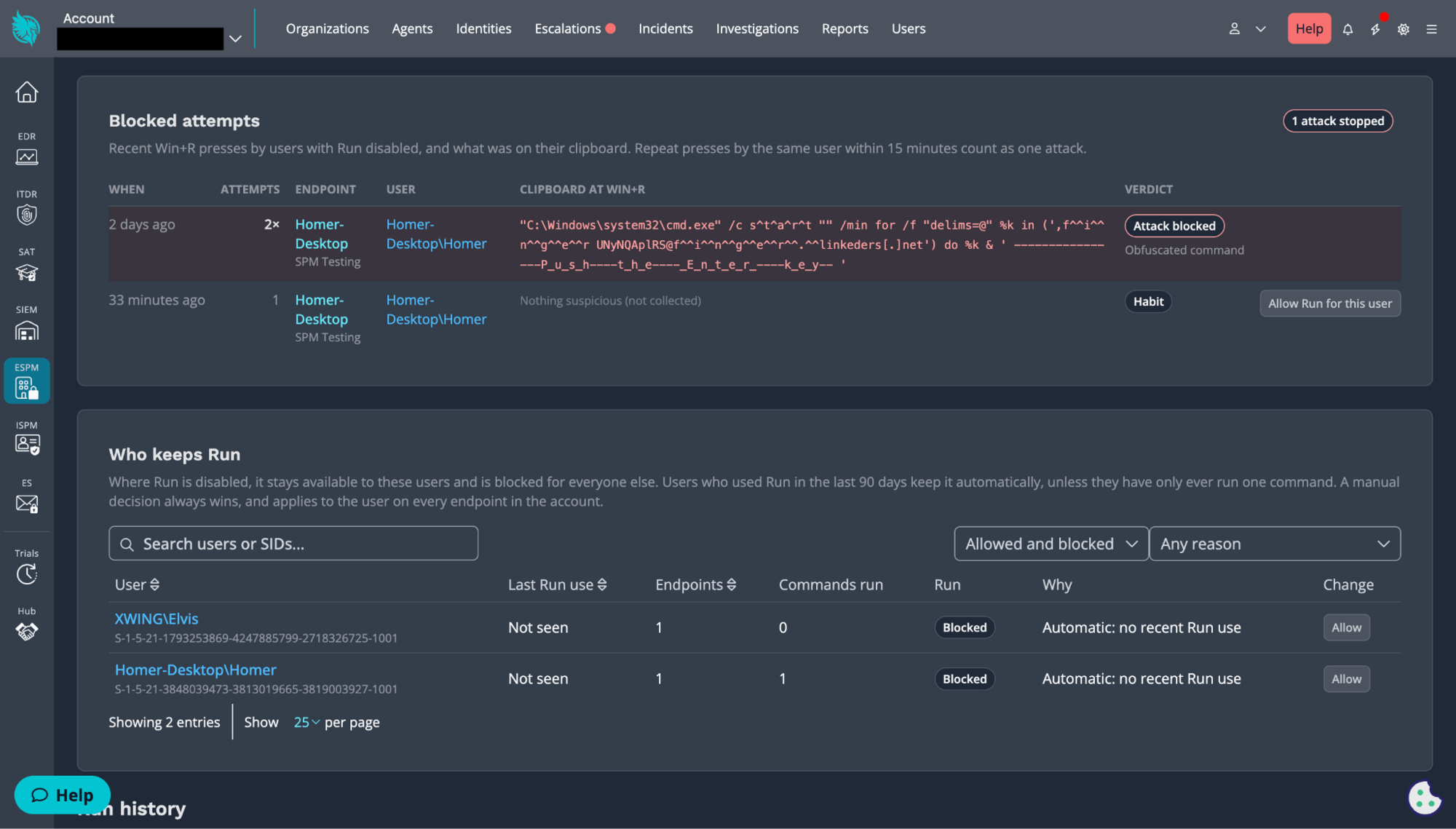
4. You get a record of what they almost ran
When a blocked user presses Windows key + R, Attack Reduction also captures what was on their clipboard. If someone was about to paste a malicious command, you'll have it on record, which helps you spot users who are being targeted and follow up.
The ESPM Attack Reduction dashboard and a list of blocked attempts by users to utilize the Run dialog.
What Attack Reduction doesn't do
We want to be clear about the limits here, because ClickFix is a moving target.
Blocking the Run dialog disrupts the most common version of ClickFix. It doesn't stop every one. Attackers can, and already do, tell users to paste commands into File Explorer's address bar, Windows Terminal, Command Prompt, or PowerShell instead.
That's why the Run dialog is the first step, not the last one. Every path we close makes the attack harder to pull off, and the planned Command Prompt and PowerShell controls are aimed at exactly those next moves. Attack Reduction also works best alongside the rest of your defenses: Managed EDR to catch what gets through, and Managed SAT so users know a real CAPTCHA will never ask them to paste a command.
Get started with Attack Reduction
Attack Reduction is available now as part of Huntress Managed ESPM Early Access for existing Huntress partners and customers.
Not in ESPM Early Access yet? Click the ESPM icon in the left-hand menu of your Huntress portal to enroll. Then let Attack Reduction collect a baseline so you can see which users actually need the Run dialog before flipping on Blocking.
As Early Access partners put this capability to work, their feedback will decide which Windows features we tackle next and how we build those controls.
Have ideas or requests? Share them at feedback.huntress.com/espm. And stay tuned. There's a lot more coming to Managed ESPM.
Our platform combines a suite of powerful managed detection and response tools for endpoints and Microsoft 365 identities, science-backed security awareness training, and the expertise of our 24/7 Security Operations Center (SOC).
Breaking Down Ransomware Attacks and How to Stay Ahead
No endpoint is immune. Ransomware is hitting businesses of every size, and double extortion has become the default. Here's how to break down what these attacks actually look like to stay ahead. Read the Blog
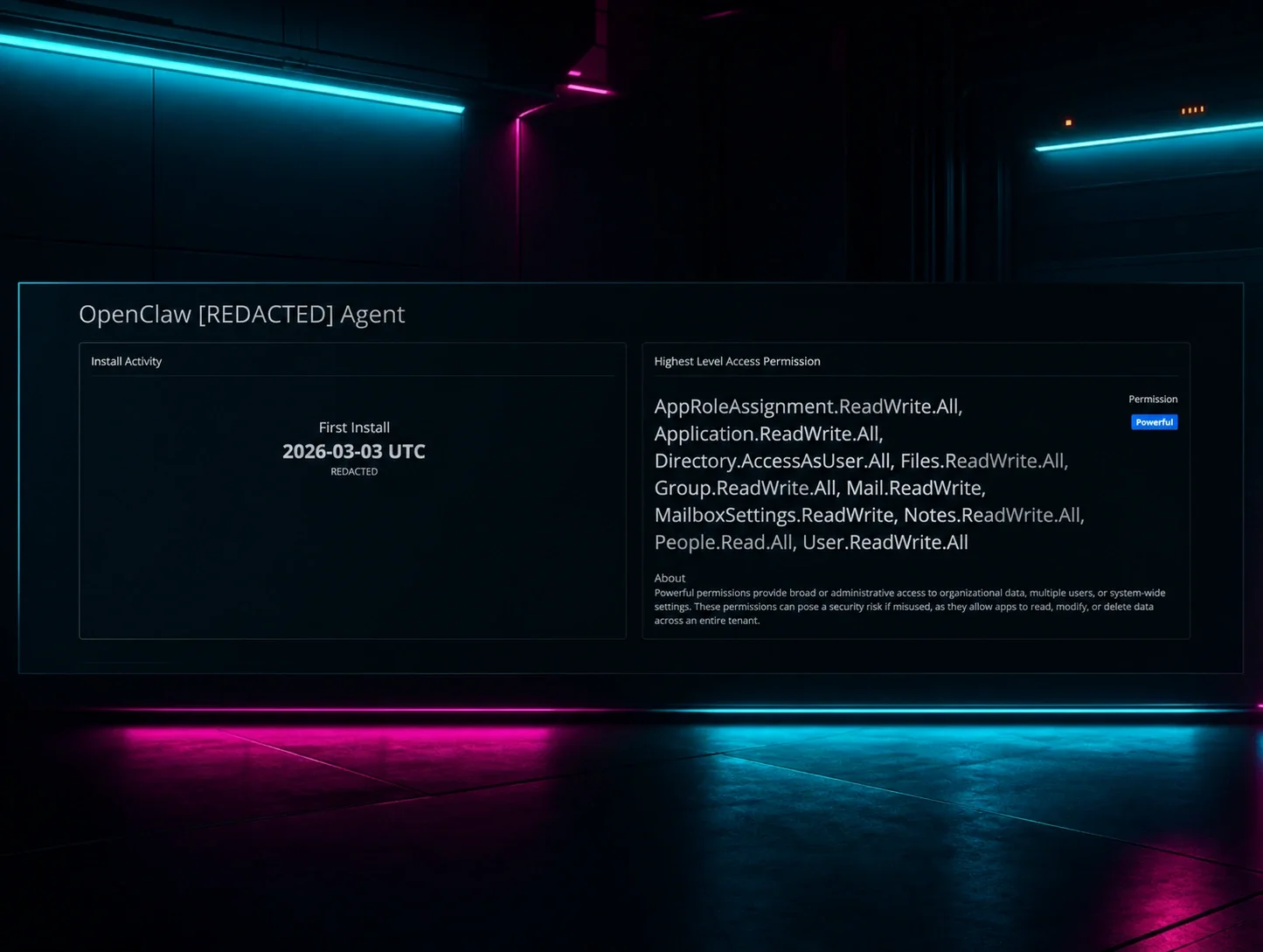
OpenClaw AI agents pose a security risk in Microsoft tenants because they're often granted broad, high-impact cloud permissions that an attacker could immediately inherit if the agent is compromised. Learn why proactive application hygiene, which includes continuous monitoring and trimming unnecessary permissions, is essential for managing this identity-based threat. Read the Blog
EDR Evasion: How Threat Actors Bypass Endpoint Security
Learn how threat actors evade endpoint visibility, hide execution, and abuse legitimate tools, and how Huntress Managed EDR helps you investigate and respond. Learn More
Active Exploitation of Gladinet CentreStack/Triofox Insecure Cryptography Vulnerability
Gladinet CentreStack is being actively exploited, with the cl0p ransomware group now reportedly targeting internet-facing servers. Huntress has been tracking this from the start and has the latest updates. Read the Blog
Learn about the Advanced Encryption Standard (AES), a top-tier encryption protocol trusted for safeguarding sensitive data. Explore its history, functionality, features, and practical applications. Learn More
CMMC isn't just another compliance checkbox — it's a market shift that will sort MSPs into winners and losers. If the EMR mandate taught you anything, it's that early movers win. Read the Blog
Operational Resilience: Turning Your Incident Response Plan Into Muscle Memory
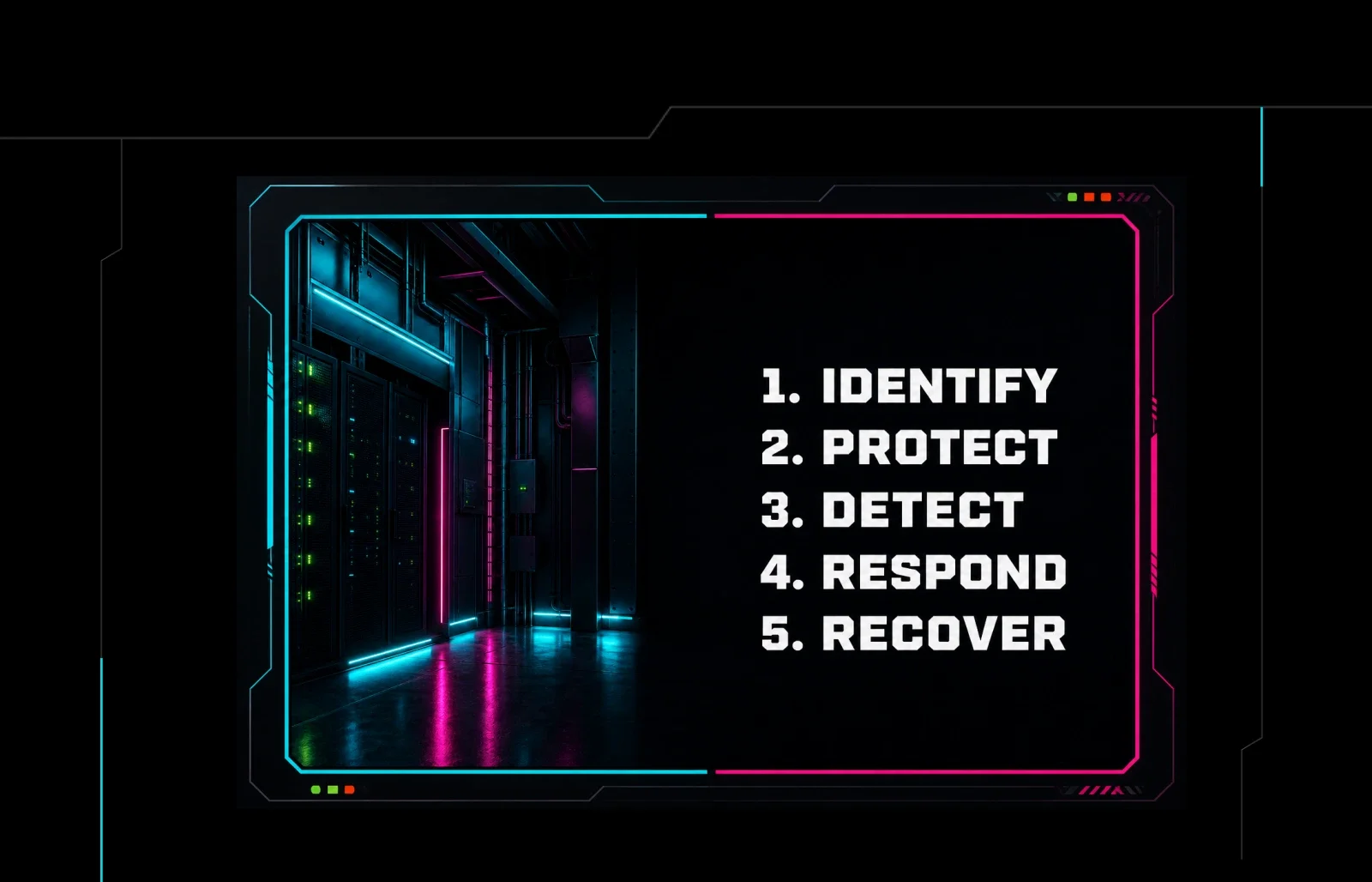
An incident response plan only works if it's tested. Learn the 5 pillars of operational resilience and how to turn your plan into muscle memory before an attack hits. Read the Blog
Learn what Software as a Service (SaaS) is, how it works, and key cybersecurity considerations for secure SaaS implementation in your organization. Learn More
Breaking Down Ransomware Attacks and How to Stay Ahead
No endpoint is immune. Ransomware is hitting businesses of every size, and double extortion has become the default. Here's how to break down what these attacks actually look like to stay ahead. Read the Blog
OpenClaw AI agents pose a security risk in Microsoft tenants because they're often granted broad, high-impact cloud permissions that an attacker could immediately inherit if the agent is compromised. Learn why proactive application hygiene, which includes continuous monitoring and trimming unnecessary permissions, is essential for managing this identity-based threat. Read the Blog
EDR Evasion: How Threat Actors Bypass Endpoint Security
Learn how threat actors evade endpoint visibility, hide execution, and abuse legitimate tools, and how Huntress Managed EDR helps you investigate and respond. Learn More
Active Exploitation of Gladinet CentreStack/Triofox Insecure Cryptography Vulnerability
Gladinet CentreStack is being actively exploited, with the cl0p ransomware group now reportedly targeting internet-facing servers. Huntress has been tracking this from the start and has the latest updates. Read the Blog
Learn about the Advanced Encryption Standard (AES), a top-tier encryption protocol trusted for safeguarding sensitive data. Explore its history, functionality, features, and practical applications. Learn More
CMMC isn't just another compliance checkbox — it's a market shift that will sort MSPs into winners and losers. If the EMR mandate taught you anything, it's that early movers win. Read the Blog
Operational Resilience: Turning Your Incident Response Plan Into Muscle Memory
An incident response plan only works if it's tested. Learn the 5 pillars of operational resilience and how to turn your plan into muscle memory before an attack hits. Read the Blog
Learn what Software as a Service (SaaS) is, how it works, and key cybersecurity considerations for secure SaaS implementation in your organization. Learn More
Breaking Down Ransomware Attacks and How to Stay Ahead
No endpoint is immune. Ransomware is hitting businesses of every size, and double extortion has become the default. Here's how to break down what these attacks actually look like to stay ahead. Read the Blog
OpenClaw AI agents pose a security risk in Microsoft tenants because they're often granted broad, high-impact cloud permissions that an attacker could immediately inherit if the agent is compromised. Learn why proactive application hygiene, which includes continuous monitoring and trimming unnecessary permissions, is essential for managing this identity-based threat. Read the Blog
 Summarize This Page
 ChatGPT
 Claude
 Perplexity
 Google AI


 Huntress Platform One managed platform across endpoint integrity, identity resilience, and operational readiness.
 Athena Engine The agentic AI that investigates every alert alongside our SOC analysts.
 Managed EDR Get full endpoint visibility, detection, and response.
 Managed ITDR Protect your Microsoft 365 and Google Workspace identities and email environments.
 Managed SIEM Managed threat response and robust compliance support at a predictable price.
 Managed SAT Empower your teams with science-backed security awareness training.
 Managed ISPM Continuous Microsoft 365 and identity hardening, managed and enforced by Huntress experts.
 Managed ESPM Proactively secure endpoints against attacks.
 API and Integrations
 Support Documentation
 Phishing
 Business Email Compromise
 Ransomware
 Infostealers
 Living off the Land
 Initial Access & RaaS
 The Product Lab Shape the next big thing in cybersecurity together.
 Fireside Chat Real people. Real perspectives. Better conversations.
 Tradecraft Tuesday No products, no pitches – just tradecraft.
 _declassified Exposing hidden truths in the world of cybersecurity.
 The Huntress SOC 24/7 Security Operations Center
 Reviews Why businesses of all sizes trust Huntress to defend their assets
 Case Studies Learn directly from our partners how Huntress has helped them
 Community Get in touch with the Huntress Community team
 MSPs Join our partner community to deliver expert-led managed security.
 Resellers Partner program designed to grow your cybersecurity business.
 Tech Alliances Driving innovation through global technology Partnerships
 Microsoft Partnership A Level-Up for Your Business Security

 Our Story We're on a mission to shatter the barriers to enterprise-level security.
 Newsroom Explore press releases, news articles, media interviews and more.
 Meet the Team Founded by former NSA Cyber Operators. Backed by security researchers.
 Careers Ready to shake up the cybersecurity world? Join the hunt.
 Micah Neidhart
 An example ClickFix attack where a user is told to press "Windows Key + R" and paste a command into the Run dialog that opens.
 Run dialog box on Windows in which a user has pasted a malicious command, unwittingly copied from a ClickFix attack.
 ESPM Attack Reduction dashboard
 The ESPM Attack Reduction dashboard and how many users are utilizing the Run dialog per week.
 The ESPM Attack Reduction dashboard and a list of blocked attempts by users to utilize the Run dialog.


 #### Huntress Service: External Recon Read about the value of Huntress' External Recon service, which highlights open ports and services that are exposed to the Internet. Learn More
 #### New Investment Fuels Our Mission To Enable SMBs to Better Protect Their Business Assets Huntress has raised $60M in Series C funding, led by Sapphire Ventures with participation from existing investors Forgepoint Capital and JMI Equity. Learn More
 #### Combating Emerging Microsoft 365 Tradecraft: Initial Access Threats evolve, and so does Huntress. Let’s talk about evolving our approach to hitting the hackers where it hurts on Microsoft 365. Learn More
 #### A Day in the Life of a Security Researcher Take a behind-the-scenes look at what our security researchers do in this Q&A session. Learn More
 #### Advanced Persistent Threat Targeting Vietnamese Human Rights Defenders Huntress identified an intrusion against a non-profit supporting Vietnamese human rights that’s likely spanned years. Jump in as we provide a thorough analysis of this malicious threat actor. Learn More
 #### Cleartext Shenanigans: Gifting User Passwords to Adversaries With NPPSPY We unravel an investigation that details one way threat actors are able to gather cleartext passwords via NPPSPY. Learn More
 #### Let’s Be Offensive This Cybersecurity Awareness Month Over 20 years of Cybersecurity Awareness Month, and we’ve had enough. This October, Huntress is taking a new attitude with an offensive-minded approach to defense. Learn More
 #### Truman’s Take: A Product Researcher’s Insights on Managed Learning In this new blog series, we’ll explore the managed episodes from Huntress Managed SAT, dive into the topics, and gain insight into why these episodes are relevant right now. Learn More
 Blog Post
 Blog Post
 Blog Post
 Cybersecurity 101
 Blog Post
 Cybersecurity 101
 Blog Post
 Blog Post
 Cybersecurity 101



 Platform




 Awards
 Contact Us
 Akamai Blog