October 2026 Patch Tuesday: 1,413 Flaws, 3 Zero-Days
criticalVulnerability exploited in the wildimportance 88
AI summary · grok-4.7-build
Microsoft's October 2026 Patch Tuesday fixes 1,413 flaws, including an exploited Windows Shell zero-day.
Microsoft's October 13, 2026 Patch Tuesday fixes 1,413 vulnerabilities across Windows, Office, Exchange Server, SharePoint, .NET, Azure services, and developer tools. The total surpasses September's 974 flaws and is described as a second consecutive monthly record, which Microsoft has linked to AI-assisted vulnerability discovery. The release includes three zero-days and more than 70 critical-rated vulnerabilities. One zero-day is an exploited Windows Shell flaw, while the other two are publicly disclosed flaws in .NET Framework and a product cut off in the excerpt.
October 13, 2026 release patches 1,413 vulnerabilities.
Total exceeds September's 974 flaws and sets another monthly record.
Three zero-days include one exploited Windows Shell flaw.
Two other zero-days are publicly disclosed, including .NET Framework.
October 2026 Patch Tuesday: 1,413 Flaws, 3 Zero-Days
Oct 14, 2026
10 Mins Read
Summarize with:
October 2026 Patch Tuesday: 1,413 Flaws, 3 Zero-Days
Microsoft’s October 2026 Patch Tuesday, released on October 13, 2026, fixes 1,413 vulnerabilities across Windows, Office, Exchange Server, SharePoint, .NET, Azure services, and developer tools. The total surpasses September’s Patch Tuesday (974 flaws) and sets a new monthly record for the second month in a row, a rise Microsoft has tied to AI-assisted vulnerability discovery.
The release includes three zero-days and over 70 critical-rated vulnerabilities. One zero-day is an exploited Windows Shell flaw, and the other two are publicly disclosed flaws in .NET Framework and the MessagePack-CSharp library.
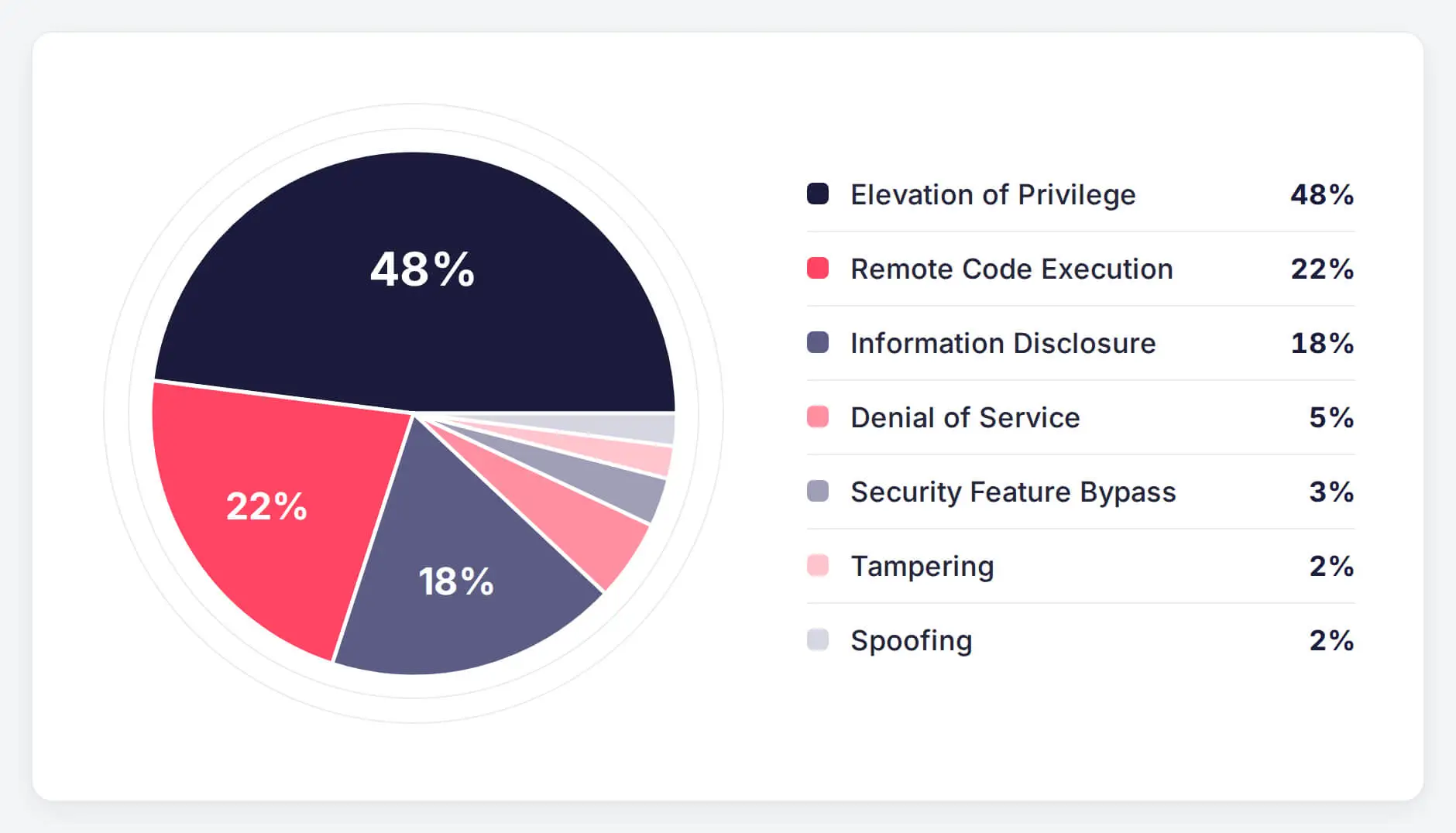
Elevation of Privilege (EoP) vulnerabilities make up 48% of the release, nearly 680 entries. Remote Code Execution follows at 22%, just over 310 entries, and Information Disclosure accounts for another 18%. Denial of Service, Security Feature Bypass, Tampering, and Spoofing share the remaining 12%.
October 2026 Patch Tuesday vulnerabilities by impact type
Key Takeaways
Microsoft’s October 2026 Patch Tuesday fixes 1,413 vulnerabilities, a new monthly record, with over 70 rated Critical.
CVE-2026-96951, an actively exploited Mark of the Web bypass in Windows Shell, should be the first patch deployed across Windows fleets.
Two publicly disclosed flaws complete the zero-day count: CVE-2026-108398, a .NET Framework bypass of Windows Defender Application Control, and CVE-2026-92707, a denial of service flaw in the MessagePack-CSharp library.
Five Outlook RCEs scored 9.8, two of them reachable through the Preview Pane, lead the Critical fixes that require customer action.
The month’s highest scores, 10.0 and 9.9, belong to cloud services Microsoft fixed server-side with no customer action required.
Zero-Day Vulnerabilities in October 2026 Patch Tuesday
Microsoft classifies a vulnerability as a zero-day when it was publicly disclosed or exploited before a fix was available, and three of this month’s flaws meet that bar. Two are Security Feature Bypass flaws rated Important with a CVSS v3.1 score of 8.8, and both weaken controls meant to stop untrusted code from running. The third is a moderate-severity denial of service flaw in a widely used .NET serialization library.
The vendor lists CVE-2026-96951 as exploited, and CVE-2026-108398 and CVE-2026-92707 as publicly disclosed with no known exploitation.
CVE-2026-96951 (CVSS 8.8): Windows Shell Security Feature Bypass
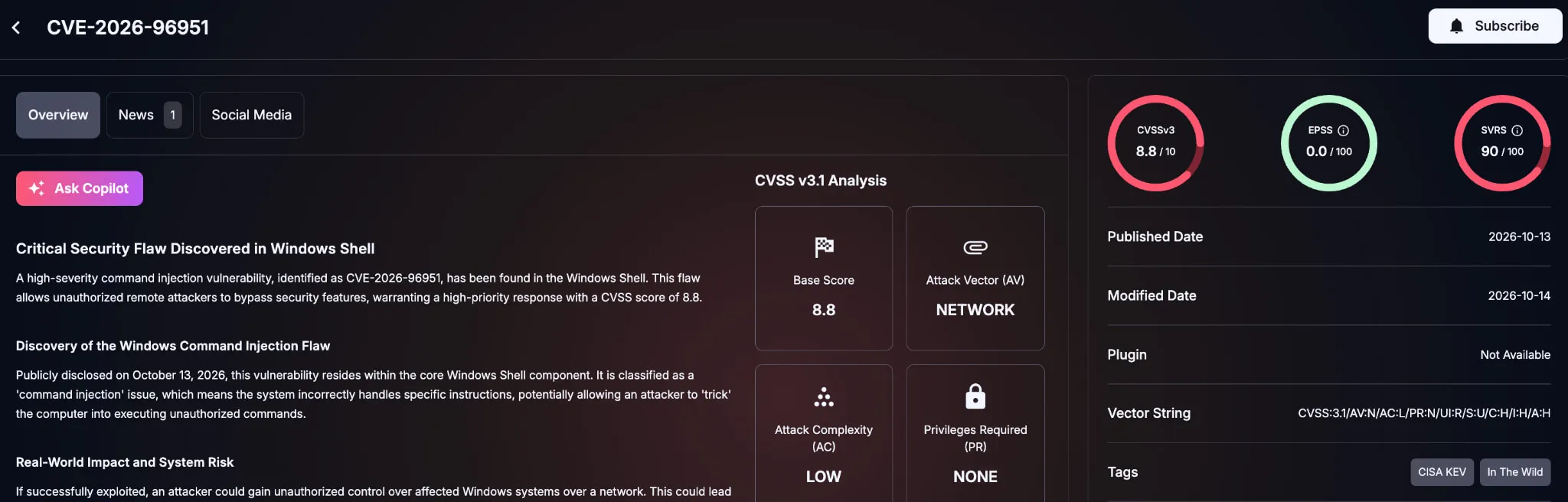
CVE-2026-96951 is a command injection flaw in Windows Shell that lets an unauthorized attacker bypass Mark of the Web (MotW), the zone tag Windows attaches to files from the internet. MotW triggers SmartScreen reputation checks and opens Office documents in Protected View. With it bypassed, a malicious download is handled like a trusted local file, and the usual warning prompts never appear.
Exploitation still requires the target to open a crafted file delivered by email, messaging, or download, which makes the flaw a natural fit for phishing campaigns. Microsoft has not shared exploitation details or named a discoverer. Windows Shell has been targeted before this year: CVE-2026-21510 was patched as an exploited zero-day in February 2026 Patch Tuesday.
SOCRadar Vulnerability Intelligence card for CVE-2026-96951
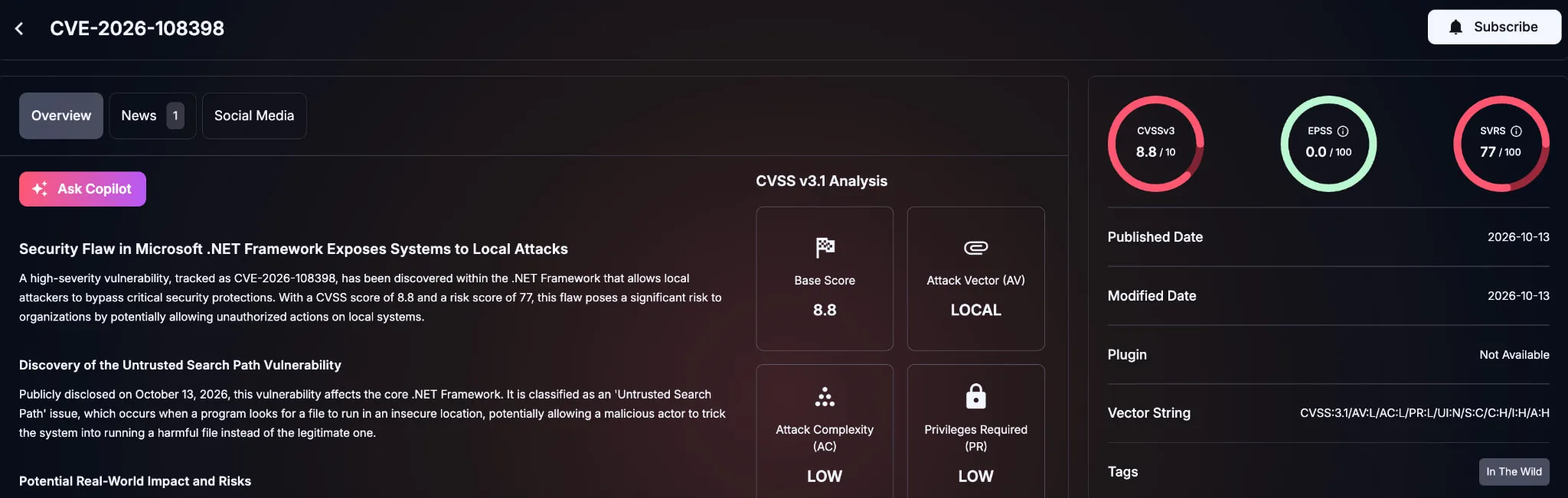
CVE-2026-108398 stems from an untrusted search path in .NET Framework. An attacker with authenticated local access can register a crafted .NET assembly for loading by a protected process. That runs the attacker’s code inside the process and bypasses Windows Defender Application Control (WDAC) enforcement, with no user interaction required. Microsoft credits James Forshaw of Google Project Zero with the discovery.
The local access requirement limits who can exploit the flaw. Its impact, however, lands where WDAC matters most: privileged access workstations, kiosks, and hardened servers that rely on allowlisting to block unapproved code. Teams that depend on WDAC should verify enforcement after installing the update.
SOCRadar Vulnerability Intelligence card for CVE-2026-108398
CVE-2026-92707 (CVSS 5.3): MessagePack-CSharp Denial of Service
CVE-2026-92707 is an improperly controlled sequential memory allocation flaw (CWE-1325) in MessagePack-CSharp, a binary serialization library common in .NET applications. An unauthenticated attacker can send crafted MessagePack data over the network to degrade service availability, with no user interaction required. Its CVSS v3.1 vector, AV:N/AC:L/PR:N/UI:N/S:U/C:N/I:N/A:L, reflects a low availability impact with no confidentiality or integrity impact.
The real-world risk depends on where the library runs. APIs, microservices, and messaging services that deserialize MessagePack input from untrusted sources are the most exposed. MessagePack-CSharp ships as a package bundled inside applications, so affected services won’t show up in Windows patch reporting. Development teams need to find the library in their dependencies and update it to the fixed release listed in Microsoft’s advisory.
Critical Vulnerabilities in October 2026 Patch Tuesday
Microsoft rated over 70 of this month’s vulnerabilities critical. The highest-scoring entries are:
CVE-2026-96207**(CVSS 10.0):** Microsoft Partner Center Elevation of Privilege Vulnerability (no customer action required)
CVE-2026-94510**(CVSS 9.9):** Microsoft Bookings Elevation of Privilege Vulnerability (no customer action required)
CVE-2026-88131**(CVSS 9.8):** Microsoft Dataverse Remote Code Execution Vulnerability (no customer action required)
CVE-2026-77900**(CVSS 9.8):** Azure App Service Remote Code Execution Vulnerability (no customer action required)
CVE-2026-97749**,CVE-2026-88156,CVE-2026-70291,CVE-2026-70242,CVE-2026-97016(CVSS 9.8):** Microsoft Office Outlook Remote Code Execution Vulnerability
CVE-2026-88178**(CVSS 9.8):** Microsoft Office PowerPoint Remote Code Execution Vulnerability
CVE-2026-100219**,CVE-2026-105016(CVSS 9.8):** Microsoft QUIC Remote Code Execution Vulnerability
CVE-2026-96934**(CVSS 9.8):** Windows DHCP Server Remote Code Execution Vulnerability
CVE-2026-70147**,CVE-2026-70153(CVSS 9.8):** Microsoft PostScript Printer Driver Remote Code Execution Vulnerability
CVE-2026-97814**(CVSS 9.8):** Windows Text Shaping Remote Code Execution Vulnerability
CVE-2026-69435**(CVSS 9.6):** Azure SRE Agent Elevation of Privilege Vulnerability (no customer action required)
Top Scores Go to Server-Side Cloud Fixes
The month’s only perfect score belongs to CVE-2026-96207, an Elevation of Privilege flaw in Microsoft Partner Center. CVE-2026-94510 in Microsoft Bookings follows at 9.9. Microsoft resolved both on the service side, along with the Dataverse, Azure App Service, and Azure SRE Agent entries, so customers have nothing to install. Organizations using these services can still review tenant audit logs for unexpected permission changes.
Five Outlook Flaws Put Every Inbox in Scope
Among the fixes that do require patching, Microsoft Office Outlook carries five Critical RCEs rated 9.8. The underlying memory corruption bugs include heap and stack buffer overflows and a double free, and all of them are reachable over the network without authentication. For CVE-2026-70291 and CVE-2026-88156, Microsoft lists the Preview Pane as an attack vector. A crafted message can trigger code execution as soon as Outlook renders it in the Reading Pane, without the recipient clicking anything.
PowerPoint flaw CVE-2026-88178 shares the Preview Pane vector. According to Microsoft, it can also be exploited without authentication through a crafted presentation submitted to an affected Office Online service. Successful exploitation of any of these flaws runs code with the signed-in user’s access, tokens, and mailbox.
Unauthenticated RCEs Across Core Windows Services
The remaining 9.8-rated entries are unauthenticated network RCEs in services that listen for traffic by design. The two Microsoft QUIC flaws expose any Windows service that uses QUIC, the transport behind HTTP/3. The Dynamic Host Configuration Protocol (DHCP) Server flaw is reachable from every segment a DHCP server answers. The PostScript Printer Driver, Message Queuing Queue Manager, and Windows Text Shaping flaws follow the same pattern: crafted network input leads to code execution, often with SYSTEM privileges.
How SOCRadar Can Help
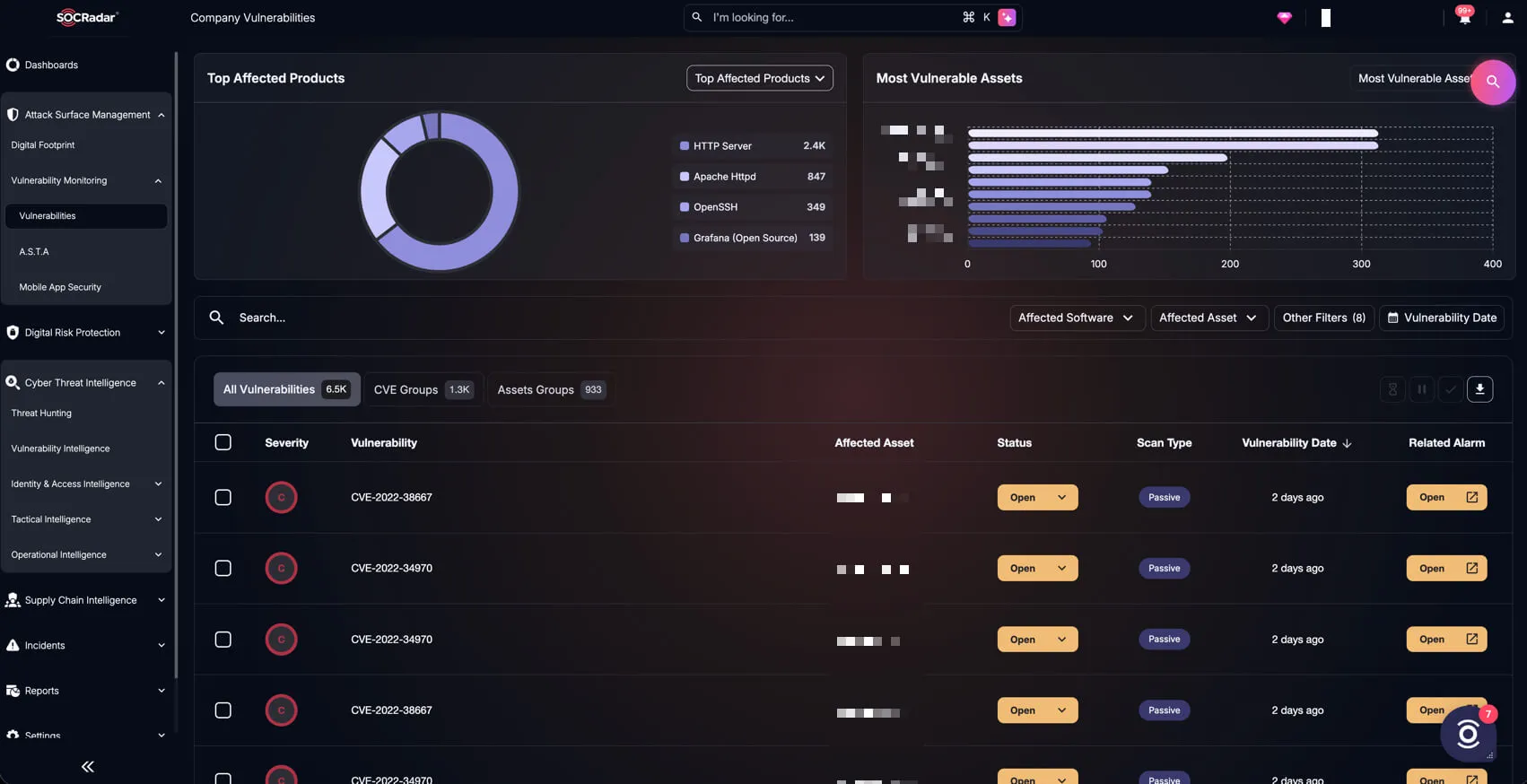
With more than 1,400 fixes in a single cycle, the useful question is which ones touch the systems your organization actually runs and exposes. Within SOCRadar XTI, Vulnerability Intelligence enriches each Microsoft CVE with exploitation and threat actor activity signals. Attack Surface Management flags internet-facing assets, such as Exchange servers, that still run vulnerable versions after rollout. Together, they help teams order patching by real exposure and confirm from the outside that critical fixes took effect.
SOCRadar Attack Surface Management, Company Vulnerabilities view
Apply Microsoft’s Security Updates for October 2026
With 1,413 fixes in one cycle, roll out in phases, ordered by exploitation and exposure. Prioritize:
Every Windows endpoint for CVE-2026-96951: Deploy the October cumulative update fleet-wide first, starting with users who handle the most external email and downloads. Keep SmartScreen and Office Protected View enforced through policy until coverage is complete.
Outlook and Office clients: Patch Office on the same schedule as Windows to close the Outlook RCEs and the Preview Pane-exploitable PowerPoint flaw.
Network-facing Windows services: Patch DHCP servers, print servers, Message Queuing hosts, and services built on Microsoft QUIC. Disable Message Queuing and the Print Spooler where they are unused, and restrict port 1801 to trusted segments where Message Queuing must run.
Exchange Server and identity infrastructure: Patch Exchange servers and all domain controllers in the same maintenance window. Include Active Directory Federation Services (AD FS) servers, which receive two Critical spoofing fixes.
WDAC-enforced hosts: Install the .NET Framework update for CVE-2026-108398, then confirm that enforcement policies still block unapproved binaries.
Applications using MessagePack-CSharp: Have development teams find services that bundle the library, starting with those that accept untrusted input, and update them to the fixed release for CVE-2026-92707.
Coverage verification: Confirm installation with at least two signals, such as endpoint management reporting and vulnerability scans, since failed installs, deferred reboots, and offline devices leave gaps.
End-of-support systems: Migrate devices off Windows 11 24H2 Home and Pro, Windows 10 Enterprise LTSB 2016, Windows Server 2012 and 2012 R2, and Office 2021 or Office LTSC 2021, none of which receive further security updates.
Microsoft’s new risk cohorts group related vulnerabilities, such as the 135 involving Office documents and mail clients. Mapped against your asset inventory, they can help sequence rollout rings.
A Mark of the Web (MotW) bypass is a flaw that lets an internet-sourced file evade the checks Windows ties to its download zone tag. When the bypass works, SmartScreen warnings and Office Protected View do not engage, so a malicious file opens like a trusted local one. CVE-2026-96951 in Windows Shell is an actively exploited example.
How do Microsoft risk cohorts affect patch prioritization?
Microsoft risk cohorts, introduced with the October 2026 release, group related vulnerabilities by component area, such as Office documents and mail clients, so teams can map each group to affected systems and owners. Microsoft calls the approach experimental and notes that cohorts do not rank flaws by danger, so exploitation status and exposure should still set patch order.
How do I check that WDAC is still enforced after the October 2026 .NET update?
Windows Defender Application Control (WDAC) enforcement can be confirmed in System Information, where the policy status should read Enforced, or through the Win32_DeviceGuard class in Windows Management Instrumentation (WMI). After installing the .NET Framework update for CVE-2026-108398, review the Microsoft-Windows-CodeIntegrity/Operational log for event 3077 entries, which confirm the policy is blocking unapproved binaries.
How do I find applications that use MessagePack-CSharp?
MessagePack-CSharp, the library behind CVE-2026-92707, ships as the MessagePack NuGet package, so scanning .NET project dependencies is the most direct way to find affected applications. Running dotnet list package –include-transitive shows direct and indirect references, and a software bill of materials (SBOM) or software composition analysis tool can cover deployed services. Prioritize services that accept untrusted input.
PROTECTION OF PERSONAL DATA****COOKIE POLICY FOR THE INTERNET SITE
Protecting your personal data is one of the core principles of our organization, SOCRadar, which operates the internet site (www.socradar.com). This Cookie Usage Policy (“Policy”) explains the types of cookies used and the conditions under which they are used to all website visitors and users.
Cookies are small text files stored on your computer or mobile device by the websites you visit.
Cookies are commonly used to provide you with a personalized experience while using a website, enhance the services offered, and improve your overall browsing experience, contributing to ease of use while navigating a website. If you prefer not to use cookies, you can delete or block them through your browser settings. However, please be aware that this may affect your usage of our website. Unless you change your cookie settings in your browser, we will assume that you accept the use of cookies on this site.
1. WHAT KIND OF DATA IS PROCESSED IN COOKIES?
Cookies on websites collect data related to your browsing and usage preferences on the device you use to visit the site, depending on their type. This data includes information about the pages you access, the services and products you explore, your preferred language choice, and other preferences.
2. WHAT ARE COOKIES AND WHAT ARE THEIR PURPOSES?
Cookies are small text files stored on your device or web server by the websites you visit through your browsers. These small text files, containing your preferred language and other settings, help us remember your preferences on your next visit and assist us in making improvements to our services to enhance your experience on the site. This way, you can have a better and more personalized user experience on your next visit.
The main purposes of using cookies on our Internet Site are as follows:
Improve the functionality and performance of the website to enhance the services provided to you,
Enhance and introduce new features to the Internet Site and customize the provided features based on your preferences,
Ensure legal and commercial security for the Internet Site, yourself, and the Organization, and prevent fraudulent transactions through the Site,
Fulfill legal and contractual obligations, including those arising from Law No. 5651 on the Regulation of Publications on the Internet and the Fight Against Crimes Committed Through These Publications, as well as the Regulation on the Procedures and Principles Regarding the Regulation of Publications on the Internet.
3. TYPES OF COOKIES USED ON OUR INTERNET SITE****3.1. Session Cookies
Session cookies ensure the smooth operation of the internet site during your visit. They are used for purposes such as ensuring the security and continuity of our sites and your visits. Session cookies are temporary cookies and are deleted when you close your browser; they are not permanent.
3.2. Persistent Cookies
These cookies are used to remember your preferences and are stored on your device through browsers. Persistent cookies remain stored on your device even after you close your browser or restart your computer. These cookies are stored in your browser’s subfolders until deleted from your browser’s settings. Some types of persistent cookies can be used to provide personalized recommendations based on your usage purposes.
With persistent cookies, when you revisit our website with the same device, the website checks if a cookie created by our website exists on your device. If so, it is understood that you have visited the site before, and the content to be presented to you is determined accordingly, offering you a better service.
3.3. Mandatory/Technical Cookies
Mandatory cookies are essential for the proper functioning of the visited internet site. The purpose of these cookies is to provide necessary services by ensuring the operation of the site. For example, they allow access to secure sections of the internet site, use of its features, and navigation.
3.4. Analytical Cookies
These cookies gather information about how the website is used, the frequency and number of visits, and show how visitors navigate to the site. The purpose of using these cookies is to improve the operation of the site, increase its performance, and determine general trend directions. They do not contain data that can identify visitors. For example, they show the number of error messages displayed or the most visited pages.
3.5. Functional Cookies
Functional cookies remember the choices made by visitors within the site and recall them during the next visit. The purpose of these cookies is to provide ease of use to visitors. For example, they prevent the need to re-enter the user’s password on each page visited by the site user.
3.6. Targeting/Advertising Cookies
They measure the effectiveness of advertisements shown to visitors and calculate how many times ads are displayed. The purpose of these cookies is to present personalized advertisements to visitors based on their interests.
Similarly, they determine the specific interests of visitors’ navigation and present appropriate content. For example, they prevent the same advertisement from being shown again to the visitor in a short period.
4. HOW TO MANAGE COOKIE PREFERENCES?
To change your preferences regarding the use of cookies, block or delete cookies, you only need to change your browser settings.
Many browsers offer options to accept or reject cookies, only accept certain types of cookies, or receive notifications from the browser when a website requests to store cookies on your device.
Also, it is possible to delete previously saved cookies from your browser.
If you disable or reject cookies, you may need to manually adjust some preferences, and certain features and services on the website may not work properly as we will not be able to recognize and associate with your account. You can change your browser settings by clicking on the relevant link from the table below.
5. EFFECTIVE DATE OF THE INTERNET SITE PRIVACY POLICY
The Internet Site Privacy Policy is dated The effective date of the Policy will be updated if the entire Policy or specific sections are renewed. The Privacy Policy is published on the Organization’s website (www.socradar.com) and made accessible to relevant individuals upon request.
SOCRadar
Address: 651 N Broad St, Suite 205 Middletown, DE 19709 USA
Phone: +1 (571) 249-4598
Email: info@socradar.io
Website: www.socradar.com


 Extended Threat Intelligence Threat intelligence enriched with External Attack Surface Management, Brand Protection, and Dark Web Radar. Explore XTIAgentic Threat Intelligence Stay ahead of cybercriminals with AI agents that autonomously think, adapt, and act. Explore ATI Advanced Dark Web Monitoring
 Dark Web Report