Your Windows PC can now reach other PCs through Windows App
Microsoft made remote PC connections generally available in Windows App for physical, virtual, and cloud PCs.
Microsoft has made remote PC connections generally available in Windows App on Windows. Users can reach physical or virtual Windows PCs alongside Windows 365, Azure Virtual Desktop, and Microsoft Dev Box from one interface. The app replaces the Microsoft Store Remote Desktop app and the separate cloud Remote Desktop client, while the built-in mstsc.exe tool remains supported. Connections need a computer name or IP address, authentication, and Remote Desktop enabled on the target; local resource redirection is disabled by default.
- Remote PC connections are generally available in Windows App on Windows.
- Users can reach physical or virtual PCs plus Windows 365, Azure Virtual Desktop, and Dev Box.
- It replaces the Store Remote Desktop app; built-in mstsc.exe remains supported.
- No work or school account is required, and resource redirection is off by default.
Full article188 words · extracted from helpnetsecurity.com · click to collapse
Microsoft has made remote PC connections generally available in Windows App on Windows. Users can access physical or virtual Windows PCs alongside Windows 365, Azure Virtual Desktop, and Microsoft Dev Box resources.
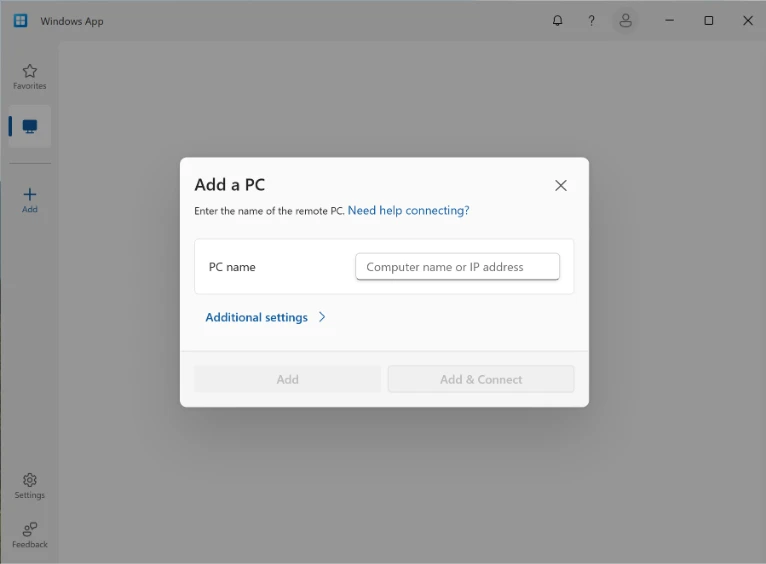
Windows App brings remote Windows devices and applications into a single interface. It replaces the Remote Desktop app distributed through the Microsoft Store and succeeds the separate Remote Desktop client used for cloud services. The built-in Remote Desktop Connection tool (mstsc.exe) remains supported.
Remote PC connections do not require a work or school account. Users must authenticate when connecting to the target computer, which must have Remote Desktop enabled.
Connecting to remote PCs
Users can add a remote PC by entering its name or IP address, customize display preferences, and configure local resource redirection. This controls the remote session’s access to resources on their own device. All redirections are disabled by default. Connections can be saved, and frequently used computers can be pinned to Favorites.
“This milestone is especially important for users and organizations that need flexibility across both cloud and traditional remote access scenarios,” Marvin Quinzon, Senior Program Manager at Microsoft, wrote.
Text extracted automatically; images, tables and formatting may be missing. Original: https://www.helpnetsecurity.com/2026/10/07/windows-app-remote-pc-access/