CloudSyncD Uses Invisible Unicode to Hide Phished Mac Passwords in Plain Sight
CloudSyncD, a fake Zoom macOS backdoor, hides phished passwords with invisible Unicode and calls live C2.
Jamf researchers describe CloudSyncD, a macOS backdoor shipped as an ad-hoc-signed fake Zoom disk image that instructs victims to bypass Gatekeeper and enter an administrator password. The dropper validates the password with dscl and hides a base64 copy in ~/.config/zoom/data.json, using zero-width Unicode characters to mark its offset and length. That password launches a cloudsyncd second stage with sudo; the implant profiles the Mac and beacons over HTTPS to orchid-led.com and bjzhishang.com paths impersonating jquery.js. Live command-and-control samples appeared within two days of the September 15 discovery and can receive encrypted Mach-O or gzipped tar tasks.
- Fake Zoom disk image tells users to override Gatekeeper and enter a password.
- Password is validated locally with dscl, then hidden using zero-width Unicode.
- Second stage runs as cloudsyncd via sudo after a failed fileless attempt.
- C2 uses HTTPS URLs impersonating jquery.js and checks in every 8 to 16 seconds.
- No browser, Keychain, or wallet theft functions were found in the sample.
Indicators of compromiseauto-extracted · verify before use · export allAll →
| Type | Indicator | Context |
|---|---|---|
| domain | bjzhishang.com | with hxxps://orchid-led[.]com/macos/jquery[.]js and hxxps://bjzhishang[.]com/macos/jquery[.]js . The shared path impersonates a jQuery |
| domain | jquery.js | observed communicating with hxxps://orchid-led[.]com/macos/jquery[.]js and hxxps://bjzhishang[.]com/macos/jquery[.]js . The shar |
| domain | orchid-led.com | CloudSyncD samples were observed communicating with hxxps://orchid-led[.]com/macos/jquery[.]js and hxxps://bjzhishang[.]com/macos/jque |
| domain | zoom.app | of the infection chain. The first-stage binary, located at Zoom.app/Contents/MacOS/app_installer , handles password phishing, v |
| url | https://bjzhishang[ | icating with hxxps://orchid-led[.]com/macos/jquery[.]js and hxxps://bjzhishang[.]com/macos/jquery[.]js . The shared path impersonates a jQu |
| url | https://orchid-led[ | r. Live CloudSyncD samples were observed communicating with hxxps://orchid-led[.]com/macos/jquery[.]js and hxxps://bjzhishang[.]com/macos/j |
Full article725 words · extracted from gbhackers.com · click to collapse
A new macOS backdoor, tracked as CloudSyncD, that masquerades as a Zoom installer and uses invisible Unicode characters to conceal a victim’s phished password inside a seemingly harmless configuration file.
The malware was found during routine VirusTotal monitoring embedded in a fake Zoom client distributed as a disk image named “Zoom.”
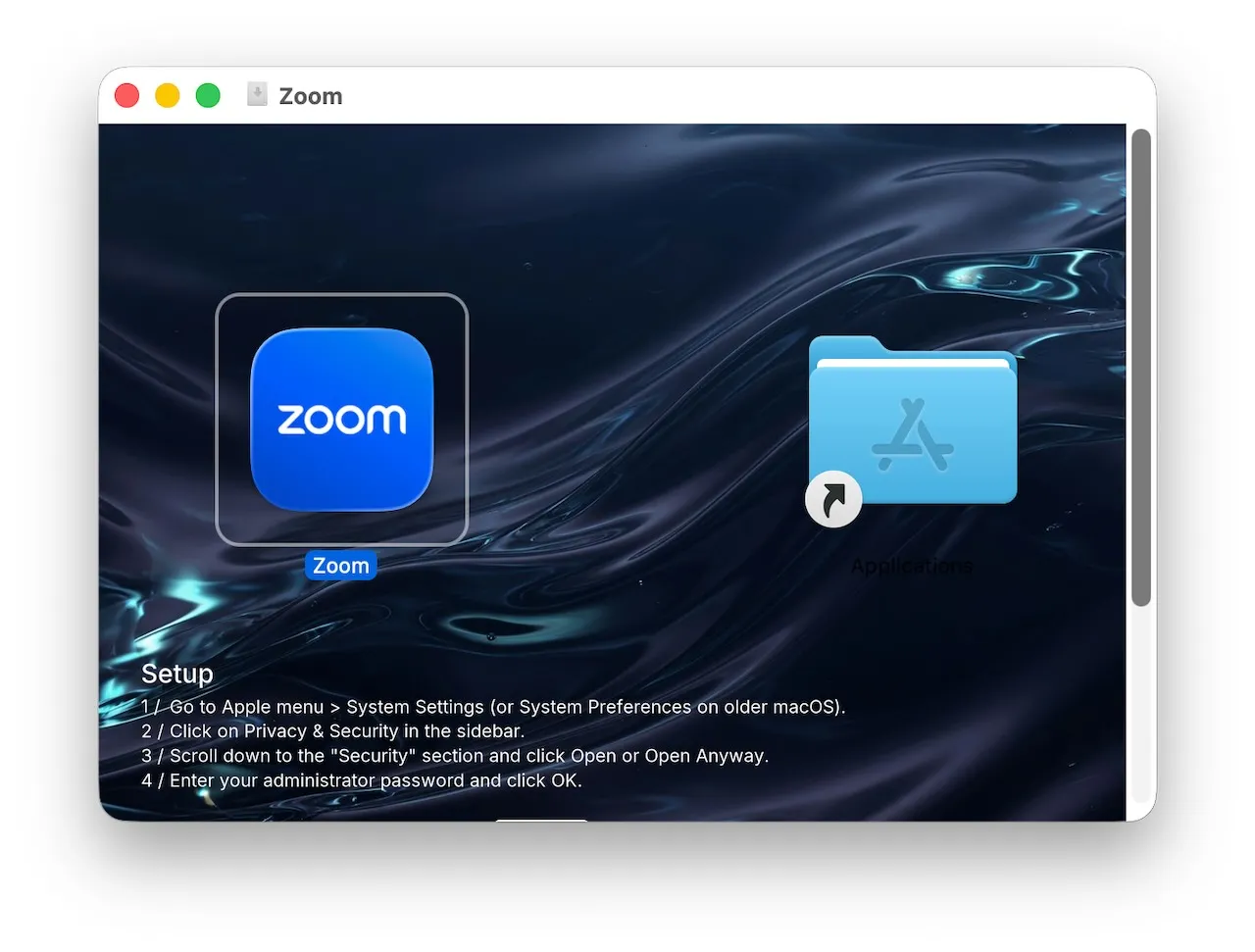
Its visual layout imitates a common macOS installation workflow, placing an application icon beside an Applications-folder alias.
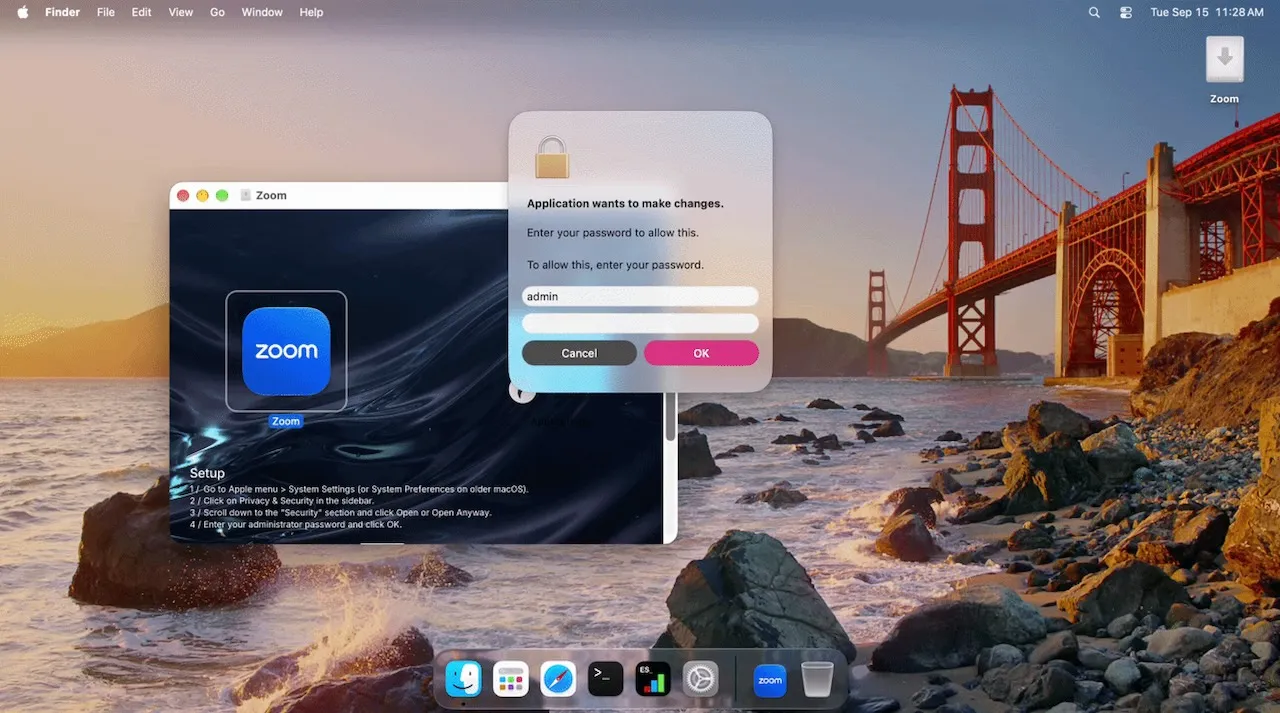
However, the disk image background instructs users to manually bypass macOS Gatekeeper by navigating to System Settings, selecting Privacy & Security, clicking Open Anyway, and entering an administrator password.
That social-engineering flow is crucial because the malicious Zoom bundle is only ad-hoc signed.
Gatekeeper normally blocks such an application, but CloudSyncD’s instructions turn Apple’s security prompt into part of the infection chain.
The first-stage binary, located at Zoom.app/Contents/MacOS/app_installer, handles password phishing, validation, payload execution and cleanup.
Rather than immediately stealing and exfiltrating the password, CloudSyncD validates it locally using dscl, macOS’s directory-service command-line utility.
The fake authorization prompt repeatedly asks for the password until the victim provides one that matches the local account. It then displays a deceptive “Downloading Zoom…” progress dialog while moving to the next stage.
The most unusual component is how the malware stores the captured credential. CloudSyncD writes a file named data.json under ~/.config/zoom/, presenting it as ordinary application settings containing fields such as theme, language, notifications and analytics.
The password is base64-encoded and embedded within a long cache value, surrounded by 32 to 64 randomly generated filler characters.
Jamf Researchers said that, the campaign appears to have progressed from a development-stage build to deployments using live command-and-control infrastructure within two days of its September 15 discovery.
CloudSyncD Backdoor
The malware hides the location of the real credential using zero-width Unicode characters appended to the visible version field.
An Objective-C class named AuthDialog presents the credential prompt.
Specifically, it uses U+200B ZERO WIDTH SPACE and U+200C ZERO WIDTH NON-JOINER characters that do not render on screen to encode the offset and length of the embedded base64 string.
In the analyzed sample, 48 invisible characters decoded to an offset of 64 and a length of eight, allowing the implant to locate and decode the password. Because filler length changes on each run, the password position is not static.
CloudSyncD does not behave like a conventional infostealer. Researchers found no integrated functions for collecting browser credentials, Keychain contents or cryptocurrency wallets.
Instead, the phished password is used to launch an embedded second-stage universal Mach-O payload with sudo, providing the operators with privileged access on both Intel and Apple silicon Macs.
The dropper first attempts fileless execution through /dev/fd, likely to avoid leaving the payload on disk.
That method failed in testing with a permission error, consistent with macOS protections such as System Integrity Protection.
The malware then falls back to creating a temporary payload with mkstemp before launching it using the victim’s validated password.
The second stage is configured to pose as a background synchronization daemon named cloudsyncd. Its intended working directory is ~/.local/share/cloudsync/, with logs stored at ~/.local/share/cloudsync/.config/logs/sync.err.
It profiles the compromised host using sysctl and ioreg, collecting the hardware UUID, processor details, memory, operating-system information, hostname, username, MAC address and raw I/O registry data before beaconing to its C2 server.
Live CloudSyncD samples were observed communicating with hxxps://orchid-led[.]com/macos/jquery[.]js and hxxps://bjzhishang[.]com/macos/jquery[.]js.
The shared path impersonates a jQuery resource, helping C2 traffic blend into apparently normal web activity.
The implant checks in every 8 to 16 seconds and can receive encrypted tasks containing executable Mach-O files or gzipped tar archives, making its observable behavior more consistent with payload delivery than shell-command execution.
CloudSyncD highlights a continuing shift in macOS malware toward native code, in-memory execution attempts, protected strings and deceptively simple credential phishing.
Its most effective capability is not an advanced exploit it is persuading a user to override Gatekeeper and enter a legitimate password.
Cut every SOC alert investigation by 21 min. Power your SOC with instant IOC context for immediate response: Integrate TI Lookup in your SOC
Mayura Kathirhttps://gbhackers.com/
Mayura Kathir is a cybersecurity reporter at GBHackers News, covering daily incidents including data breaches, malware attacks, cybercrime, vulnerabilities, zero-day exploits, and more.