CVE-2026-85097 in the Bricksforge WordPress plugin is being exploited for unauthenticated remote code execution.
SOCRadar reports that CVE-2026-85097, an unauthenticated remote code execution flaw in the Bricksforge WordPress plugin, is being exploited. The article describes an exploit chain, observed exploitation, payload variations, and automated distributed infrastructure, plus detection and mitigation. Victim counts and payload specifics are not included in the available text.
CVE-2026-85097 is an unauthenticated RCE in the Bricksforge WordPress plugin.
SOCRadar reports observed exploitation, payload variants, and distributed infrastructure.
The write-up also covers detection and mitigation guidance.
The Bricksforge plugin for WordPress is vulnerable to unauthenticated arbitrary file upload (CWE-434) in versions up to and including 3.1.8.9 because an attacker-controlled URL in the temporaryFileUploads parameter is not sufficiently validated during form submission. An unauthenticated attacker can cause a file that passed temporary upload checks to be referenced with a PHP extension and executed by the server. Successful exploitation allows arbitrary PHP code execution and can fully compromise the site (confidentiality, integrity, and availability), with a CVSS 3.1 score of 9.8. WordPress sites running Bricksforge 3.1.8.9 or earlier are affected. No public proof of concept is known, and the issue is not listed in CISA's Known Exploited Vulnerabilities catalog.
Do: Update Bricksforge to a release newer than 3.1.8.9 as soon as the vendor publishes a fix; the advisory data does not name a patched version. Until then, deactivate the plugin or otherwise block unauthenticated access to its form handling, and review the temporary and public upload directories for unexpected PHP files.
CVE-2026-85097: Bricksforge WordPress Plugin Flaw Exploited for Unauthenticated RCE
Oct 12, 2026
9 Mins Read
Oct 13, 2026
Summarize with:
CVE-2026-85097: Bricksforge WordPress Plugin Flaw Exploited for Unauthenticated RCE
Threat actors are actively exploiting CVE-2026-85097, a maximum-severity (CVSS 10.0) vulnerability in the Bricksforge plugin for WordPress. The flaw lets unauthenticated attackers upload and execute arbitrary PHP code on vulnerable sites, resulting in remote code execution (RCE).
Patchstack first observed exploitation attempts on October 7, 2026, at 21:47 UTC. Bricksforge versions up to and including 3.1.8.9 are affected, and the issue is fixed in version 3.1.8.10.
Key Takeaways
Active exploitation: Patchstack telemetry recorded exploitation attempts against CVE-2026-85097 beginning October 7, 2026
No authentication required: Attackers chain an unauthenticated nonce endpoint, a GIF/PHP polyglot upload and a crafted form submission to execute PHP code
Root cause: Bricksforge does not validate the url field inside the temporaryFileUploads parameter at form submission
Automated activity: 63 unique source IPs were recorded, with patterns pointing to automated exploitation over distributed infrastructure
Fix available: Update to Bricksforge 3.1.8.10 or later; the vendor’s current release is 4.0.1
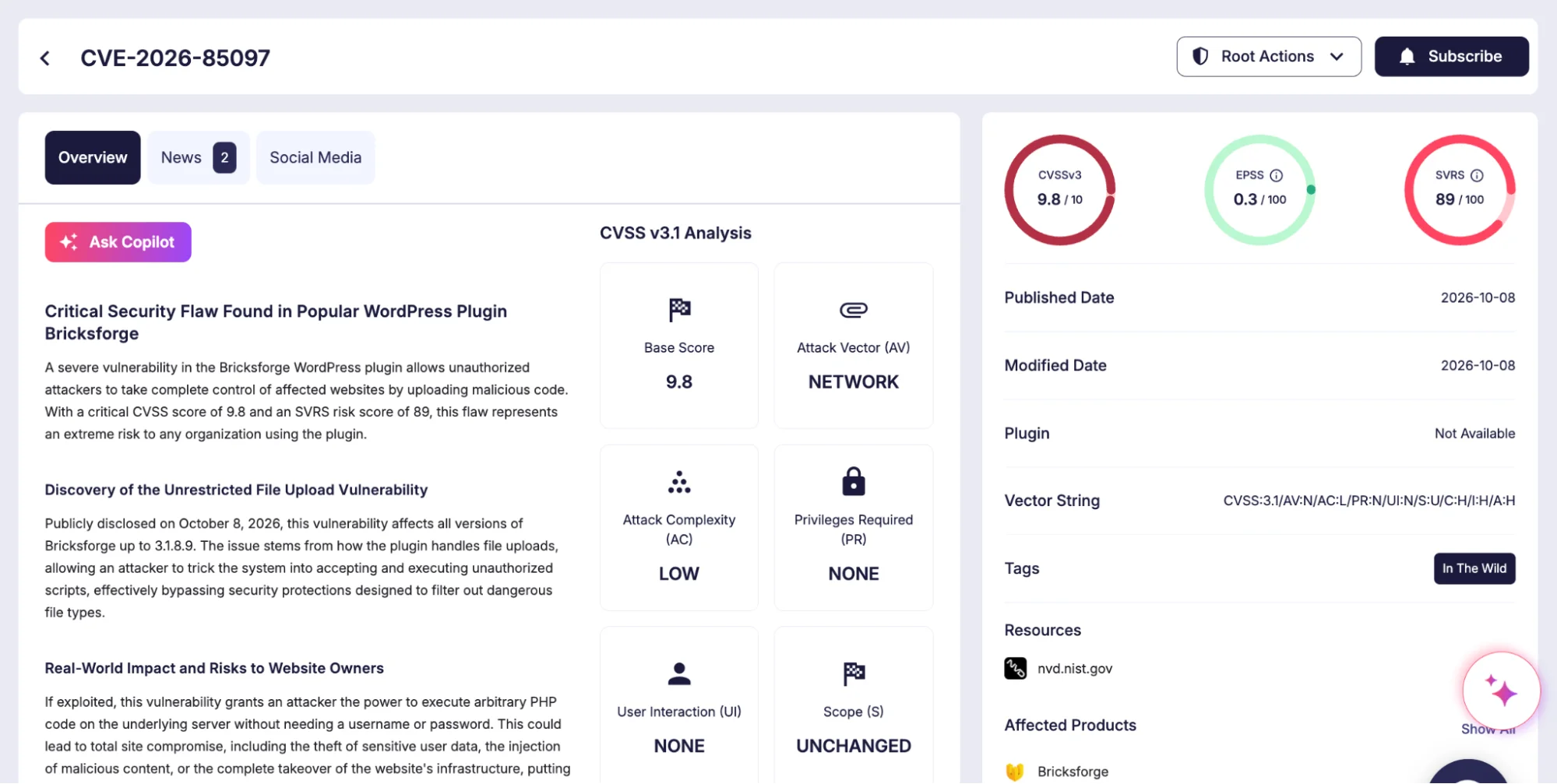
CVE-2026-85097 at a Glance
Attribute
Detail
CVE ID
CVE-2026-85097
CVSS score
10.0 (Critical)
Product
Bricksforge plugin for WordPress
Vulnerability type
Unauthenticated arbitrary file upload leading to RCE
Bricksforge is a WordPress plugin that extends Bricks Builder, a visual website-building tool for WordPress. It adds features such as advanced forms (Pro Forms), animations, custom interactions, dynamic data management and backend customization. The vulnerable code path sits in the Pro Forms file upload handling.
Details of Bricksforge, CVE-2026-85097 (SOCRadar Vulnerability Intelligence)
How the CVE-2026-85097 Exploit Chain Works
Bricksforge validates a file’s MIME type at initial upload, then trusts the client-supplied file metadata when the form is later submitted.
Because the url field inside the temporaryFileUploads parameter is not validated, an attacker can redirect a validated image to a PHP destination in four steps:
Request a valid nonce from the unauthenticated bricksforge_regenerate_nonce AJAX endpoint
Upload a GIF/PHP polyglot, a valid image that also contains PHP code, which passes the MIME check and lands in the temporary upload directory
Submit a form in which the file path points to the validated image while the url ends in a PHP extension
Bricksforge places the file’s contents at the PHP location, and the server executes the embedded code when that file is requested
The Wordfence advisory describes the same chain. Successful exploitation gives the attacker arbitrary PHP execution on the server, which can be used to deploy web shells, modify site content, read sensitive data and establish persistent access.
All but one of the exploitation attempts Patchstack captured targeted the Bricksforge REST API form submission endpoint, POST /wp-json/bricksforge/v1/form_submit. The remaining request hit /wp-admin/admin-ajax.php with the bricksforge_form_submit action. Every request carried a crafted temporaryFileUploads parameter, as in this normalized representative payload:
The key signature is the mismatch between an image server-side path and a PHP destination URL. In 95% of captured requests, the server-side path ended in .gif or .png. Most payloads referenced the Bricksforge temporary directory, while some used destination filenames matching login_admin_*.php to place PHP files in the regular WordPress uploads directory, such as /wp-content/uploads/2026/10/.
Payload Variations
Attackers are probing for ways around extension filtering:
Alternative PHP extensions:.php5, .php7, .php8, .phtml, .pht, .phtm and .phps
Case manipulation:.PHP, .Php, .pHp and .PHTML
Encoded extensions: URL-encoded and double-encoded forms such as %2ephp, .%70hp and .%2570%2568%2570
Modified metadata: Altered or missing path, name, originalFilename and url fields
Automated, Distributed Infrastructure
Two clusters stand out. In the first, 44 IPs sent 56 requests with identical payloads within seconds of each other. In the second, three IPs tested 25 variations of PHP extensions and encodings against the same temporary file. Patchstack assesses both patterns as automated exploitation over rotating proxies or distributed infrastructure, and notes they do not on their own attribute the activity to a single threat actor.
The activity came from 63 unique source IPs spanning datacenter servers, cloud providers, VPN and proxy services, and residential or fixed-line ISP connections. The six most active addresses accounted for about 46% of all requests:
Source IP
Network
177.75.57[.]20
EXPLORERNET (Brazilian fixed-line ISP)
23.97.62[.]146
Microsoft Azure
84.247.60[.]125
HostRoyale
38.154.185[.]97
B2 Net Solutions
150.109.16[.]166
Tencent
153.75.90[.]146
Cloudzy (datacenter)
Affected and Fixed Bricksforge Versions
Status
Version
Affected
3.1.8.9 and earlier
Fixed
3.1.8.10
Current release
4.0.1 (October 8, 2026)
The Bricksforge changelog lists a security fix for the Pro Forms file upload in version 4.0.1. The vendor states the issue affects every site with Pro Forms active, including sites whose forms use no upload fields.
How to Detect CVE-2026-85097 Exploitation
Review HTTP and application logs for the following indicators:
Requests to /wp-json/bricksforge/v1/form_submit that contain a temporaryFileUploads parameter
Upload metadata pairing an image path (.gif, .png) with a PHP-related destination URL
Calls to the bricksforge_regenerate_nonce AJAX action followed by an upload and a form submission
Repeated form submissions cycling through file extensions, encodings or capitalization
Unexpected PHP files in /wp-content/uploads/bricksforge/tmp/ or any other uploads directory, especially files named login_admin_*.php
HTTP requests to newly created PHP files in upload directories
Traffic from the source IPs listed above
If a site ran a vulnerable version without protection, review historical logs and the host for unexpected PHP files, unusual application activity and unauthorized changes.
Mitigation
Update immediately: Upgrade Bricksforge to version 3.1.8.10 or later, preferably the current 4.0.1 release
Hunt for compromise: Updating closes the vulnerability but does not remove files already planted; check upload directories for PHP files and review access logs for the indicators above
Block at the edge: Where an immediate update is not possible, apply a WAF or virtual patching rule that blocks form submissions pairing image paths with PHP destination URLs
Frequently Asked Questions
What is CVE-2026-85097?
CVE-2026-85097 is a CVSS 10.0 unauthenticated arbitrary file upload vulnerability in the Bricksforge plugin for WordPress. It lets attackers upload and execute PHP code on vulnerable sites, resulting in remote code execution.
Is CVE-2026-85097 being exploited in the wild?
Yes. Patchstack first observed exploitation attempts on October 7, 2026, at 21:47 UTC, and recorded activity from 63 unique source IPs.
Which Bricksforge versions are affected by CVE-2026-85097?
Bricksforge versions 3.1.8.9 and earlier are affected.
Which Bricksforge version fixes CVE-2026-85097?
The vulnerability is fixed in version 3.1.8.10. The current release is 4.0.1, published on October 8, 2026.
Does exploitation require authentication?
No. Attackers obtain a valid nonce from the unauthenticated bricksforge_regenerate_nonce AJAX endpoint, so no account or login is needed.
How can I tell if my site was targeted?
Check logs for requests to /wp-json/bricksforge/v1/form_submit containing a temporaryFileUploads parameter, and look for unexpected PHP files in /wp-content/uploads/bricksforge/tmp/ or files named login_admin_*.php in upload directories.
Is the exploitation attributed to a specific threat actor?
No. Patchstack links the activity to automated exploitation over rotating proxies or distributed infrastructure, without attributing it to a single threat actor.
Share :
We value your privacy
We use cookies to improve your experience, analyze traffic, and personalize content. You can accept all or customize your preferences.
Accept All Reject All
Manage your cookie preferences
Select which types of cookies you allow. You can update these at any time.
Essential Cookies
Required for the website to function properly, including security, login, and saving consent preferences
[x]
Analytics Cookies
Collect anonymous data to help us understand how visitors use the website and improve content and usability.
[x]
Functional Cookies
Enable enhanced features such as remembering preferences, interactive tools, and other functionality improvements.
[x]
Personalisation Cookies
Allow the site to tailor content and recommendations based on user interactions without collecting personal information.
[x]
Optimisation Cookies
Help us test and improve site speed, layout, and overall performance for a better user experience.
[x]
Save Preferences Accept All
Subscribe to our newsletter and stay updated on the latest insights!
PROTECTION OF PERSONAL DATA****COOKIE POLICY FOR THE INTERNET SITE
Protecting your personal data is one of the core principles of our organization, SOCRadar, which operates the internet site (www.socradar.com). This Cookie Usage Policy (“Policy”) explains the types of cookies used and the conditions under which they are used to all website visitors and users.
Cookies are small text files stored on your computer or mobile device by the websites you visit.
Cookies are commonly used to provide you with a personalized experience while using a website, enhance the services offered, and improve your overall browsing experience, contributing to ease of use while navigating a website. If you prefer not to use cookies, you can delete or block them through your browser settings. However, please be aware that this may affect your usage of our website. Unless you change your cookie settings in your browser, we will assume that you accept the use of cookies on this site.
1. WHAT KIND OF DATA IS PROCESSED IN COOKIES?
Cookies on websites collect data related to your browsing and usage preferences on the device you use to visit the site, depending on their type. This data includes information about the pages you access, the services and products you explore, your preferred language choice, and other preferences.
2. WHAT ARE COOKIES AND WHAT ARE THEIR PURPOSES?
Cookies are small text files stored on your device or web server by the websites you visit through your browsers. These small text files, containing your preferred language and other settings, help us remember your preferences on your next visit and assist us in making improvements to our services to enhance your experience on the site. This way, you can have a better and more personalized user experience on your next visit.
The main purposes of using cookies on our Internet Site are as follows:
Improve the functionality and performance of the website to enhance the services provided to you,
Enhance and introduce new features to the Internet Site and customize the provided features based on your preferences,
Ensure legal and commercial security for the Internet Site, yourself, and the Organization, and prevent fraudulent transactions through the Site,
Fulfill legal and contractual obligations, including those arising from Law No. 5651 on the Regulation of Publications on the Internet and the Fight Against Crimes Committed Through These Publications, as well as the Regulation on the Procedures and Principles Regarding the Regulation of Publications on the Internet.
3. TYPES OF COOKIES USED ON OUR INTERNET SITE****3.1. Session Cookies
Session cookies ensure the smooth operation of the internet site during your visit. They are used for purposes such as ensuring the security and continuity of our sites and your visits. Session cookies are temporary cookies and are deleted when you close your browser; they are not permanent.
3.2. Persistent Cookies
These cookies are used to remember your preferences and are stored on your device through browsers. Persistent cookies remain stored on your device even after you close your browser or restart your computer. These cookies are stored in your browser’s subfolders until deleted from your browser’s settings. Some types of persistent cookies can be used to provide personalized recommendations based on your usage purposes.
With persistent cookies, when you revisit our website with the same device, the website checks if a cookie created by our website exists on your device. If so, it is understood that you have visited the site before, and the content to be presented to you is determined accordingly, offering you a better service.
3.3. Mandatory/Technical Cookies
Mandatory cookies are essential for the proper functioning of the visited internet site. The purpose of these cookies is to provide necessary services by ensuring the operation of the site. For example, they allow access to secure sections of the internet site, use of its features, and navigation.
3.4. Analytical Cookies
These cookies gather information about how the website is used, the frequency and number of visits, and show how visitors navigate to the site. The purpose of using these cookies is to improve the operation of the site, increase its performance, and determine general trend directions. They do not contain data that can identify visitors. For example, they show the number of error messages displayed or the most visited pages.
3.5. Functional Cookies
Functional cookies remember the choices made by visitors within the site and recall them during the next visit. The purpose of these cookies is to provide ease of use to visitors. For example, they prevent the need to re-enter the user’s password on each page visited by the site user.
3.6. Targeting/Advertising Cookies
They measure the effectiveness of advertisements shown to visitors and calculate how many times ads are displayed. The purpose of these cookies is to present personalized advertisements to visitors based on their interests.
Similarly, they determine the specific interests of visitors’ navigation and present appropriate content. For example, they prevent the same advertisement from being shown again to the visitor in a short period.
4. HOW TO MANAGE COOKIE PREFERENCES?
To change your preferences regarding the use of cookies, block or delete cookies, you only need to change your browser settings.
Many browsers offer options to accept or reject cookies, only accept certain types of cookies, or receive notifications from the browser when a website requests to store cookies on your device.
Also, it is possible to delete previously saved cookies from your browser.
If you disable or reject cookies, you may need to manually adjust some preferences, and certain features and services on the website may not work properly as we will not be able to recognize and associate with your account. You can change your browser settings by clicking on the relevant link from the table below.
5. EFFECTIVE DATE OF THE INTERNET SITE PRIVACY POLICY
The Internet Site Privacy Policy is dated The effective date of the Policy will be updated if the entire Policy or specific sections are renewed. The Privacy Policy is published on the Organization’s website (www.socradar.com) and made accessible to relevant individuals upon request.
SOCRadar
Address: 651 N Broad St, Suite 205 Middletown, DE 19709 USA
Phone: +1 (571) 249-4598
Email: info@socradar.io
Website: www.socradar.com


 Extended Threat Intelligence Threat intelligence enriched with External Attack Surface Management, Brand Protection, and Dark Web Radar. Explore XTIAgentic Threat Intelligence Stay ahead of cybercriminals with AI agents that autonomously think, adapt, and act. Explore ATI Advanced Dark Web Monitoring
 Dark Web Report